johnrellis
Legend
Dec 10, 2014 12:38 AM UTC
Needs More Info

P: Still inconsistent capture date/time for photos and videos

Update 5/17/2018: Though LR 7.1 made improvements, LR 7.3.1 still has two closely related problems with a single underlying cause:

- With photos and videos missing metadata capture date/times (e.g. scans), there is still an inconsistency between the times shown under the thumbnails in grid view and in the Metadata panel and the hidden, internal times used for sorting in grid view.

- Changing IPTC Date Created in the Metadata panel, either by editing the field or using Metadata > Copy/Paste Metadata, similarly causes inconsistent values to be shown and sorting and searching to work inconsistently.  It also causes date metadata to be written back to the files that doesn't conform with the Metadata Working Group's standard.

The underlying cause is architectural: LR doesn't have a single internal catalog field representing "capture time".  Rather, it maintains capture time in several different fields, and the various parts of LR update those fields inconsistently.

See here for precise recipes to replicate these bugs:

https://feedback.photoshop.com/photoshop_family/topics/lightroom-still-inconsistent-capture-date-tim...

https://feedback.photoshop.com/photoshop_family/topics/lightroom-still-inconsistent-capture-date-tim...

See here for a workaround: 

https://feedback.photoshop.com/photoshop_family/topics/lightroom-still-inconsistent-capture-date-time-for-videos?topic-reply-list%5Bsettings%5D%5Bfilter_by%5D=all&topic-reply-list%5Bsettings%5D%5Breply_id%5D=15475521#reply_15475521.  

-------------

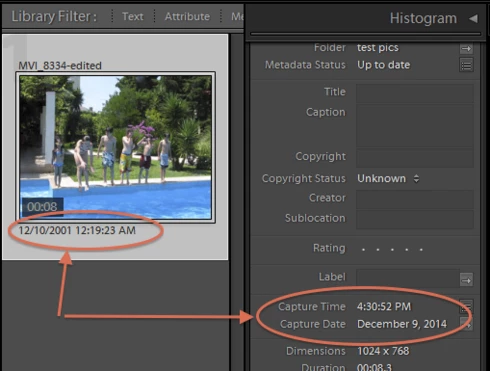
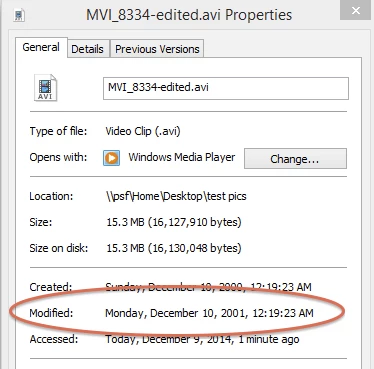
LR 5.7 still shows inconsistent capture date/times for videos. For a test .avi on Windows 8.1, the date in grid view appears to be the file system's last-modified time, while Capture Date/Time is set to the time of import.This problem was declared fixed in LR 5.5, and it appears to have been fixed for images, but not videos:http://feedback.photoshop.com/photoshop_family/topics/inconsistent_dates_for_files_missing_date_time...I'm opening a new topic, since the previous one has been marked "Solved".
This topic is closed to new replies. Start a new post to keep the conversation going.

168 replies

Sunil_Bhaskaran
Inspiring
Dec 12, 2017 4:51 AM UTC
Please see Lightroom Classic 7.1. This issue is fixed.

Thanks,
Sunil
Translate
johnrellis
Legend
Nov 15, 2017 7:19 PM UTC
Good, thanks.
Translate
abhishek_india
Participating Frequently
Nov 15, 2017 3:16 PM UTC
We are able to reproduce the inconsistency observed in the capture date/time for the images attached by John. We have logged a new bug for the same. 
Translate
johnrellis
Legend
Nov 14, 2017 12:22 AM UTC
This bug was fixed in LR 7, but see here for a related bug that was introduced: https://feedback.photoshop.com/photoshop_family/topics/lightroom-still-inconsistent-capture-date-tim...
Translate
johnrellis
Legend
Nov 14, 2017 12:20 AM UTC
LR 7.0.1 doesn't fix the outsanding bug with editing IPTC > Date Created in the Metadata panel or using Metadata Copy/Paste Metadata to copy IPTC > Date Created: https://feedback.photoshop.com/photoshop_family/topics/lightroom-still-inconsistent-capture-date-tim...
Translate
johnrellis
Legend
Nov 14, 2017 12:18 AM UTC
Note that LR 7 fixes problems with newly imported photos.  Photos imported prior to LR 7 still need to be adjusted using the workaround described above:  Select the affected photos, do Metadata > Edit Capture Time, and do Change All.
Translate
johnrellis
Legend
Nov 14, 2017 12:17 AM UTC
Unfortunately, LR 7.0.1 doesn't properly handle photos with neither EXIF:DateTime nor EXIF:DateTimeOriginal, e.g. photos from many scanner programs.  I think this bug was previously fixed in later versions of LR 5 and early versions of LR 6 (the last time I recall testing it).   (Note that ExifTool calls the industry-standard EXIF:DateTime "ModifyDate".)

Here's how to reproduce the bug:

1. Create a new catalog.

2. Download and unzip https://www.dropbox.com/s/hbma8x3n15n99ce/capture-time-bug.2017.11.13.zip?dl=0. 

3. Import the file "test4.jpg".

4. Observe that the date/time shown under test4.jpg's thumbnail is the file's last-modified time incorrectly expressed in UTC rather than local time.  (My computer is in UTC-8.):


5. Do View > Sort > Capture Time and View > Sort > Ascending and observe that the photos are correctly sorted by the date appearing under the thumbnail:


6. Do Metadata > Edit Capture Time and observe that "Original Time" shows the file's last-modified time in local time,  which doesn't match the date/time shown under the thumbnail (UTC). Hit Cancel when done.


7. Do View > Show Filter Bar and select Metadata. With test4.jpg selected, observe that the Date column shows test4.jpg in the year 2017, even though the Metadata panel's Default tagset incorrectly shows no capture date.  To be consistent with the handling of photos with EXIF:DateTime but no EXIF:DateTimeOriginal, the Metadata panel should show test4.jpg's file last-modified time as Capture Date/Time.


8. Select test4.jpg and do Library > Rename Photo.  Select the Capture Date template.  Observe that the file gets renamed using the file's last-modified time in local time, which doesn't match the UTC time shown under the thumbnail:


To summarize the inconsistencies:

A. The date/time shown under the file's thumbnail is the file's last-modified time shown in UTC rather than local time.

B. The Edit Capture Time command's Original Time correctly shows the file's last-modified time in local time, which doesn't match the UTC time shown under the thumbnail (incorrect).

C. The Metadata panel incorrectly shows the photo with no Capture Date, whereas the Metadata browser of the Library Filter bar correctly shows the capture date as "known".

D. Renaming the file using the capture date correctly uses the last-modified time as expressed in local time, whereas the date shown under the thumbnail is incorrectly shown in UTC.
Translate
johnrellis
Legend
Nov 13, 2017 11:19 PM UTC
LR 7.0.1 (Classic) fixes the bug with photos that have EXIF:DateTime but no EXIF:DateTimeOriginal. (ExifTool calls EXIF:DateTime EXIF:ModifyDate.)  The recipe for reproducing that bug is here: 
https://feedback.photoshop.com/photoshop_family/topics/lightroom-still-inconsistent-capture-date-tim...
Translate
Inspiring
Sep 2, 2017 3:45 AM UTC
Is there some other adobe product that does do a good job with capture time and date? If not, is there some other software that does?
Translate
johnrellis
Legend
Aug 22, 2017 5:53 PM UTC
Do you have regularly scheduled system backups made by a backup utility?  If so, you could try recovering a more recent catalog from there.

If you had checked the option Catalog Settings > Metadata > Automatically Write Changes  Into XMP, then your develop edits and metadata changes will be stored inside of non-raw files (e.g. JPEGs) and in .xmp sidecars for raw files, and you could recover the changes.

But if you don't have a more recent backup of the catalog, and you didn't have that option checked, I'm afraid you're out of luck.  

Going forward, I highly recommend you select that option, since it provides a second level of protection for precisely these kinds of situations.
Translate