johnrellis
Legend
December 10, 2014

P: Still inconsistent capture date/time for photos and videos

  • December 10, 2014
  • 165 replies
  • 5533 views

Update 5/17/2018: Though LR 7.1 made improvements, LR 7.3.1 still has two closely related problems with a single underlying cause:

- With photos and videos missing metadata capture date/times (e.g. scans), there is still an inconsistency between the times shown under the thumbnails in grid view and in the Metadata panel and the hidden, internal times used for sorting in grid view.

- Changing IPTC Date Created in the Metadata panel, either by editing the field or using Metadata > Copy/Paste Metadata, similarly causes inconsistent values to be shown and sorting and searching to work inconsistently.  It also causes date metadata to be written back to the files that doesn't conform with the Metadata Working Group's standard.

The underlying cause is architectural: LR doesn't have a single internal catalog field representing "capture time".  Rather, it maintains capture time in several different fields, and the various parts of LR update those fields inconsistently.

See here for precise recipes to replicate these bugs:

https://feedback.photoshop.com/photoshop_family/topics/lightroom-still-inconsistent-capture-date-tim...

https://feedback.photoshop.com/photoshop_family/topics/lightroom-still-inconsistent-capture-date-tim...

See here for a workaround: 

https://feedback.photoshop.com/photoshop_family/topics/lightroom-still-inconsistent-capture-date-time-for-videos?topic-reply-list%5Bsettings%5D%5Bfilter_by%5D=all&topic-reply-list%5Bsettings%5D%5Breply_id%5D=15475521#reply_15475521.  

-------------

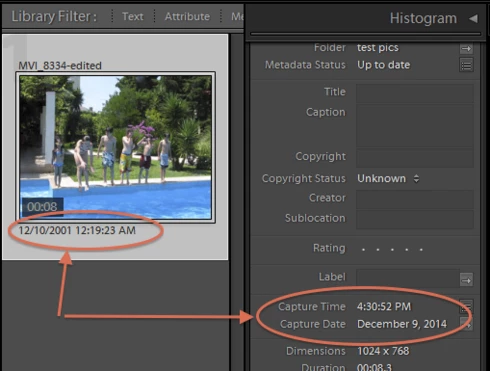
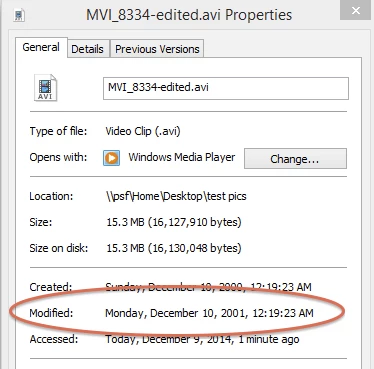
LR 5.7 still shows inconsistent capture date/times for videos. For a test .avi on Windows 8.1, the date in grid view appears to be the file system's last-modified time, while Capture Date/Time is set to the time of import.This problem was declared fixed in LR 5.5, and it appears to have been fixed for images, but not videos:http://feedback.photoshop.com/photoshop_family/topics/inconsistent_dates_for_files_missing_date_time...I'm opening a new topic, since the previous one has been marked "Solved".
This topic has been closed for replies.

165 replies

johnrellis
Legend
December 16, 2017
"Anyone who has used Edit Capture Time and/or Paste Metadata will have different values in different fields in the catalog for the relevant images. Where is the utility to make these consistent?"

In my testing, the previous workaround continues to work: Select all the affected photos, do Metadata > Edit Capture Time, and click Adjust All.  That  will set IPTC:DateCreated to the same capture date value as shown in Metadata > Default,  Metadata > EXIF, and under the thumbnail.
johnrellis
Legend
December 16, 2017
Sunil and Melissa,

In August, Adobe asked me to provide recipes for the issues in this thread. I provided two such recipes, updated the first post in this topic with them, and communicated that by email. After 7.0.1, Adobe asked me to test, which I did, I updated one of the recipes, and posted that the other one hadn't yet been addressed.

In LR 7.1, the recipe concerning photos missing metadata capture date/times has been completely addressed, while the recipe concerning edits to IPTC:DateCreated has not.

Details:

This topic concerns two ways to provoke the underlying architectural inconsistency in the capture date/time fields, in which the values shown under the thumbnail, in Metadata > Default, Metadata > EXIF, and Metadata > IPTC would be inconsistent, and different parts of the application would use different values (sorting, file renaming, the Library filter bar, smart collections).

1. Import a photo or video with missing metadata date/time fields or with just EXIF:DateTime but not EXIF:DateTimeOriginal (e.g. importing scans or from very old digital cameras):

https://feedback.photoshop.com/photoshop_family/topics/lightroom-still-inconsistent-capture-date-tim...

I've tested this recipe and tested a similar one for video, and it appears to be finally fixed!   There are no inconsistencies between the dates shown under the thumbnail and in Metadata > Default and Metadata > EXIF.  Sorting thumbnails in grid view and the Library Metadata filter bar are consistent with those values, and renaming files in grid view and in export uses those values consistently.  

2. Change IPTC:DateCreated with with the Metadata > IPTC panel or by copying and pasting that field with Metadata > Copy/Paste Metadata.  

https://feedback.photoshop.com/photoshop_family/topics/lightroom-still-inconsistent-capture-date-tim...

Though the Metadata Working Group specification to which LR subscribes says that IPTC:DateCreated should be consistent with EXIF:DateTimeOriginal and XMP:DateCreted, changing the IPTC:DateCreated in the Metadata panel doesn't update the date/times shown under the thumbnail, Metadata > Default, or Metadata > EXIF.

The previous workaround continues to work: Select all the affected photos and doing Metadata > Edit Capture Time and then Adjust All will set IPTC:DateCreated to the same value as shown in Metadata > Default and Metadata > EXIF.
ItWasNotMe
Known Participant
December 16, 2017
1. I did start a specific thread, it got merged into this
2. It would be quite straightforward for them to enumerate all the errors in this thread and answer yes/no - if you read the thread you will see I suggested this earlier
3. Its my job to USE the software not test it. Remember I'm paying them, not the other way round
Victoria Bampton LR Queen
Community Expert
Community Expert
December 16, 2017
It's impossible for them to promise they've fixed every single one Stephen, because even if they think they've fixed everything, someone might still have a problem. If you can still reproduce any of the issues you've noted, please feel free to update the thread or start a new one for the specific error you're still seeing.
Victoria - The Lightroom Queen
ItWasNotMe
Known Participant
December 15, 2017
1. Did you fix ALL the bugs referenced in this thread or just the one referenced in the title? You will see many comments (i.e. complaints), including mine, that disparate errors have been merged into this thread.
2. Anyone who has used Edit Capture Time and/or Paste Metadata will have different values in different fields in the catalog for the relevant images. Where is the utility to make these consistent?
axmelissarios1
Community Manager
Community Manager
December 13, 2017
Hi all,

Just to reiterate what Sunil said in a comment above, this issue should be fixed in Lightroom Classic CC 7.1. Please let us know if you're still seeing this issue after updating.

Thanks,
Melissa
Melissa Rios, Product Manager, Community Experiences & Platforms | Adobe
johnrellis
Legend
December 13, 2017
Not the same issue as the topic in which you posted.

Please reference the new conversation here: Lightroom: Recovering file last-modified date/time?
Participating Frequently
December 13, 2017
I could, but that would not solve the problem because LR wrote the metadata to the original files.
Participating Frequently
December 13, 2017
Maybe it is obvious that this will not work, but could you restore a previous version of the catalog? Before you made the edits? 

Im horrified by the thought of your situation. Hope you encounter a fix!
Participating Frequently
December 12, 2017
Not sure if my issue is the same as others who have posted here, but I'm dealing with a large-scale nightmare relating to creation dates in my LR catalog of 20K+ images. I recently made a lot of keyword updates and saved the metadata to the files. Then I noticed that for any of my photos that didn't have embedded capture/digitized metadata, the "Metadata Date" was changed to the day I saved the keyword metadata to the files. These files now only show the new date in the metadata since they lack capture dates. 

However, in Library grid view, the thumbnails still display the correct creation dates even though in the metadata panel all date fields are empty except for Metadata Date. So when I followed the advice of someone above to save metadata to file and then read metadata from file, I ended up wiping the correct capture date that had been displayed on the thumbnail, replacing it with the date I last edited the metadata.

If there is no way to reset the capture times to those saved in the LR catalog (i.e. the ones displayed on the thumbnails), then I'm facing hundreds of hours of manually correcting the metadata. In other words, nightmare.

I have my entire LR library synced/backed up on Dropbox. It is possible to restore a previous version from Dropbox, but this is only possible on a file-by-file basis. I'm now regretting not backing up my library to my Time Machine.