johnrellis
Legend
December 10, 2014

P: Still inconsistent capture date/time for photos and videos

Update 5/17/2018: Though LR 7.1 made improvements, LR 7.3.1 still has two closely related problems with a single underlying cause:

- With photos and videos missing metadata capture date/times (e.g. scans), there is still an inconsistency between the times shown under the thumbnails in grid view and in the Metadata panel and the hidden, internal times used for sorting in grid view.

- Changing IPTC Date Created in the Metadata panel, either by editing the field or using Metadata > Copy/Paste Metadata, similarly causes inconsistent values to be shown and sorting and searching to work inconsistently.  It also causes date metadata to be written back to the files that doesn't conform with the Metadata Working Group's standard.

The underlying cause is architectural: LR doesn't have a single internal catalog field representing "capture time".  Rather, it maintains capture time in several different fields, and the various parts of LR update those fields inconsistently.

See here for precise recipes to replicate these bugs:

https://feedback.photoshop.com/photoshop_family/topics/lightroom-still-inconsistent-capture-date-tim...

https://feedback.photoshop.com/photoshop_family/topics/lightroom-still-inconsistent-capture-date-tim...

See here for a workaround: 

https://feedback.photoshop.com/photoshop_family/topics/lightroom-still-inconsistent-capture-date-time-for-videos?topic-reply-list%5Bsettings%5D%5Bfilter_by%5D=all&topic-reply-list%5Bsettings%5D%5Breply_id%5D=15475521#reply_15475521.  

-------------

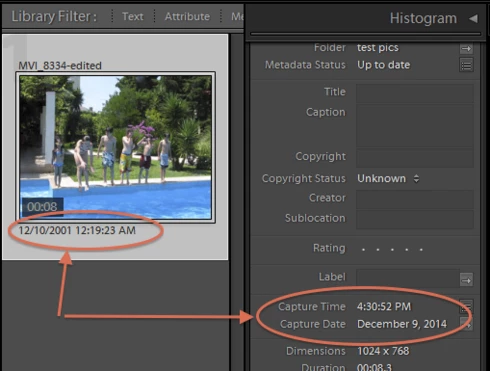
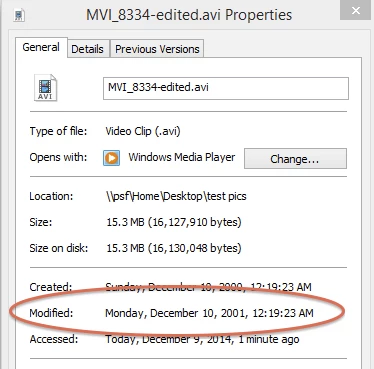
LR 5.7 still shows inconsistent capture date/times for videos. For a test .avi on Windows 8.1, the date in grid view appears to be the file system's last-modified time, while Capture Date/Time is set to the time of import.This problem was declared fixed in LR 5.5, and it appears to have been fixed for images, but not videos:http://feedback.photoshop.com/photoshop_family/topics/inconsistent_dates_for_files_missing_date_time...I'm opening a new topic, since the previous one has been marked "Solved".
このトピックへの返信は締め切られました。

返信数 165

Participating Frequently
February 15, 2018
I was hopeful that Lightroom Classic CC 7.1 would fix this issue, but it didn't.  I have updated to 7.2 and still have the same problem, but only with iphone 6s plus videos (.MOV).  

When I import videos and images I like to rename all my files to include the capture date and time (YYY-MM-DD Hour.Minute.Second).  My 5d Mark iv images and videos (.MOV) import and rename based on time perfectly and it matches all the metadata times.  Same with iphone images.  However, the time in the iphone video filenames are ALWAYS wrong, and I can't for the life of me figure out where the hour even comes from.  It's always 5 or 6 hours off, which I suspect changes based on whether it's daylight savings or not.  As a result of the incorrect time, any videos taken after 6 or 7 pm, also have an incorrect date.

To be clear, I am expecting a filename based on the time CREATED, just like images and other videos I import.  

Example 1-iphone 6s plus:
Filename time: 14.22.28 (=2:22:28 pm; 6 hours off when daylight savings ends)
Date Time Digitized: 8:22:28 AM (correct time of capture)
Date Time: 10:37:17 PM (correct time of import)

Example 2-iphone 6s plus:
Filename time: 23.43.57 (=11:43:57 pm; 5 hours off during daylight savings)
Date Time Digitized: 6:43:57 PM (correct time of capture)
Date Time: 9:48:41 PM (correct time of import)

At first glance I might have said it was a time zone error, except the metadata is correct in the videos and all other images and my professional camera videos renamed with the same filename structure are always correct upon import, with the filename date/time matching all metadata.  

Observations:
*Images have 3 date/time areas; all seem to match; all are the exact date/time created:
1) Date Time Original     =date/time created
2) Date Time Digitized    =date/time created
3) Date Time                      =date/time created

*However, Videos only have 2 & 3 of the above time areas where:
2) Date Time Digitized   =date/time created
3) Date Time                     = date/time IMPORTED (WHY anyone needs this is beyond me, but whatever, even this doesn't match the random time in my iphone video filenames)

*Sorting images/videos by date created works correctly-even when the filename shows an incorrect time.  I presume this is because the metadata is correct, regardless of the filename.

*Auto importing the exact same iphone videos as above  from a watched folder and using the exact same naming structure (date hour.minute.second) works correctly.  I've been using this workaround for years.  But it is full of flaws: Lightroom will re-import the same files-with the exact same metadata- if air dropped to the watched folder by accident. And it is a pain to figure out what has and hasn't been airdropped if done out of order, so my catalog becomes full of duplicate images and videos that have a -2 at the end of the filename).  

This is a HUGE problem.  My workaround is flawed and it causes me to not back up my iphone images as often as I should.  Even when I don't import using the hour.minute.second filename structure, the date is off for all iphone videos taken after 6pm or before 6am, which is UNACCEPTABLE for organizational purposes.  Ultimately, I can't believe this has been going on for years and people just accept it.  I pay every month and I haven't been able to import videos with the correct time.  That's basic.  FIX IT.   

Note:  I have also tried renaming on import with only the date and without the time, but this still results in incorrect dates for all videos taken after 6 or 7 pm.  Not renaming with dates is not an option.
ItWasNotMe
Known Participant
February 14, 2018
Still not completely fixed in 7.2 on MacOS 10.13.3; see posts below for details.
ItWasNotMe
Known Participant
December 23, 2017
Missing from the checklist at the top of this thread, and still wrong in the 7.1 release, is that when you sort by capture date in the grid library views the sort order is not always the same order as you would expect from the dates displayed in the 'Capture Date' field in the default metadata view. 
[Edit - revised to state not always]
ItWasNotMe
Known Participant
December 19, 2017

Yep, its often referred to as data abstraction, dates back to before 1980 as a concept.

Sadly, though, I think swathes of the code don’t use ‘the database’ per se, rather they parse the xmp string. This is always stored as a composite string in one of the columns. For example, if my analysis below is correct, then

  • ‘Edit Capture Time’ doesn’t take the ‘true’ database field as the source
  • Reminder, Paste didn’t set this field, therefore if ‘Edit’ used this as the source then it would revert the date back to the value before the paste, rather than ‘correcting’ the issue
  • Conclusion, ‘Edit’ must be taking photoshop:DateCreated as its source
  • This is only in the xmp

 Another rather old concept is refactoring, Wiki suggests first known use of the term is 1990.

 In this context, you might refactor the code and make all the ‘read’ occurrences of capture date use the 'true' database field and apply data abstraction to the write occurrences.            Removes some inconsistency but highlights another problem, the 'true' database field can be incorrect.

johnrellis
johnrellis作成者
Legend
December 18, 2017
I agree that the current architecture is very fragile.   Some background: I believe that it was originally motivated by a desire to have the database metadata tables reflect the contents of the corresponding date/time metadata fields. (There are four different photo metadata standards with at least 12 different date/time fields.)  Several years after LR was released, the Metadata Working Group came out with its revised standard, which LR adopted.  That standard introduced some significant changes in the way that the multiple date/time metadata fields should be handled.   

It would be straightforward for LR to have its cake and eat it too, maintaining the original metadata fields in the database but have a single unified method for accessing "capture time" (whether via a function or a database field).  But somewhere along the way the engineering lost its way on this.
ItWasNotMe
Known Participant
December 18, 2017
This is what I think is happening

On a test catalog  I took three images created in 2010, 2014, 2017 from a supported camera

 ·      2010 image, I left unchanged

·      2014 image, I pasted the date from the 2010 image

·      2017 image, I used Metadata -> Edit Capture time; set to random value

First difference:

Paste metadata doesn’t write to the field captureTime in Table Adobe_Images

Action, Copy/Paste from 2010 image to the 2014 image

  • Before "2014-04-25T14:09:38.24", After "2014-04-25T14:09:38.24"

Whereas Metadata -> Edit Capture time does, on the 2017 Image

  • Before, "2017-03-28T11:53:38.41, After "1995-01-01T00:00:01"

Second difference:

Only image related xmp date field that I could see copy/paste changing is photoshop:DateCreated

These are selected changes on the Copy/Paste xmp, three of the values are unchanged from their original 2014 values (created in import)

  • exif:DateTimeOriginal="2014-04-25T14:09:38.24"
  • xmp:ModifyDate="2014-04-25T14:09:38.24"
  • xmp:CreateDate="2014-04-25T14:09:38.24"
  • photoshop:DateCreated="2010-01-01T12:22:19.73

Whereas the Edit Capture Time changes an additional field, exif:DateTimeOriginal

  • exif:DateTimeOriginal="1995-01-01T00:00:01"
  • xmp:ModifyDate="2017-03-28T11:53:38.41"
  • xmp:CreateDate="2017-03-28T11:53:38.41"
  • photoshop:DateCreated="1995-01-01T00:00:01" 

Note, neither action changes the xmp:CreateDate, or xmp:ModifyDate both are the time that I shot the relevant image.

[Edit] Forgot to say there are other date fields in the tables that I didn't look at, such as harvested date which may or may not have been updated.

ItWasNotMe
Known Participant
December 18, 2017

Fortune favours the lucky then...

 Lets conduct a little thought experiment. Conjecture:

  • There is a field captureTime in the Database table, but not all of the code uses this (maybe its seen as slow to access, who knows)
  • There are two fields in the XMP, exif:DateTimeOriginal and photoshop:DateCreated,  (in reality there are more but twos enough for this example) and these are used frequently in the code but not consistently, which is the symptom we see

 We know that ‘Copy/Paste’ metadata and ‘Edit Capture Time’ don’t update consistently, so

  • Lets say ‘Edit’ updates all three
  • Lets say ‘Copy’ only updates photoshop:DateCreated and (maybe) captureTime but not exif:DateTimeOriginal
  • So, we have some images for which these two xmp values may differ 

Now, there are lots of places that capture date is used.

  • Several points in the library display (i.e. the inconsistencies in the title of this thread)
  • Sort by
  • The API
  • The edit and copy functions themselves need to display something as a starting point
  • And so on
There is no guarantee that all of these use captureTime, or exif:DateTimeOriginal. From you example they can't, otherwise we would not see variability. In V6 for example some of the fields had quite complex conditional statements trying to find a date that could be displayed.

Lets have Adobe ‘fix’ the immediate problem and have the ‘Copy’ write exif:DateTimeOriginal as well (and captureTime if it doesn't). Further, it doesn't standardise the code to use the value in the database rather than the XMP and doesn’t provide any utility function to align these values for each image. 

Were this the case, then

  • At any point in the future, any of its developers may decide that for the little fragment of code they are changing, it would be better to use the ‘other’ field.
  • Then for some data stored prior to the ‘fix’, we are back to the inconsistency and start all over again. This is why it should repair the database as well as fixing the code.

 There is a reason that camera supports have three legs and not four – stability.

 For the same reason its poor practice to have the same data value in more than one place.

Sunil_Bhaskaran
Community Manager
Community Manager
December 18, 2017
Thanks a lot for the details, John.
We are looking into the second issue you mentioned.

Thanks,
Sunil
johnrellis
johnrellis作成者
Legend
December 17, 2017
"should you use a plug-in then you are at the mercy of the gods as to which of the many fields the developer has chosen."

The LR SDK API appears to reflect accurately what is shown in the application to the user.  All photos have a "captureTime" that is the same as what's shown in the app, and photos that have EXIF:DateTimeOriginal in their metadata have "dateTimeOriginal".

{--table: 1
    [LrPhoto( id "3875" )] = {--table: 2
        captureTime = 461908947, 
        date = "2015-08-22T04:02:27", 
        path = "/Users/john/Downloads/capture-time-bug copy/test2.jpg"}, 
    [LrPhoto( id "3874" )] = {--table: 3
        captureTime = 493531347, 
        date = "2016-08-22T04:02:27", 
        dateTimeOriginal = 493531347, 
        path = "/Users/john/Downloads/capture-time-bug copy/test1.jpg"}, 
    [LrPhoto( id "3876" )] = {--table: 4
        captureTime = 556603347, 
        date = "2018-08-22T04:02:27", 
        dateTimeOriginal = 556603347, 
        path = "/Users/john/Downloads/capture-time-bug copy/test3.jpg"}, 
    [LrPhoto( id "3877" )] = {--table: 5
        captureTime = 532143432, 
        date = "2017-11-12T01:37:12", 
        path = "/Users/john/Downloads/capture-time-bug copy/test4.jpg"}}
ItWasNotMe
Known Participant
December 16, 2017
They may look the same on screen but in the underlying database they are still different. 
For example, should you use a plug-in then you are at the mercy of the gods as to which of the many fields the developer has chosen.
[Edit, see your own comment below on copy/paste. Until that is corrected, in any event; any utility would be of limited use ]