johnrellis
Legend
December 10, 2014

P: Still inconsistent capture date/time for photos and videos

  • December 10, 2014
  • 165 replies
  • 5533 views

Update 5/17/2018: Though LR 7.1 made improvements, LR 7.3.1 still has two closely related problems with a single underlying cause:

- With photos and videos missing metadata capture date/times (e.g. scans), there is still an inconsistency between the times shown under the thumbnails in grid view and in the Metadata panel and the hidden, internal times used for sorting in grid view.

- Changing IPTC Date Created in the Metadata panel, either by editing the field or using Metadata > Copy/Paste Metadata, similarly causes inconsistent values to be shown and sorting and searching to work inconsistently.  It also causes date metadata to be written back to the files that doesn't conform with the Metadata Working Group's standard.

The underlying cause is architectural: LR doesn't have a single internal catalog field representing "capture time".  Rather, it maintains capture time in several different fields, and the various parts of LR update those fields inconsistently.

See here for precise recipes to replicate these bugs:

https://feedback.photoshop.com/photoshop_family/topics/lightroom-still-inconsistent-capture-date-tim...

https://feedback.photoshop.com/photoshop_family/topics/lightroom-still-inconsistent-capture-date-tim...

See here for a workaround: 

https://feedback.photoshop.com/photoshop_family/topics/lightroom-still-inconsistent-capture-date-time-for-videos?topic-reply-list%5Bsettings%5D%5Bfilter_by%5D=all&topic-reply-list%5Bsettings%5D%5Breply_id%5D=15475521#reply_15475521.  

-------------

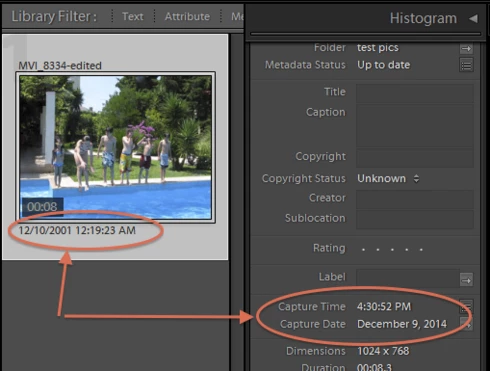
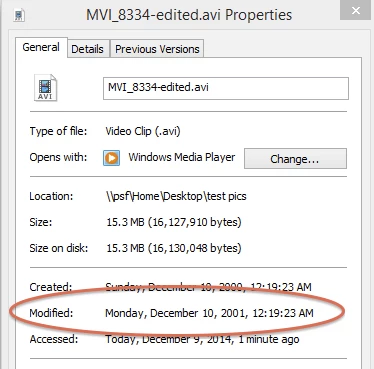
LR 5.7 still shows inconsistent capture date/times for videos. For a test .avi on Windows 8.1, the date in grid view appears to be the file system's last-modified time, while Capture Date/Time is set to the time of import.This problem was declared fixed in LR 5.5, and it appears to have been fixed for images, but not videos:http://feedback.photoshop.com/photoshop_family/topics/inconsistent_dates_for_files_missing_date_time...I'm opening a new topic, since the previous one has been marked "Solved".
This topic has been closed for replies.

165 replies

johnrellis
Legend
July 2, 2016
This problem was reported in LR 5.2.  I just retested, and it still occurs in LR CC 2015.6.  The same underlying cause: Internally, LR doesn't have a uniform abstract concept of "capture time", and different parts of LR use different metadata fields in different ways.  
johnrellis
Legend
July 2, 2016


Editing Date Created in the Metadata:IPTC panel does not completely set LR's notion of capture time, nor does it properly set EXIF:DateTimeOriginal, as specified in the industry standard that Adobe has sponsored. The results vary inconsistently depending on whether the imported file already contains IPTC:DateCreated.

To reproduce:

1. To reproduce in LR 5.2 (Windows 7 64-bit):

2. Import a photo with no EXIF, XMP, or IPTC fields.

3. In the Metadata:IPTC panel, change Date Created to 2009-04-13.

4. Note that the Metadata:Default panel shows that date as Capture Date, and that date will show under the thumbnail in Library grid view. But the image will not sort properly by capture time in Library grid view, and the smart-collection criterion "Capture Date is 2009-04-13" does not properly match the image.

5. Do Metadata > Save Metadata To File.

6. Remove the file from the catalog.

7. Examine the file's metadata with Exiftool and observe that IPTC:DateCreated and XMP:DateCreated have been set, but EXIF:DateTimeOriginal has not, even though "Guidelines for Handling Image Metadata Version 2.0" specify on page 38 that "Changes to XMP ... SHOULD be exported to Exif. ... This is also true in the case that only IPTC DateCreated is available."

8. Use Exiftool to remove XMP:DateCreated from the image, so that it now has just IPTC:DateCreated.

9. Reimport the image.

10. Note that the date is shown in the Metadata:Default panel as Capture Date and under the thumbnail in Library grid view. The image sorts properly by capture time in grid view. The smart-collection criterion "Capture Date is 2009-04-13" properly matches the image.

11. In the Metadata:IPTC panel, change Date Created to 2009-04-09.

12. Note that the Metadata:Default panel now shows Capture Date as 2009-04-09, as does the date under the Library thumbnail. But the thumbnail does not sort properly in Library view, and the smart-collection criterion "Capture Date is 2009-04-09" does not match the image.
ItWasNotMe
Known Participant
July 2, 2016
Would be useful of have a bullited list at the top, cataloging each identified instance of an error; would make it easier to identify whether Adobe has actually 'fixed' things
ItWasNotMe
Known Participant
July 1, 2016
And heres another related item, don't whether this is new/old but still inconsistent behaviour, same versions as before (2015.6 etc)

1. Import image without date/time data
2. Metadata; Edit Capture Time; Change (with no change to data)
3. Copy/Paste Date Created etc from another image via Menu items

Displayed date in right panel for the target image doesn't change in the way it does if you did not do step 2; it remains as displayed before action 3

Edit: removed reference to step 1 in last paragraph
ItWasNotMe
Known Participant
July 1, 2016
This is not a bug about sorting the display, this is a recently introduced bug in Paste metadata (from the menu) that makes the issues with display worse.
ItWasNotMe
Known Participant
July 1, 2016
Well its absolutely clear to me that it changed in the recent release, and the behaviour changed for the worse - see below

Only the images I have imported and copied metadata to since that release have this problem. These images are NEF raw files, with XMP sidecars that are generated by LR; files from which I am copying the data are in general Tiffs.

1. I'm running the latest version Lightroom 2015.6 release Camera Raw 9.6, CC reports no updates available. Running on OSX 10.11.5 - App Store update reports no updates available

2. Copy Metadata from menu, Paste Metadata from menu. Check Filled; IPTC Image - Date Created - this is the field that is changed on the display of Capture time in the right panel, is populated on the source and is pasted into at least one place.

So when the image is initially imported, the field does not appear in the right panel, when I copy the metadata the field appears and is populated with the date and time from the other image. This behaviour is as in earlier versions.

However, the paste behaviour has changed such that some other field is no longer populated - which one this is ??? This appears to be used in sorting collections/folders in capture time sequence as the sequence is wrong for images I imported since updating to the LR 2015.6 release.

As I previously said, selecting the images and Men-> Edit Capture time; Change - fixes the problem, so this activity is populating the field that Paste Metadata no longer touches.

What Edit Capture time change appears to do, and I can't guarantee it as its only a visual check, is write extra lines to the sidecar, with a value for  exif:DateTimeOriginal set to the date that I pasted. However, and more garbage, it also appears to write a line labelled xml:ModifyDate with exactly the same value as DateTimeOriginal. So it appears to me that the behaviour was changed to omit writing one or more of these on the Paste.

3. What I meant there is that its not my job to QA and frankly I couldn't be bothered to work out which it was sorting on - as you said its a mess and has been for 5 years+
johnrellis
Legend
July 1, 2016
It's not clear to me yet that CC 2015.6 behaves differently than previous versions with respect to scans missing capture times:

1. Please do Help > System Info and report the exact version you're running.  Many think they are running "the current version" but in fact aren't due to problems with the Creative Cloud desktop app.

2. "Copy Metadata from existing image including those fields".  Exactly how are you copying the metadata?  With the menu command Metadata > Copy Metadata?  Which fields are you selecting to be copied?  (There is no field available in that window that corresponds to what LR displays as capture time.)

3. "Image appears according to create/import time (I can't determine which) rather than displayed values".  LR has long been inconsistent in how it sorts images missing capture time in their metadata.  

LR's handling of missing capture time is a complete mess. To determine if your situation is in fact different in the CC 2015.6, it would help to have two sample photos in hand, the scanned photo missing the capture time and the photo from which you are copying metadata values.   You could upload them to Dropbox (or similar) and copy the sharing link here.
ItWasNotMe
Known Participant
July 1, 2016


I know this has been a long running issue, but the latest release has changed the behaviour of Capture Date and Time for the worse

Sequence of events:
1. Import scanned image without any metadata in the Capture Date/Time Fields
2. Copy Metadata from existing image including those fields
3. Paste into the newly imported image
4. Select a folder containing the image, sorted by capture time

Previous version (numbers refer to above steps):
1. Capture date/time not shown in right column
3. Capture date time shown as pasted values
4. Image appears according to displayed date/time

Current version:
1. Capture date/time not shown in right column
3. Capture date time shown as pasted values
4. Image appears according to create/import time (I can't determine which) rather than displayed values

Now this can be fixed on the image by opening the Metadata edit capture time dialog and selecting change.

This places image in the correct place in the sequence but is yet another pointless step I have to add to my workflow.
BassBone42
Participating Frequently
February 27, 2016
This technique seemed to work more generally. I used it to fix both video and .JPG's that were sorting incorrectly. This was with Lightroom CC on a Mac. Thanks a bunch!
johnrellis
Legend
February 26, 2016
"it  seems that any timezone stored in a picture (e.g. by Geosetter) will be removed when re-saving new meta information within Lightroom."

Yeah, LR doesn't follow the standard (Metadata Working Group, of which Adobe is a member), which calls for existing time zones in date/times to be preserved.   LR is pretty aggressive at pretending time zones don't exist.