johnrellis
Legend
December 10, 2014

P: Still inconsistent capture date/time for photos and videos

  • December 10, 2014
  • 165 replies
  • 5533 views

Update 5/17/2018: Though LR 7.1 made improvements, LR 7.3.1 still has two closely related problems with a single underlying cause:

- With photos and videos missing metadata capture date/times (e.g. scans), there is still an inconsistency between the times shown under the thumbnails in grid view and in the Metadata panel and the hidden, internal times used for sorting in grid view.

- Changing IPTC Date Created in the Metadata panel, either by editing the field or using Metadata > Copy/Paste Metadata, similarly causes inconsistent values to be shown and sorting and searching to work inconsistently.  It also causes date metadata to be written back to the files that doesn't conform with the Metadata Working Group's standard.

The underlying cause is architectural: LR doesn't have a single internal catalog field representing "capture time".  Rather, it maintains capture time in several different fields, and the various parts of LR update those fields inconsistently.

See here for precise recipes to replicate these bugs:

https://feedback.photoshop.com/photoshop_family/topics/lightroom-still-inconsistent-capture-date-tim...

https://feedback.photoshop.com/photoshop_family/topics/lightroom-still-inconsistent-capture-date-tim...

See here for a workaround: 

https://feedback.photoshop.com/photoshop_family/topics/lightroom-still-inconsistent-capture-date-time-for-videos?topic-reply-list%5Bsettings%5D%5Bfilter_by%5D=all&topic-reply-list%5Bsettings%5D%5Breply_id%5D=15475521#reply_15475521.  

-------------

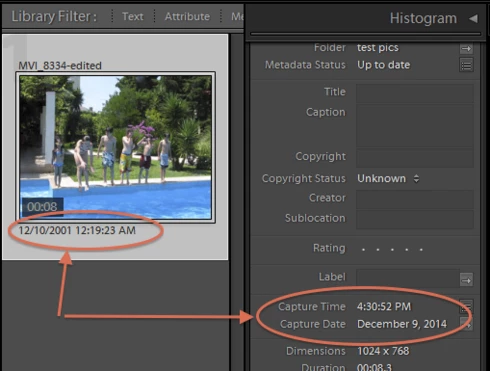
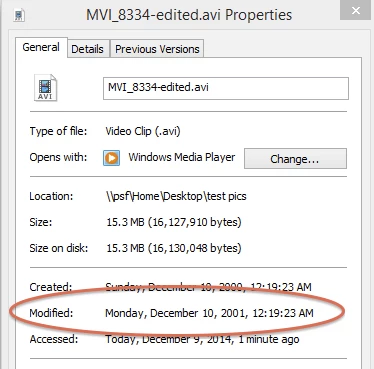
LR 5.7 still shows inconsistent capture date/times for videos. For a test .avi on Windows 8.1, the date in grid view appears to be the file system's last-modified time, while Capture Date/Time is set to the time of import.This problem was declared fixed in LR 5.5, and it appears to have been fixed for images, but not videos:http://feedback.photoshop.com/photoshop_family/topics/inconsistent_dates_for_files_missing_date_time...I'm opening a new topic, since the previous one has been marked "Solved".
This topic has been closed for replies.

165 replies

anothertal3
Inspiring
February 24, 2016
Sorry, haven't been here for a while. Dropped by to thank you for suggestion.

Timezone handling seems to be kind of funny indeed, even with images.
Example: it  seems that any timezone stored in a picture (e.g. by Geosetter) will be removed when re-saving new meta information within Lightroom.

Then again... I'm not completely sure about the standardized process, so maybe it's some sort of irregular information anyway.
johnrellis
Legend
January 28, 2016
"Had some issues when attempting to assign the capture date/time of a video to its filename. There was always a strange offset."

If they were Quicktime videos (e.g. with extension .mov, from an iDevice), there's a known bug where LR gets confused by the time zone (or lack of one) stored in the video's metadata: http://feedback.photoshop.com/photosh...
anothertal3
Inspiring
January 28, 2016
Had the same issue recently. As a workaround, reassigning the same date by using the method described by John in this topic worked for me ( http://feedback.photoshop.com/photosh... ).

Still... a proper fix would be much better 😕😕
anothertal3
Inspiring
January 28, 2016
Had some issues when attempting to assign the capture date/time of a video to its filename. There was always a strange offset.

I tried this workaround before renaming and it then worked fine.

Always worth a shot, I guess.
Known Participant
January 22, 2016
Hi John,
How can I (or others) help gather info into one spot?
I always appreciate your help & insight!
johnrellis
Legend
January 17, 2016
I confirmed that for .mov (QuickTime) files produced by iOS 9, the Library > Rename Photo command is showing a similar inconsistency as the other use cases in this topic. In particular, the rename command is using the file system's modification date as "capture time", whereas the Metadata panel and the thumbnail use the QuickTime metadata field "Create Date" as the "capture time".

As an example, I used this renaming template:


to rename a .mov file. The new filename 2016-01-16--22-20-31.MOV corresponds to the file system's modification date. Whereas the date under the thumbnail and in the Metadata panel corresponds to the QuickTime metadata field Create Date:


The capture time shown under the thumbnail and in the Metadata panel is 8 hours after the local time at which the video was taken. (My computer is running in UTC-8.) This shift is due to a different bug in which LR trips over QuickTime's lack of time zones in some date/time metadata fields: http://feedback.photoshop.com/photosh....
johnrellis
Legend
January 17, 2016
The core issue is that LR doesn't have a single internal field that it uses consistently for capture time. This results in inconsistencies in a number of different places in the application: sorting, filtering, metadata display, renaming. But they all have the same root cause, the failure of the implementation to have an abstraction that provides a consistent value for "capture time".

The inconsistencies occur more often with video than with images, most likely because Adobe admitted in this forum that they never finished video metadata due to other priorities.

Gathering all of these inconsistencies in a single topic will make it more likely that Adobe will notice and address the core issue rather than apply incomplete baind-aids (as did once before).
TheGreekGeek
Participating Frequently
January 17, 2016
John, is there anyway to find out who merged my topic into this one? My issue is related to the File rename functionality. The capture times I see are correct, it's how they're used that is a problem. (see my general comment below)
TheGreekGeek
Participating Frequently
January 17, 2016
I just noticed my topic/bug was merged into this one. I feel this was done in error as my issue is specific to how LR is applying a file rename template. It's possible whoever did this only read my topics title and mistook my issue to be related to this thread.

As noted in my topic and the screenshots I linked, the capture time LR displays is correct. How it uses that time to generate my filename per my rename template is not. If the rename is performed at import it is correct (with the exception of MTS files) but if I apply a rename AFTER the import it shifts all my file names by 6 hours. The capture time remains correct.

To whoever merged my topic please undo this or. I specifically chose not to merge it into this topic as my problem is not the same as that as the OP's. I don't want my information pertaining to the rename functionality to be overlooked as I feel it offers some clues as to where the rename issue resides (i.e. works during import - for at least mov/avi files, fails for MTS - fails on subsequent renames). As a developer myself I know those sorts of clues could be very valuable. It took nearly 2 hours of testing to gather the details in my post and I now its been merged into a mostly unrelated thread where the information may get overlooked (especially given the age of this thread).

As you can see below the file reports a capture time of 6:05 PM. This is the correct capture time (it's dusk outside not midnight). What is incorrect is how LR chose to apply said capture time to the file rename template which generated a time 6 hours in the future. This issue was consistent across my entire catalog and always +6 hours off. As noted my workaround was to re-import my catalog and the problem went away for all but MTS files.


as you can see in the file system details (as posted in my org post) the capt time is correct. my issue is not related to OP; please unmerge
johnrellis
Legend
January 16, 2016
As described in this topic, LR has a number of longstanding inconsistencies when handling video capture dates. Also, it doesn't handle Quicktime (.mov) capture dates very gracefully, which results in a time zone shift: http://feedback.photoshop.com/photosh...