johnrellis
Legend
December 10, 2014

P: Still inconsistent capture date/time for photos and videos

  • December 10, 2014
  • 165 replies
  • 5533 views

Update 5/17/2018: Though LR 7.1 made improvements, LR 7.3.1 still has two closely related problems with a single underlying cause:

- With photos and videos missing metadata capture date/times (e.g. scans), there is still an inconsistency between the times shown under the thumbnails in grid view and in the Metadata panel and the hidden, internal times used for sorting in grid view.

- Changing IPTC Date Created in the Metadata panel, either by editing the field or using Metadata > Copy/Paste Metadata, similarly causes inconsistent values to be shown and sorting and searching to work inconsistently.  It also causes date metadata to be written back to the files that doesn't conform with the Metadata Working Group's standard.

The underlying cause is architectural: LR doesn't have a single internal catalog field representing "capture time".  Rather, it maintains capture time in several different fields, and the various parts of LR update those fields inconsistently.

See here for precise recipes to replicate these bugs:

https://feedback.photoshop.com/photoshop_family/topics/lightroom-still-inconsistent-capture-date-tim...

https://feedback.photoshop.com/photoshop_family/topics/lightroom-still-inconsistent-capture-date-tim...

See here for a workaround: 

https://feedback.photoshop.com/photoshop_family/topics/lightroom-still-inconsistent-capture-date-time-for-videos?topic-reply-list%5Bsettings%5D%5Bfilter_by%5D=all&topic-reply-list%5Bsettings%5D%5Breply_id%5D=15475521#reply_15475521.  

-------------

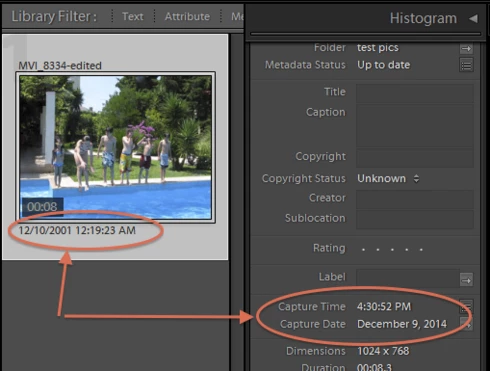
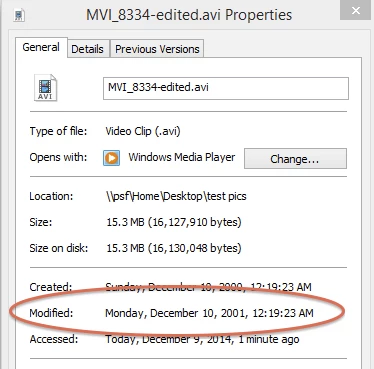
LR 5.7 still shows inconsistent capture date/times for videos. For a test .avi on Windows 8.1, the date in grid view appears to be the file system's last-modified time, while Capture Date/Time is set to the time of import.This problem was declared fixed in LR 5.5, and it appears to have been fixed for images, but not videos:http://feedback.photoshop.com/photoshop_family/topics/inconsistent_dates_for_files_missing_date_time...I'm opening a new topic, since the previous one has been marked "Solved".
This topic has been closed for replies.

165 replies

TheGreekGeek
Participating Frequently
January 16, 2016


The rename functionality within Lightroom 5.7 ( “Menu>Library>Rename Photo”) is broken when renaming video files using filename templates that contain the “Date” tags. This is only an issue with rename as the problem doesn’t occur during the initial import of the video files into the catalog using the exact same template. The problem appears to only affect video files and not my RAW or JPEG files.

My filename template contains a “Custom Text” tag followed by the capture date. For example:
5diii.November 21, 2015-18.05.35.MOV

Rather than use the capture time the bug in the rename functionality pushes the file’s name 6 hours into the future. This is what led me to uncover the problem as a directory from 21st of the month contained files named as if they’d been shot on the 22nd...

As noted the initial import works just fine so as a test I removed one of the affected video file from my library, moved it to another part of the disk, and then re-import the file. Upon doing this the file’s name correctly reflected the capture time. (Note I had to move the file because the import dialog hides the rename option if the file is in the same path it’s going to be imported into – could be annoying for some).

See the included screen captures for details of what I've said here.

While the above workaround is a viable it’s a very painful one as my custom tag is based on my camera model. To preserve that I had to isolate all my video files by model and re-import each separately applying the correct custom tag to my template. Under Windows 10 this isn’t too big a deal using both search and copy, but it still took a good hour and was only made easier by the fact that, unlike my still images, all my video images are in a single catalog. That said the catalog spans 10 years and includes ~2500 files. In that time my wife and I have used 7 different cameras and 5 different smartphones which is what made it a pain.

I happen to in UTC-6, but changing my timezone on my PC doesn’t seem to affect the problem and even then I’d expect the value to be 6 hours in the past and not 6 hours in the future - unless an absolute value is being applied. That said I have no idea if LR is determining my time zone from my IP address and not looking at the system time but I’d be surprised if that were the case so this is probably just a coincidence.

Finally, I’ve only had to rename files in my video catalog if I forgot to set the “Custom Text” for the camera model. Not doing so defaults the custom text to ‘untitled’. It would be nice if LR threw an warning if this was the case as I doubt most people intend their file names to contain untitled. IF possible I could see this being an optional setting ("Warn custom tag not specified") stored on the template that is set to true by default, otherwise a global catalog setting would be nice.

On a related note once an instance of LR has been used to perform an import the custom text is retained until LR is restarted. While a nice feature, this has caused me to accidentally apply custom text for the wrong camera if I import from multiple sources in one session and forget to change the custom tag. A similar option warning would be nice (i.e. “Warn custom tag when changing source”)

The video in question as it appears in my catalog alongside file system details from Windows 10:


The video in question re-imported with the correct date along side the incorrectly named one. Note that I brought up the rename dialog on the correctly named file and the preview shows the name reflecting the 6 hour shift:
johnrellis
Legend
January 5, 2016
Another inconsistency (observed in LR CC 2015.3) for photos missing a capture date in their metadata: The metadata panel shows a capture date, but the Date column for the filter bar shows "Unknown".

Inspiring
October 27, 2015
I have this problem too. My photo was taken on my iphone using a different app and the photo didn't record an Exif capture time. However, it must detect it somehow as the capture time is correct in the metadata tab. The end result is that even though the capture time is correct, it doesn't sort by capture time correctly. The photos that reproduce this are here:

https://www.dropbox.com/sh/vmanuyx80y...

There, the middle photo doesn't sort correctly even though the metadata shown in the metadata tab looks correct.

My light room version is 5.7.1 build number 994254
johnrellis
Legend
August 22, 2015
This bug also happens for photos when there is no DateTimeOriginal but there is an EXIF:ModifyDate, e.g. with a scan that's been edited by an app but doesn't have a capture date.

As an example, here are the relevant metadata date fields for a sample TIF:


$ exiftool -a -G sample.tif | grep -i date
[File] File Modification Date/Time : 2015:08:22 12:25:20-07:00
[File] File Access Date/Time : 2015:08:22 12:25:22-07:00
[File] File Inode Change Date/Time : 2015:08:22 12:25:20-07:00
[EXIF] Modify Date : 2015:08:21 21:02:27
[ICC_Profile] Profile Date Time : 1998:02:09 06:49:00


And here's a screen shot showing that the date under the thumbnail shows the operating system's file modified date, while the Metadata panel shows the capture time as the EXIF:ModifyDate:
Inspiring
August 10, 2015
After months of waiting if not for a solution that at least for a reaction from Adobe I decided NOT TO USE LR for any video-oriented purposes, it seems the video features are pure marketing, sadly.
Inspiring
August 1, 2015


The Meta Data of the files look correct, but the sorting is wrong (maybe some creation date problems)

I'm a Mac User on Mac OSX 10.10.4
(you forgot to add a specification on this form!)
Inspiring
July 4, 2015
I'm having a similar problem. The dates are correct on my Samsung video camera and files, but when LR imports them, it says they were shot in 1949 (and bizarrely, a day before the actual day they were shot)! I can go into each folder and "Edit capture time" and select "Date file created" to fix the dates, but then I have to drag and drop each file into the correct date folder, because LR sorted them all (upon import) into folders with the wrong dates!
Inspiring
June 18, 2015
Not sure why is rocket science for Adobe to acknowledge and fix such an obvious bug. The whole video support is just poorly made
Inspiring
June 18, 2015
The bug still exists in LR CC 2015.1 released a couple of days ago. Given that this bug has been present in some form for 4 years now without a resolution is a deal-breaker for me in my quest to find an Aperture replacement.
Inspiring
May 30, 2015
This is absolutely maddening, especially as I'm trying to migrate from Aperture which can read all the date, camera, and location info on videos just fine (and has for years).

The data is all there, can be read by other competing apps along with utilities like exiftool. Why can't Lightroom do the same?