johnrellis
Legend
December 10, 2014

P: Still inconsistent capture date/time for photos and videos

  • December 10, 2014
  • 165 replies
  • 5533 views

Update 5/17/2018: Though LR 7.1 made improvements, LR 7.3.1 still has two closely related problems with a single underlying cause:

- With photos and videos missing metadata capture date/times (e.g. scans), there is still an inconsistency between the times shown under the thumbnails in grid view and in the Metadata panel and the hidden, internal times used for sorting in grid view.

- Changing IPTC Date Created in the Metadata panel, either by editing the field or using Metadata > Copy/Paste Metadata, similarly causes inconsistent values to be shown and sorting and searching to work inconsistently.  It also causes date metadata to be written back to the files that doesn't conform with the Metadata Working Group's standard.

The underlying cause is architectural: LR doesn't have a single internal catalog field representing "capture time".  Rather, it maintains capture time in several different fields, and the various parts of LR update those fields inconsistently.

See here for precise recipes to replicate these bugs:

https://feedback.photoshop.com/photoshop_family/topics/lightroom-still-inconsistent-capture-date-tim...

https://feedback.photoshop.com/photoshop_family/topics/lightroom-still-inconsistent-capture-date-tim...

See here for a workaround: 

https://feedback.photoshop.com/photoshop_family/topics/lightroom-still-inconsistent-capture-date-time-for-videos?topic-reply-list%5Bsettings%5D%5Bfilter_by%5D=all&topic-reply-list%5Bsettings%5D%5Breply_id%5D=15475521#reply_15475521.  

-------------

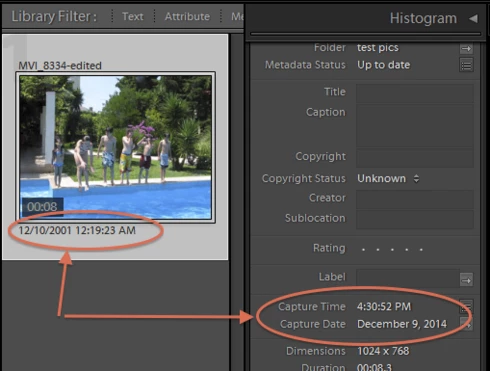
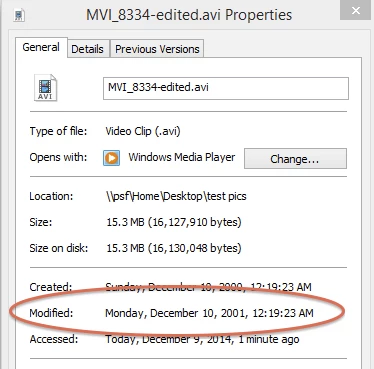
LR 5.7 still shows inconsistent capture date/times for videos. For a test .avi on Windows 8.1, the date in grid view appears to be the file system's last-modified time, while Capture Date/Time is set to the time of import.This problem was declared fixed in LR 5.5, and it appears to have been fixed for images, but not videos:http://feedback.photoshop.com/photoshop_family/topics/inconsistent_dates_for_files_missing_date_time...I'm opening a new topic, since the previous one has been marked "Solved".
This topic has been closed for replies.

165 replies

Known Participant
May 6, 2015
The bug still exists in LR CC 2015.0.1 / Windows 8.1.
Known Participant
May 6, 2015
I havn't tried it yet but there is nothing in the release notes that indicate that anything was done to improve metadata for video or image files.
Known Participant
May 6, 2015
I believe that Any File plugin is great, thanks John!

Does anyone know if this has gotten better in LR6?
johnrellis
Legend
March 21, 2015
LR does a poor job with video metadata in general. Add your vote and opinion to this topic:

http://feedback.photoshop.com/photosh...

You might consider my Any File plugin to manage your videos in LR. It uses the very robust Exiftool to extract video metadata and add it to the LR catalog, and any changes you make to the metadata in LR get written back to JPEG sidecars. Any File isn't as convenient as having proper video management built in to LR, but it gets the job done reliably.
Inspiring
March 20, 2015
To John:

thank you very much for all your research, I'll give it a try, although it seems to be just another workaround and it MAY stop working for any reason...

I've just gone through my 1000 thousand videos and stated the problem is even worse - there are sources (android devices only?) where there is the original capture time wrong - it can be seen under windows as well (last modification time). It seems to be a creation time while copying the files on android or something like that. Now I am completely unsure if there is anywhere the proper capture time - as I said windows shows not the expected time and LR shows just nothing...

I will probably need to dig in the EXIFs of the videos... I hoped LR is clever enough to manage it on its own. I'm getting even more frustrating. I am ensuring myself one again - NEVER EVER TRUST any tools you didn't constructed yourself...

... my origin idea was so simple - throw everything into LR, let it sort by LR and make your own order. None of these works 100% (just try to import some BMPs from a scanner).

Grrrrr
johnrellis
Legend
March 16, 2015
I just verified with LR 5.7.1 / Windows 8.1: You can correct the inconsistency described in the original post above by:

1. Select all the videos.

2. Metadata > Edit Capture Time

3. OK

For each video, this will make the Capture Date/Time shown in Metadata panel match the capture date/time shown under the thumbnail in Library Grid view (which is the file's last modified time, if LR wasn't able to read the file's metadata).

There is no need to do each video one at a time. But if you have any doubt, make a backup of your catalog first.
johnrellis
Legend
March 16, 2015
Update: I just updated my post to clarify a little.
johnrellis
Legend
March 16, 2015
Fotografista wrote, "But *all* the files would get then the *same* date and time (of the "most marked" one)."

I haven't tested with videos in the most recent version of LR, but in previous versions, I and others observed that Edit Capture Time would set the capture time of each video to its correct internal time, not the time of the most-selected video.

That in general is how Edit Capture Time works when you have multiple images selected. It offsets each image's time by the amount that the most-selected image is being offset. If the most-selected image is being offset by 0 seconds, than all the others will be too:


The text of the Edit Capture Time window says "but not videos", but at least in past versions, it did what I described. Worth a test.
Inspiring
March 16, 2015
I saw there hundreds of bug reports in here...

I would really appreciate to get an answer it was read from someone from LR Team. Just to know this thread in not an dead end...
Inspiring
March 16, 2015
John,

that would work. But *all* the files would get then the *same* date and time (of the "most marked" one). It's OK, if you wanted to move the time of all files about an interval, but that is not what I need.