johnrellis
Legend
December 10, 2014

P: Still inconsistent capture date/time for photos and videos

  • December 10, 2014
  • 165 replies
  • 5533 views

Update 5/17/2018: Though LR 7.1 made improvements, LR 7.3.1 still has two closely related problems with a single underlying cause:

- With photos and videos missing metadata capture date/times (e.g. scans), there is still an inconsistency between the times shown under the thumbnails in grid view and in the Metadata panel and the hidden, internal times used for sorting in grid view.

- Changing IPTC Date Created in the Metadata panel, either by editing the field or using Metadata > Copy/Paste Metadata, similarly causes inconsistent values to be shown and sorting and searching to work inconsistently.  It also causes date metadata to be written back to the files that doesn't conform with the Metadata Working Group's standard.

The underlying cause is architectural: LR doesn't have a single internal catalog field representing "capture time".  Rather, it maintains capture time in several different fields, and the various parts of LR update those fields inconsistently.

See here for precise recipes to replicate these bugs:

https://feedback.photoshop.com/photoshop_family/topics/lightroom-still-inconsistent-capture-date-tim...

https://feedback.photoshop.com/photoshop_family/topics/lightroom-still-inconsistent-capture-date-tim...

See here for a workaround: 

https://feedback.photoshop.com/photoshop_family/topics/lightroom-still-inconsistent-capture-date-time-for-videos?topic-reply-list%5Bsettings%5D%5Bfilter_by%5D=all&topic-reply-list%5Bsettings%5D%5Breply_id%5D=15475521#reply_15475521.  

-------------

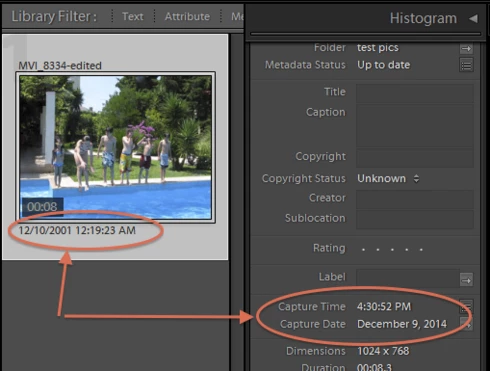
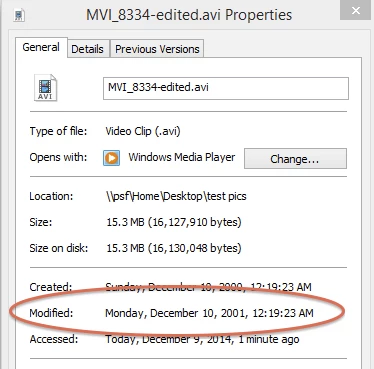
LR 5.7 still shows inconsistent capture date/times for videos. For a test .avi on Windows 8.1, the date in grid view appears to be the file system's last-modified time, while Capture Date/Time is set to the time of import.This problem was declared fixed in LR 5.5, and it appears to have been fixed for images, but not videos:http://feedback.photoshop.com/photoshop_family/topics/inconsistent_dates_for_files_missing_date_time...I'm opening a new topic, since the previous one has been marked "Solved".
This topic has been closed for replies.

165 replies

Participating Frequently
January 16, 2022

Some photos do not display in the correct order when selecting sort by Capture Time.

In the Grid, View > View Options, I display the Capture Date/Time, and I can clearly see the faulty sort.

Here is a screenshot, where we can see that IMG_7753.JPG is not sorted in the correct order although it displays the correct time in the grid:

In the EXIF panel we can see that IMG_7753.JPG has no EXIF Date/Time, but Lightroom still figures the correct Date/Time to display in the grid.  

However, for some reason, Lightroom fails to use the displayed Date/Time for the sorting process.

To be clear, the proper order would be:

- IMG_7751.JPG

- IMG_7753.JPG

- IMG_7757.JPG

Those 3 JPG files can be found in attachment to reproduce the bug.

Thanks,

johnrellis
Legend
January 17, 2022
johnrellis
Legend
February 26, 2021

Another workaround: Select all the affected photos, do Metadata > Edit Capture Time, and click Adjust All. That will set the internal field used for sorting to the capture dates displayed in the Metadata Panel's Capture Date and IPTC Date Created  fields.  (And as you probably know, it won't set the photos to all have the same date.)

alanterra
Inspiring
February 20, 2021

This is a minor bug, which I thought I should document. I am still using Lightroom Classic 9.4, but I suspect that this bug is in the current version. If someone wants to confirm, that would be great.

Bug: if your database is set to Automatically Write Changes into XMP, and you use the metadata panel to set the IPTC DateCreated field, then Lightroom will write the new value to the file, but won't update its internal value in the database until you do a "Read Metadata" command.

Background: There are a large number of metadata fields that describe when an image was made, was scanned, was edited, etc. (see this post), and Lightroom does not give the user the means to set most of them. But one field you can change is IPTC DateCreated. In the absence of other information, Lightroom will use this date for sorting an image by Capture Time.

However, if you put an image into your database that has no other date metadata fields, and set this field using the metadata panel, the image will continue to sort with the default value (the files' creation date) until you Read Metadata.

Example: download a file with no date fields, for example the image found here. The command "exiftool -alldates" shows that there is no date-oriented metadata in the file. Import the file into Lightroom and it will sort as if it was taken today (since Lightroom uses the file creation date if there is no other information). Use the IPTC Image Description::Date Created field to give the photo a date (for instance 1925:07:01T12:00) and note that the image still sorts as if it was taken today. Now Read Metadata, and the file sorts correctly.

This should be easy to fix, if anyone at Adobe wants to do that.

[Edit: I linked to the wrong post originally.]

Known Participant
November 3, 2020

Thanks John for your help. 🙂

johnrellis
Legend
November 3, 2020

LR has long behaved inconsistently when a photo is missing EXIF:DateTimeOriginal, using different date/times under the thumbnails in grid view, in the Metadata panel, and for sorting:

https://feedback.photoshop.com/conversations/lightroom-classic/lightroom-still-inconsistent-capture-datetime-for-photos-and-videos/5f5f45764b561a3d424dfc91 

You can get LR to use a single consistent capture date for a photo by doing Metadata > Edit Capture Time and then clicking Change -- the capture date will be set to the date/time that appears in the Corrected Time field. 

Known Participant
November 3, 2020

All versions are the latest as of today 3rd november 2020. This is not linked to the camera. Original raw fils are fined. This is linked to my workflow. Sometimes the original Exif IPTC Core Creation dates are lost through my workflow. I don't consider there is an specific issue to be corrected. It just happens.

By luck, there is a creation date in the file that is ok with me. In the same time Lightroom display this date in its metadata tab. I just ask is-it possible to ask Lightroom to consider the Capture Date of the file (instead of the capture date coming from the IPTC Core) for ranking in gallery and can Lightroom switch those dates ? 

Known Participant
November 3, 2020

Camera?  OS? Bridge Version?  LR Version.  Does your camera manufacturer follow the recommendations of the standards committee for writing the capture time in the appropriate slot in the IPTC core?  It seems to me this is a camera issue rather than a LR issue.

Known Participant
November 3, 2020

Hello,

I have a number of images that do not have dates recorded in the capture date portion of the EXIF (IPTC Core). In Lightroom, by clicking sort by capture date, they appear at the beginning of all the others. If I look in the Metadata pane of Lightroom, I can see a capture date indicated that actually corresponds to the creation date visible in Bridge in the file property (but not IPTC Core, in which case the field is empty).

1. This date suits me well and I would like Lightroom to sort the images in gallery taking this date into account. Is-it possible to set up Lightroom to work this way?

2. If it is not possible, then I need to copy the creation date of the file to the IPTC Core creation date. I can do this in Bridge but it is not my workflow. Is it possible to do this fairly smoothly in Lightroom? 

Best regards,

Thibaud