


Participating Frequently
May 17, 2020

P Desktop: Brown and grey tiles in Library

  • May 17, 2020
  • 15 replies
  • 352 views

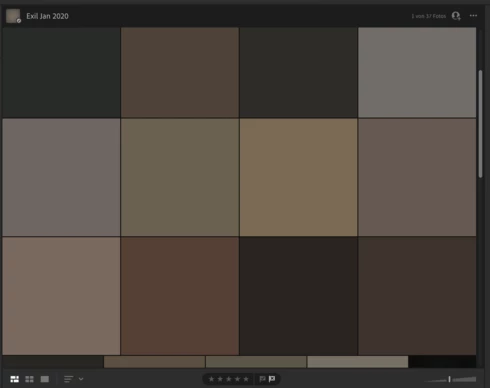
Hey everyone, some (not all) of my folders look like this. It is on all devices. (IPad, Windows 10 Laptop and Samsung Galaxy S8. This is even the case when I log on directly through lightroom.adobe.com.

However, when I edit a picture it appears normal again. Also when I export the picture is not broken. Any idea, how I can solve it. It appeared after I got a new IPad and reinstalled Lightroom. However, this could be a coincidence.

Screenshot of the problem below.


Thank you for your help and best,

Heiko
This topic has been closed for replies.

15 replies

Rikk Flohr_Photography
Community Manager
Community Manager
August 18, 2020
This should be fixed in the latest version. Install the .4 version and let us know if you still the problem. 
Rikk Flohr: Adobe Photography Org
Rikk Flohr_Photography
Community Manager
Community Manager
June 9, 2020
It shouldn't happen again. The problem has been identified and a fix is planned for a future release. 
Rikk Flohr: Adobe Photography Org
Tack TurnAuthor
Participating Frequently
June 9, 2020
Yes, it seems to work! Do you know what have happend? Can it happen it again or was it a general bug which has been fixed?
Thank you!
Rikk Flohr_Photography
Community Manager
Community Manager
June 9, 2020
Has the issue been fixed on your end Heiko?
Rikk Flohr: Adobe Photography Org
Rikk Flohr_Photography
Community Manager
Community Manager
June 8, 2020
Sent you an email to obtain the test file. 
Rikk Flohr: Adobe Photography Org
Tack TurnAuthor
Participating Frequently
June 6, 2020
Rikk, Yes of course. Do you mean a sample of such an image BEFORE I uploaded it to Lightroom? If so, where should I send it to?

Best,
Heiko
Rikk Flohr_Photography
Community Manager
Community Manager
June 4, 2020
Heiko,

The team is still working on your issue. It appears to be more involved than originally thought. They are looking for a sample original image or two of those images that show the problem. Would you be willing to supply them?
Rikk Flohr: Adobe Photography Org
Tack TurnAuthor
Participating Frequently
June 2, 2020
Still no feedback. How long does a respond takes usually from the cloud team?
Rikk Flohr_Photography
Community Manager
Community Manager
May 26, 2020
The Cloud team is looking at your account and will have to fix it on the server. I do not have an ETA at this point. 

Thank you for your patience. 
Rikk Flohr: Adobe Photography Org
Tack TurnAuthor
Participating Frequently
May 26, 2020
Hey Rikk, did you already hat a look?