


Inspiring
October 22, 2017

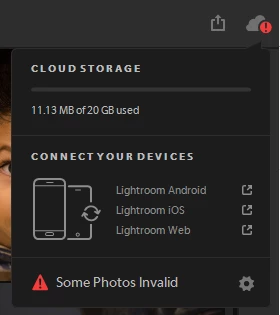
P: Error in cloud sync dialog "Some Photos Invalid"
  • October 22, 2017
  • 28 replies
  • 2893 views


I saw this annoying red "!" exclamation mark on my Lightroom CC, which states, "Some Photos Invalid"

There are two problems 

1) Which photos? 
2) Where are the verbs, I am no English expert but it should have been "Some photos are invalid" (mind case and verb)

This topic has been closed for replies.

28 replies

Rikk Flohr_Photography
Community Manager
Community Manager
December 19, 2024

You’ve posted to an ancient thread. It is highly unlikely that the issue described in this thread, though not impossible, is the same one you are currently experiencing. Rather than resurrect an old thread that is seemingly similar, you are better off posting to a new thread with fresh, complete information, including system information, a complete description of the problem, and step-by-step instructions for reproduction. 


If the issue is the same, we will merge you back into the appropriate location. 

This thread will be locked. 


Thank you!


Rikk Flohr: Adobe Photography Org
Participant
December 19, 2024

Won't deleting all of my photos also delete the edits I've made to them? I'm having this issue with 37,000+ images and it sounds like I'm basically being asked to delete years worth of work. 😞

fliplip1
Inspiring
August 11, 2020
What is a 'troublesome' file? LR seems to think perfect files are 'troublesome' Are you suggesting we delete all our images because this poorly programmed software cant handle them? If it cant handle images that meet the spec what use is it?
fliplip1
Inspiring
August 11, 2020
I cant believe after all these years Adobe hasnt bothered fixing this. Yes, its still there today, with the most up to date version, as im sure Adobe are well aware off and just ignore it.
That, along with Invisible windows menus caused by LR CC (also going on a few years) is why they are losing so many customers.
Rikk Flohr_Photography
Community Manager
Community Manager
June 4, 2020
Have you tried the steps mentioned above? 

Modifying the problem file in LrWeb or Clearing a troublesome item from the Deleted folders? 
Rikk Flohr: Adobe Photography Org
nathanaelm95169854
Participating Frequently
June 3, 2020
Has Adobe even addressed this problem? I've been using Lightroom (not classic –adobe, seriously, didn't you see search conflicts with naming here) and it's still persistent. Will someone official please post a solution for this? 
nathanaelm95169854
Participating Frequently
June 3, 2020
Nope. Still an issue 1 full year later. 
nathanaelm95169854
Participating Frequently
June 3, 2020
Holding the option key and clicking the cloud icon (top right, correct?) didn't show me anything different than normal. 
Participating Frequently
February 19, 2020
It took me a while, but I finally found the culprit files in my Deleted folder! Sheesh - I deleted them on purpose. Don't nag me about the files being invalid if they have been Deleted.
Inspiring
November 21, 2019
This issue has just appeared for me. The Option-cloud icon doesn't show anything different.