


Participating Frequently
October 23, 2018

P: Error T505 - Trying to download Smart Preview

  • October 23, 2018
  • 14 replies
  • 323 views

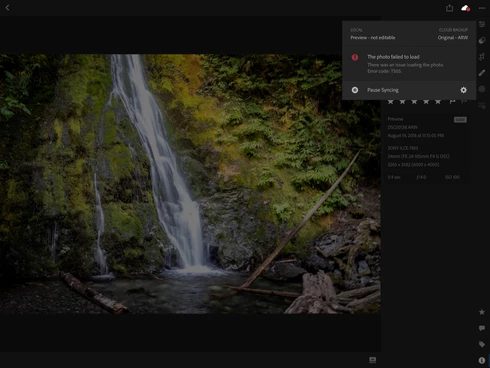
In August I imported a few hundred Raw images to LR CC mobile using my iPad Pro. They are synced to LR CC through Adobe Creative Cloud to my desktop on my Mac. I have applied edits to both the mobile and desktop versions. Currently I have no problem continuing to edit these images on my desktop LR CC, BUT when I try to go into LR CC mobile and do some edits I get Error T505 - Photo Failed to Load.
This topic has been closed for replies.

14 replies

Participating Frequently
November 22, 2018
I am currently running 4.0.2 on IOS and the problem appears to be fixed.

Thank you!
Community Manager
November 22, 2018
Have you updated to the latest version, i.e. 4.0.2?
Inspiring
November 14, 2018
Having the same problem with error code T505 on my IPad Pro. Unable to download most of my pics in full resolution from the cloud! On windows 10 app no problem so far.
Inspiring
November 13, 2018
Me too
Inspiring
November 1, 2018
I am having the same issues on LR mobile. error T505. all i can do is view the photo, cannot export, download, edit with some photos
Inspiring
November 1, 2018


Me sale en algunas fotografias error t505 y necesito las fotografías soy premium y me gustaria que me ayudaran a solucionar el problema gracjas
Participating Frequently
October 24, 2018
While I am not glad other people are experiencing the same issue as me, I hope by our shared issue, Adobe will move quickly with a patch.
Participating Frequently
October 23, 2018
Thanks for your help. I hope my input will be helpful in resolving the problem.
Rikk Flohr_Photography
Community Manager
Community Manager
October 23, 2018
Thanks for trying the workaround, Douglas. We have a fix for this coming in an update but I don't have an ETA on this yet. 
Rikk Flohr: Adobe Photography Org
Participating Frequently
October 23, 2018
Rikk, here are the steps I took:

iPad Pro
1. I used a small Album with 14 Raw images and in the Album drop down menu I turned on the Store Locally button.
2. It downloaded the images and when it finished it showed a little blue check mark next to the album name.

Desktop
1. Went to the album, took the 1st image and made a change

iPad Pro
1. I went back to the "All Photos" and the album and the image showed with the changes I had just made in Desktop.

However
It still gives me the same T505 Error Message and will not let me edit the image.

Some Additional Information
iPad Pro - LR CC is running Version 4.0.0 E6059D
iPhone X - LR CC is running Version 3.4.0 F59BE2

Here's the thing: I am NOT having any of these problems, whatsoever, on my iPhone. Also, I am running IOS 12 on both devices.

Thanks for your help............Doug Comfort