


Participating Frequently
March 7, 2024

P: (iOS) Error: T20200124 - Forced Edit Reset on an image

  • March 7, 2024
  • 31 replies
  • 7513 views

I keep getting the error pictured below on files imported onto my iOS version of lightroom.


iOS version: 17.3.1 (current)

lightroom mobile version: 9.2 (current)


I've replicated the issue multiple times and been fighting it for about a month now

1. Import ARW files from camera via SD card into the lightning cable 

2. Lightroom automatically converts them from ARW to DNG. 

3. Edit photo 1, edit photo 2, edit photo 3 

4. Press back to gallery & compare white/black points & colours across multiple photos 

5. Tap back into any of the above photos to make adjustments and voila - Error T20200124
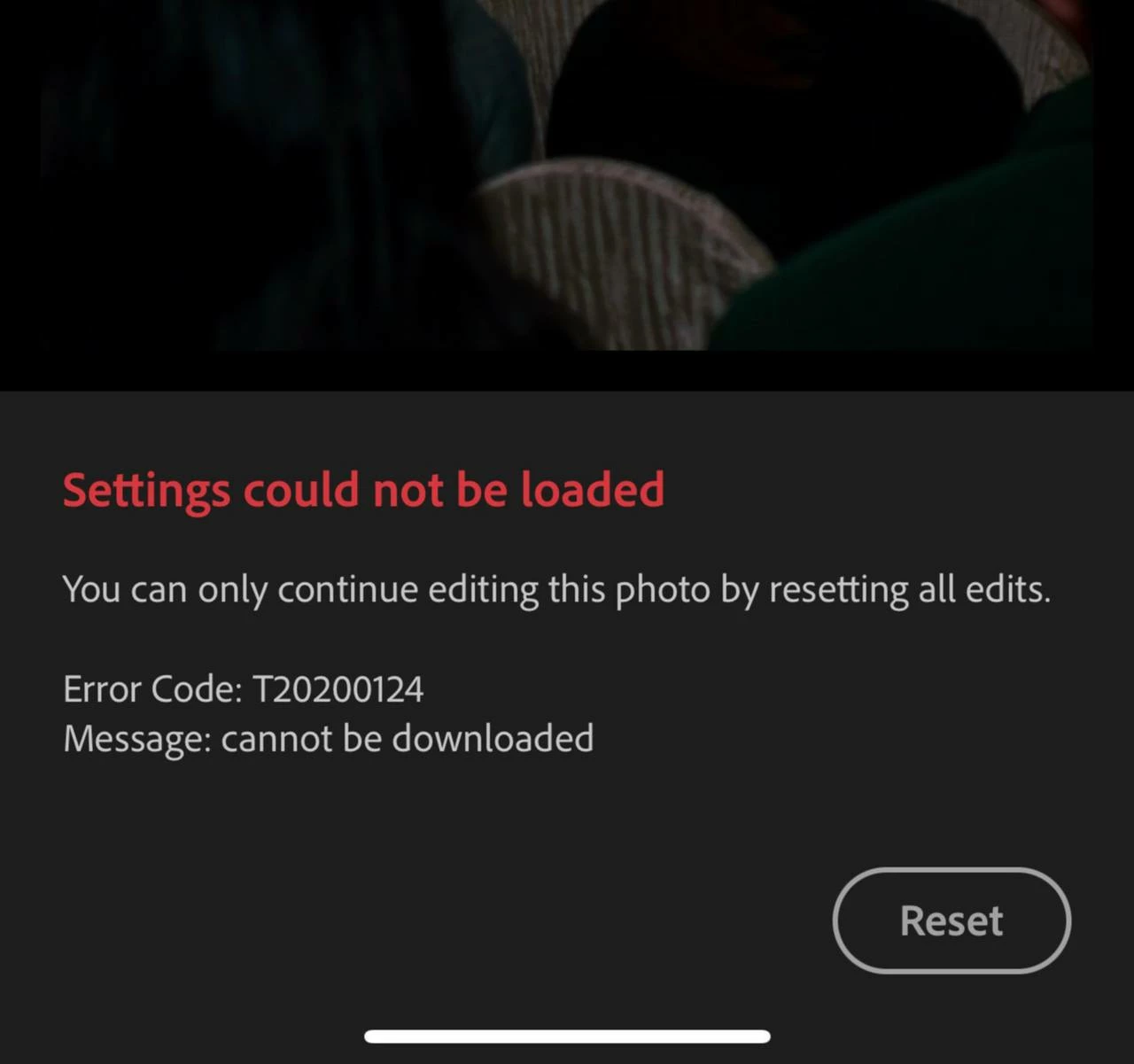


Error: T20200124

Message: Cannot be downloaded 


"You can only continue editing this photo buy resetting all edits" 

Reset button proceeds to fail - I can see it animating as though I've tapped it, but nothing happens. Photo does not reset. 


It seems to be occuring because I've edited the photo BEFORE it's original file ~20MB (approx) has uploaded to the cloud. When I tap back into the photo lightroom is trying to pull an incomplete or nonexistent original from the cloud with edits and then craps itself? Why would it do that if the file is not fully uploaded AND is stored locally? 


I've tried clearing my lightroom on-device cache to no avail 


The only workaround I've found is to 

1. Delete affected photos from "my photos" 

2. Go to deleted items & restore the affected photos 

3. When I go back to edit them, I still get the same error, but at least now the reset button works 

4. WAIT FOR AN INCREDIBLY LONG TIME for the photos to upload - sometimes this gets jammed and I have to delete, permanently delete, and then re-import 

5. Go to versions and restore my previous edit 

6. Export finally 


Is it me or did lightroom uploads slow down considerably?

I'm constantly on 5G or enterprise level WIFI and sync speed was not an issue until about 6 weeks ago? 


More notes: 

When I go to lightroom's web interface there's a section of photos that pop up under "Sync issues" that includes the files that haven't uploaded fully (with no smart previews which makes them even harder to identify). Usually they get stuck uploading and then nothing really works. Edits get jammed with this error etc, it's a vicious bloody cycle & making me want to terminate my subscription. 


It's so frustrating! And there's no documentation on what this error code is? 

This topic has been closed for replies.

31 replies

Rikk Flohr_Photography
Community Manager
Community Manager
May 21, 2024

Greetings all,


Adobe Lightroom Mobile product updates have been released. The May 2024 updates contain a fix for this issue. 

Updates will be available via the Apple App Store, Google Play Store, and the Galaxy App Store. Note that it can take several days for some customers to receive a notification of an available update via their App Store.


Thank you for being so patient.

Rikk Flohr: Adobe Photography Org
ben_ki_gva
Participant
May 15, 2024

Hi,


As my internet connection couldn't upload all the pictures (almost 1000 and bad connection..), I've started to edit pictures and then, this error T20200124 appeard to my workflow this morning.


I will try to upload all the pictures to the Cloud before modifying pictures again to see if this error appear again. It need to be confirmed, but I'm pretty sure that error comme from that.


I need that Adobe fix it, it's very annoyingwwhen you need to edit your pictures directly after the shooting and you've not internet connection.


Participating Frequently
May 13, 2024

A later version might work - depends on the point at which the bug struck. Worth a try, but I have only gone to "original". 

Participant
May 17, 2024
I have the latest version for iPad. It appears to be reasonably random but think it occurs with cropping. Reset is easy to do but finding those images that are affected is a pain - have to open every image to check before uploading to Photos or a file on the pc.
Mike
Sent from my iPad
jennifers1602225
Known Participant
May 13, 2024

You have lost the edit though or retained? So much lost time... 

Participating Frequently
May 13, 2024

This works for me - Ipad. 1. Tap Reset. Ignore lack of tesponse. 2. Tap "i" (info). 3. Now you can tap versions 4. Tap original and "Apply".  Image is now wditable. 

Participant
April 29, 2024

I have the same issue. Pressing reset button then the edit button shows the Open button bottom right of the image - open image clears the issue.  This is a huge pain when you when downloading a few hundred images form a shoot and you have to go to every image to find out which one needed resetting.

Participant
April 29, 2024

I am a new lightroom user as of March 2024 and have had this problem from the get go. Very devestating as I was using it for my first paid photoshoot and basically lost all all 18 hours of my editing. Please fix this as soon as possible it is a nightmare. I will be looking into other editing softwares- incredibly dissapointing. 

Participant
April 28, 2024

4/28/2024


also still having this issue and it is extremely frustrating when trying to deliver galleries to client in a timely manner and maintain a business. 

KenKenco
Participant
April 26, 2024

Happening here too. I edit on my iPad and it's made my workflow a nightmare. I spent hours the other night editing a batch of photos to find a huge number of them with the same error. I had to wipe my edits and start again. I'm still experiencing it now. Sometimes it happens if I edit a photo, leave it and come back and my edits won't sync and I get the error. But I've noticed going back to old photos I edited a while ago it produces the error too. I'm scared to edit or open older photos now for fear that I lose the sync edits on them. I'm frustrated because I'm paying for this software and I'm forced to use the cloud utility which is money wasted when I cannot work with it. It's disheartening to see that adobe can't even replicate the issue, yet there's an error code coded for sync issues. Surely there is logging for this. I won't be using the software now until it's fixed and if it persist any longer I'll be cancelling my subscription during that time

Participant
April 24, 2024

Same issue here, i have a number of photos that show error code T20200124, after I uploaded them via iphone. They don't synch with other devices after the error. 

The reset button next to the error was grayed out, after a while it's available and when i hit reset it's taking forever "uploading". Been like that for 10 mins and nothing happens.


-I tried deleting from All-photos in iphone lightroom, restoring from deleted files and the photo is now showing fine, no error (lost all edits thou). The photo is now synched across devices too. Workaround works


This is a pain when i see that the number of photos in an album in my ipad does not synch with those in my iphone, and have to go 1 by 1 in my iphone to find the ones in error and apply the workaround for each.