


Participating Frequently
March 7, 2024

P: (iOS) Error: T20200124 - Forced Edit Reset on an image

  • March 7, 2024
  • 31 replies
  • 7513 views

I keep getting the error pictured below on files imported onto my iOS version of lightroom.


iOS version: 17.3.1 (current)

lightroom mobile version: 9.2 (current)


I've replicated the issue multiple times and been fighting it for about a month now

1. Import ARW files from camera via SD card into the lightning cable 

2. Lightroom automatically converts them from ARW to DNG. 

3. Edit photo 1, edit photo 2, edit photo 3 

4. Press back to gallery & compare white/black points & colours across multiple photos 

5. Tap back into any of the above photos to make adjustments and voila - Error T20200124
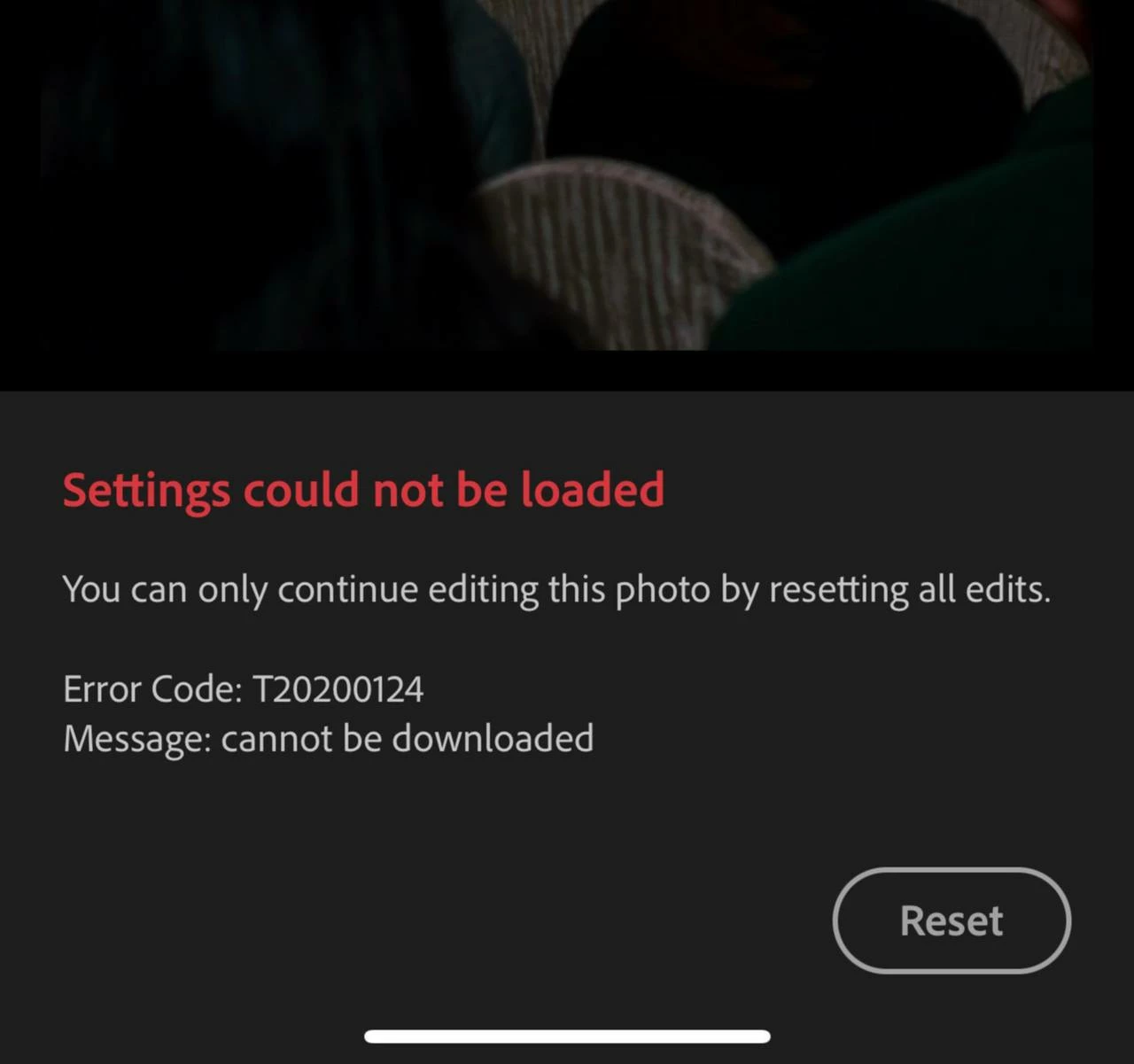


Error: T20200124

Message: Cannot be downloaded 


"You can only continue editing this photo buy resetting all edits" 

Reset button proceeds to fail - I can see it animating as though I've tapped it, but nothing happens. Photo does not reset. 


It seems to be occuring because I've edited the photo BEFORE it's original file ~20MB (approx) has uploaded to the cloud. When I tap back into the photo lightroom is trying to pull an incomplete or nonexistent original from the cloud with edits and then craps itself? Why would it do that if the file is not fully uploaded AND is stored locally? 


I've tried clearing my lightroom on-device cache to no avail 


The only workaround I've found is to 

1. Delete affected photos from "my photos" 

2. Go to deleted items & restore the affected photos 

3. When I go back to edit them, I still get the same error, but at least now the reset button works 

4. WAIT FOR AN INCREDIBLY LONG TIME for the photos to upload - sometimes this gets jammed and I have to delete, permanently delete, and then re-import 

5. Go to versions and restore my previous edit 

6. Export finally 


Is it me or did lightroom uploads slow down considerably?

I'm constantly on 5G or enterprise level WIFI and sync speed was not an issue until about 6 weeks ago? 


More notes: 

When I go to lightroom's web interface there's a section of photos that pop up under "Sync issues" that includes the files that haven't uploaded fully (with no smart previews which makes them even harder to identify). Usually they get stuck uploading and then nothing really works. Edits get jammed with this error etc, it's a vicious bloody cycle & making me want to terminate my subscription. 


It's so frustrating! And there's no documentation on what this error code is? 

This topic has been closed for replies.

31 replies

Community Manager
April 22, 2024

Hello @jennifers1602225 


The team is investigating this, but as much as it may surprise you our team is having trouble reproducing this in-house for debugging.  I sent you a direct message on Apr 19 asking for specific info.  I also requested a diagnostic log.

It seems the theme is that this error happens when images are edited before they are uploaded, and we're still working along those lines.  Was that your experience as well?


What info would help from you and other users on this thread:


  • Can you describe your workflow in detailed steps that caused this error? 
  • Can you confirm you made edits on photos before they uploaded?
  • What kinds of images are you trying to import? (camera make & model, image file size)
  • Are you importing from the camera roll, or attached SD card? 
  • Is the LR app online or offline during import? 
  • Do you recall any other significant details.  Any info may help


The private message I sent also includes steps to send us a diagnostic log -- it would help if you can do that.


Thanks for any info you can share

jennifers1602225
Known Participant
April 24, 2024
Hi
Thanks for your mail, I don’t seem to have received the prior one.

I’ve had so much trouble, and so much time wasted just trying to do my daily work, I’m a wedding photographer.

The issue with the T20200124 I’ve had about five to ten times but I seem to have minimised this now, the greater problem is general syncing. I’m very regularly getting a message saying ‘Waiting for settings to download form iPad and a date/time’ it doesn’t end up loading however long I wait, so the edits are lost. I can spend an hour on one bridal photo with really tricky cloning, then all lost, I’m losing the love for my work. I’m almost at the stage of switching to purely classic, which is such a shame as I like to edit on my iPad, it’s quicker and easier…. It seems to be the mobile version that has the problem.

So….. the images were uploaded to the cloud before edit, the whole gallery each time, I edited, saved as a jpeg, even checked on the web version to ensure saved, a day later I go back to the gallery on the iPad to review edits, the odd one won’t open….. waiting for settings.

I’ve since gone back to older edits, two years ago and the same is happening, random photos …. Won’t open, waiting settings.

I use Nikon Z6, I load from am XQD card via a card reader, the images are raw either wedding or landscape, or macro photos, there doesn’t seem to be a pattern in what won’t load…

I don’t know how to do your diagnostic log, not sure I’ve time as I’m having such a hard time trying to work right now….

I hope this may help
Jen


Sent from my iPad
jennifers1602225
Known Participant
April 22, 2024

I've had exactly this issue for two months now. I used my iPad to edit on the go for over two years with not a single syncing issue, now it's almost impossible to use this cloud version. I'm getting 'waiting for settings' all the time, I then loose all the extensive edits I've done. I try to edit locally and half the photos won't even allow me to open and edit, just nothing. 

I've reported this multiple times now, Adobe what is being done??????? 

MEZPHOTOGRAPHIE
Participating Frequently
April 21, 2024

I got the exact same issue on my Ipad, while travelling - thankfully not on a job - and 5 days later I still cannot fix it. I hope this will be fixed very soon, as I very often have to shoot edit and send pics live on an event. This is very hard to explain to a client you cannot deliver when they are paying extra for live delivery...

donaldp46075901
Participant
April 18, 2024

This isn't a help, really! I store hundreds of thousands of pictures in LR, I'm really thinking about canceling my subscription because of this error. It's a shame for adobe as we all spend a lot of money in an unsure product that may destroy our work. Please, fix that!

guibarthel
Participant
April 17, 2024

I'm getting the very same error here, both on my iPad an iPhone.

Participant
April 20, 2024

I absolutely loved Lightroom mobile when they didn't have the cloud and syncing capabilities, now I hate it and consistently having syncing issues.


I always clear my cache in app, and I have enough storage on my device, however, I'm not always in places where my network is terribly strong. There have been countless times, genuinely not exaggerating, where I've been editing and have checked that little cloud in the upper right corner has a check mark, and then I will come back to the photo a couple minutes later and all my edits will be lost.  Sometimes that means losing an hour plus of editing. This happens so frequently that I am tirelessly looking for alternatives - I truly despise this app. What makes it even worse is that, most of the time, it will flash the picture with the edits that I want to use or continue editing on, and then say, "Waiting for settings" due to some issue with it not being downloaded. I have attached a video of said problem (which happened 3 times today!!!! Resulting in me waiting hours for it to download and with no luck so I had to spend more time re-editing the photos.

I have no need for Lightroom sync and it hinders my workflow consistently. I desperately want to continue using Lightroom without destroying my phone in frustration or simply hopping to another app. The only peace I have found is when I pause syncing and edit in airplane mode. Unfortunately, that's still causes me problems as not all the photos have been properly downloaded and it also makes the app very slow, but my edits never delete thankfully. Is there any way to completely shut off cloud, sync, and any Internet capabilities so that I can use the app off-line.


I only want to use the app off-line. Let me repeat that. I only want to use the app off-line because it is horrible otherwise.


I've seen all the different answers in various forums and none of them work for me. None of them are consistent solutions. Any developers that see this you can try to convince me, however, you will find to be more effective if you simply let me know how to use the app, completely off-line - devoid of any syncing - so that my workflow is no longer interrupted and my feelings remain positive. I use Lightroom on my computer, completely off-line as well. I have no need for any syncing abilities. Thank you.

Participant
April 16, 2024

For me it helps to paste development settings from another photo in the grid-view. Unfortunately, I am loosing my already applied settings. 


But better than to download, delete and reupload...

Participant
April 15, 2024

I got the same error. Also masking stop working. It's just loading and that's it. Adobe's service now now is awful. I don't know why I'm still paying for for this. 

Participant
April 15, 2024

When can we expect this bug to be fixed?

I'm also experiencing this and it's very frustrating.

Participant
April 15, 2024

Thanks for confirming thsi is a knonw bug. I am also experiencng this issue and would be interested to see a plan of resolution.

Also woudl be good to understand if you are working on "prevebnting a recurrence" or also "fixing the existing issues".

Essentially do i have to redo my edits or will you fix the corruption issue?

Participant
April 8, 2024

Thanks for confirming! Hopefully the issue can be resolved!