


Participant
October 14, 2024

P: Lens Vignetting error and Lens Correction Check Box

  • October 14, 2024
  • 26 replies
  • 4160 views

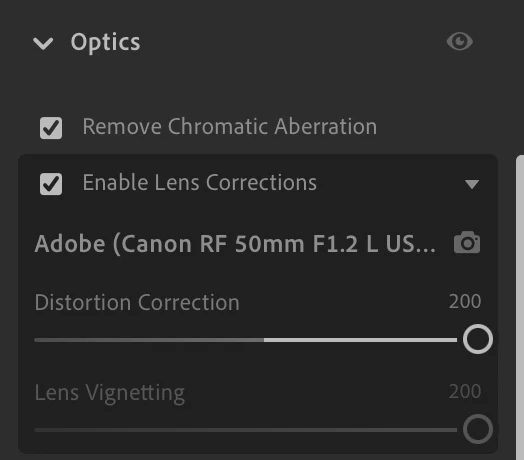
I updated to the latest version of the cloud based lightroom last night and noticed the lens vignetting is gone on the lens corrections tab. So it leaves a vignette on my images and I'm unable to fix it. Anyone know if there's a way to get that back? 
26 replies

Participant
November 27, 2024

Thanks, appreciate the update!

Community Manager
November 27, 2024

A fix has been identified and will be rolled out in an upcoming Lightroom update. Thank you for your patience!

Participant
November 27, 2024

Plus one! This bug drives me nuts, I prefer to compare lens correction vs not. Not possible in Mac version of app. 

Participant
November 27, 2024

Any updates on this? It's been broken for almost 2 months

Participant
November 9, 2024

Issue: 

  • Lightroom Version Number: 8.0 20241003-1027-def78b5 Build
  • OS Version Number: Windows 11 23H2


Steps to reproduce:

1. Open a photo in Edit mode with lens correction applied (either by clicking it manually or via import)

2. Try to uncheck "Enable Lens Corrections" box

Expected result: Lens correction no longer applied, "Enable Lens Corrections" box is unchecked
Actual result: Nothing changes, box still checked

Participant
November 4, 2024

I'm getting the same bug in lightroom on imac. In order to uncheck lens profile, I've found a workaround by doing it in mobile app (iOS), and then forcing the sync from mobile. Then it is unchecked in desktop app. However, checking it again results in the same problem, unable to remove afterwards. This is in latest version 8.0.


Thanks,

Josh

yamato713108855
Community Expert
Community Expert
October 25, 2024

"Enable Lens Corrections" cannot be disabled.
There is a problem with corrections using the lens profile.

Participant
October 23, 2024

Lightoom V.8 Build 20241003-1027-def78b5 will not allow Lens Correction checkbox to be un-checked.

If Lens Correction is off, it stays off, but once selected, cannot be unchecked.

kglad
Community Expert
Community Expert
October 23, 2024

in the future, to find the best place to post your message, use the list here, https://community.adobe.com/

p.s. i don't think the adobe website, and forums in particular, are easy to navigate, so don't spend a lot of time searching that forum list. do your best and we'll move the post (like this one has already been moved) if it helps you get responses.


<"moved from using the community">
itsmeblake
Participant
October 23, 2024

I am having this same problem.  Huge problem!  This lens correction is useful for some pictures and very undesirable for other pictures.  Now, I can only adjust the distortion correction.  I am unable to change the lens vignetting and uncheck the box.  I will need to reinstall older versions of the app. The 7.5.

JMHedrick
Participant
October 22, 2024

I'm experiencing the same issue. I'm on an M1 Max macbook pro. Using sony a7.  I can apply a preset that has the lens corrections saved to 'off', but when I turn lens corrections on, I cannot turn it back off without reselecting the preset. When I import straight from the card, I cannot toggle lens corrections.