


Participant
October 14, 2024

P: Lens Vignetting error and Lens Correction Check Box

  • October 14, 2024
  • 26 replies
  • 4160 views

I updated to the latest version of the cloud based lightroom last night and noticed the lens vignetting is gone on the lens corrections tab. So it leaves a vignette on my images and I'm unable to fix it. Anyone know if there's a way to get that back? 
26 replies

Participant
October 19, 2024

Whenever I enable lens correction on the newest update (v 8.0), I cannot change the lens vignette values. I can, however, paste the values from photos I've edited before the update. After pasting though, I cannot change the value from the pasted value.


This only started occuring after updating to this version. I've tried restarting the program and restarting my computer but to no avail. This is an important part of my workflow, since I shoot on very wide lenses and like to correct the edges of the frame. I sometimes do not like the values that appear in the default correction, and being able to fix this is essential for me.


My OS is Sonoma 14.3 on Mac M3.

Participant
October 17, 2024

I'm unable to toggle Lens Corrections in the Optics section on or off.  This happens specifically on Windows 11 with Canon CR3 files.  It was working fine before updating to LR 8.0.  


Rikk Flohr_Photography
Community Manager
Community Manager
October 17, 2024

Linking to internal bug report - updating status

Rikk Flohr: Adobe Photography Org
Participant
October 16, 2024

Same...I can see a drastic difference while editing especially on my 35mm lens with the warping.

Participant
October 16, 2024

Same exact issue here.  Hoping someone replies with a fix or Adobe fixes it soon!

Participant
October 14, 2024

Lightroom version: 8.0 x64 [ 20241003-1027-def78b5 ] (Oct 3 2024)

Operating system: macOS
OS Version: macOS 13.6.9 (22G830)


1. Select raw imported photo in Lightroom in Edit Detail mode (Canon R8 with Canon RF 16mm F2.8 STM lens)

2. Under Edit in Optics section, uncheck Enable Lens Corrections


Result:  Checkbox cannot be unchecked to remove lens corrections

Expected Result:  Checkbox may be unchecked to remove lens corrections

Rikk Flohr_Photography
Community Manager
Community Manager
October 14, 2024

I am not able to reproduce this. The box can be unchecked and checked. 

Please expand the Optics panel, take a screenshot of the current state and post it here in the thread. 


Thanks!

Rikk Flohr: Adobe Photography Org
Participant
October 17, 2024

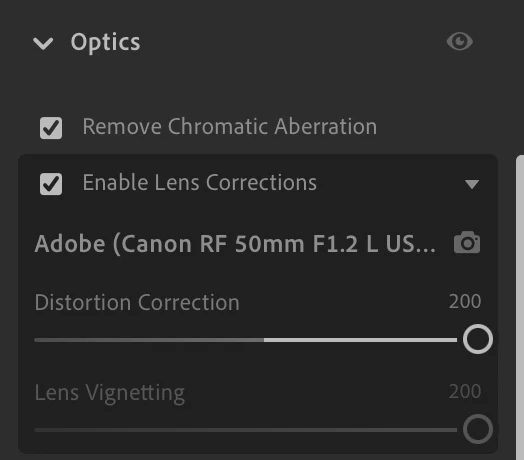
Thanks for quickly responding, Rikk!  I was hoping it might have been a fluke but I'm still unable to uncheck the "Enable Lens Corrections" checkbox.  These are photos I'd imported and worked with prior to the most recent Creative Cloud Lightroom Upgrade in case that's part of the problem I'm experiencing.  Below, please see a screenshot of the checkbox constantly checked.  "Remove Chromatic Aberration" checkbox above can be unchecked.