
Participant
October 14, 2024

P: Lens Vignetting error and Lens Correction Check Box

  • October 14, 2024
  • 26 replies
  • 4160 views

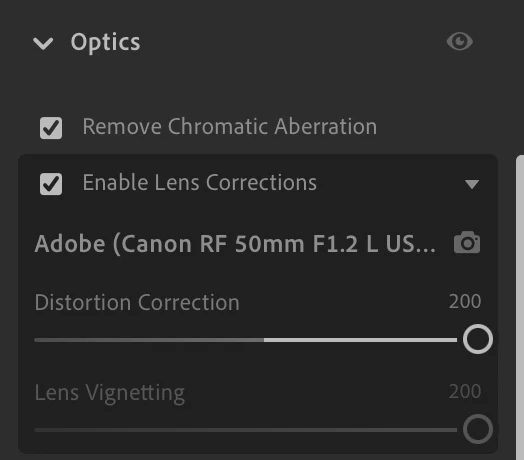
I updated to the latest version of the cloud based lightroom last night and noticed the lens vignetting is gone on the lens corrections tab. So it leaves a vignette on my images and I'm unable to fix it. Anyone know if there's a way to get that back? 
26 replies

kuantou
Known Participant
October 10, 2025

no, still having the same issue in lightroom classic, everything updated in mac oct 25. Some photos are normal, some photos vignette is greyd out. even photos from the same day, one next to the other.

yamato713108855
Community Expert
Community Expert
March 26, 2025

The problem on the Lightroom side has been fixed, so this may be a problem with the lens profile.
Please create a new thread and post a detailed description of your camera, lens name, and the symptoms you're experiencing.

Fujifilm's relatively new lenses include lens profiles in RAW files, so they cannot be manipulated in Lightroom.

Participant
March 26, 2025

For my Old Fuji files I have sometimes vignetting available, but distorion correction is disabled, or both disabled and unable to correct them. For Ricoh GR3 files they are both working.
For Lumix (L-Mount) lenses vignetting is disabled.
It is really annoying because the vignette control in effect tab is very blunt.

Lightroom version: 8.2 MAS x64 [ 20250201-0700-1b12095 ] (Jan 31 2025)
NGL Version: 1.39.0.9
WF Version: 7.2 963a5a9
VF Version: 1.0.154
HIL Version: 40501
CAI Version: adobe_c2pa/0.9.3 c2pa-rs/0.31.0
PH Version: 5.0

Participant
February 11, 2025

Hi @Rikk Flohr: Photography just want to highlight that as far as I can tell from my experiences, this Lens Vignetting adjustment error occurs with all Leica lens profiles and not just the Summilux 35mm.

Rikk Flohr_Photography
Community Manager
Community Manager
February 11, 2025

Got the file - thanks! @slgcjt 

Rikk Flohr: Adobe Photography Org
Participant
February 11, 2025
Rikk Flohr_Photography
Community Manager
Community Manager
February 11, 2025

@slgcjt  We are no longer able to reproduce this issue internally. Can you provide us with a DNG copy or an Original plus Settings version of your file so that we can verify the failure?

Rikk Flohr: Adobe Photography Org
Participant
February 2, 2025

Hi @Rikk Flohr: Photography 


I've updated to the latest version (8.1) and I still encounter this error.


Rikk Flohr_Photography
Community Manager
Community Manager
December 12, 2024

Greetings all, 


A new update for Adobe Photography Products has been released.  The December update contains an update for this issue. 

If you do not see the update in your Creative Cloud Application, you can refresh it by hitting [Ctrl/Cmd]+[Alt/Opt]+[ R ].

Note: It may take up to 24 hours for your update to be available in your Creative Cloud app.


Thank you for being so patient.

Rikk Flohr: Adobe Photography Org
Participant
December 9, 2024

When is the Update going to be? I'm waiting for this since two months...