Participant
August 7, 2026

P: LrM 11.5 (Android) Snapping behavior in cropping adjustments after 11.5 update

  • August 7, 2026
  • 11 replies
  • 189 views

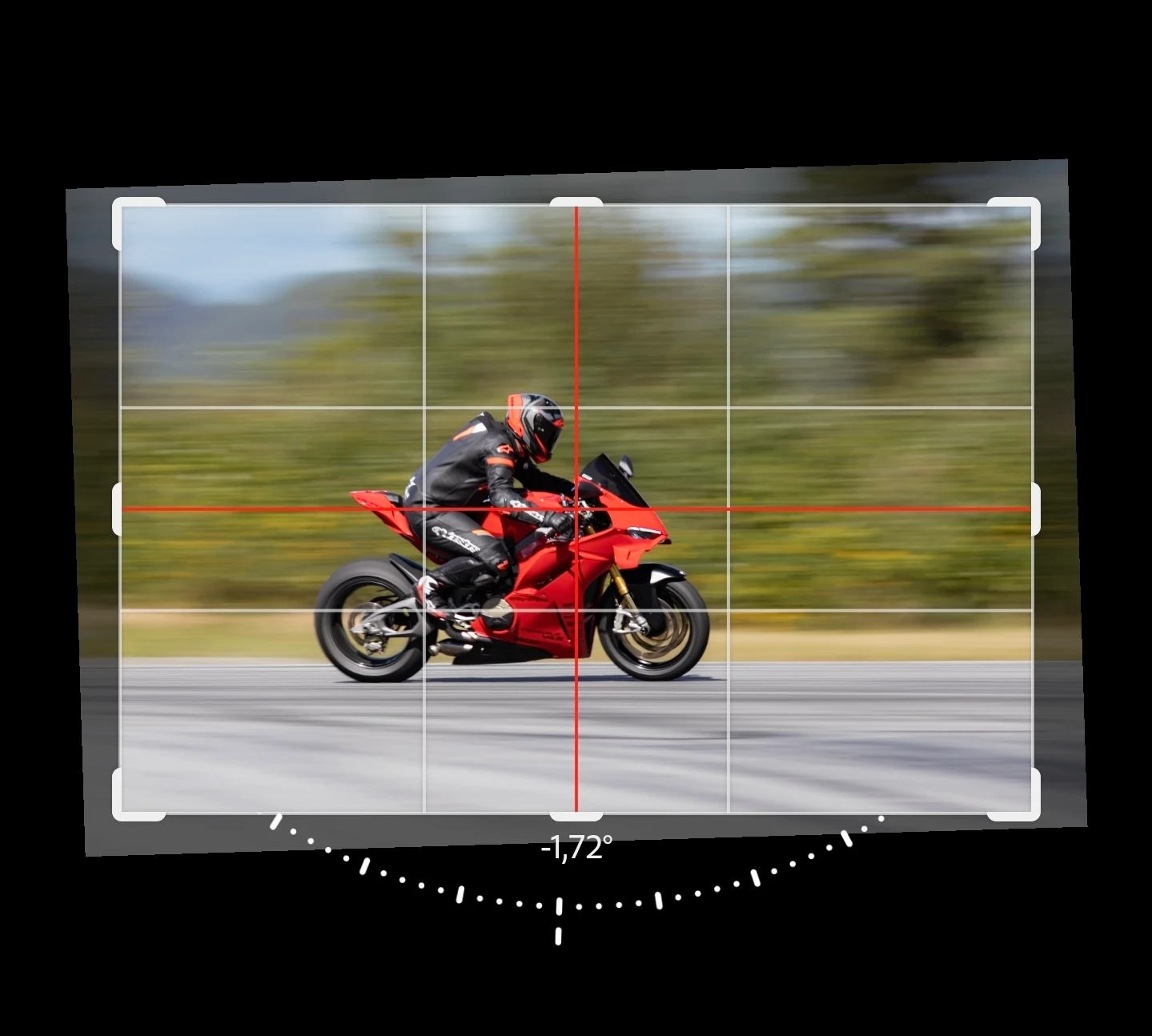
After the Lightroom 11.5 update on Android 16 (Samsung S24 Ultra, OneUI 8.5), we can not any longer make minor adjustments when cropping and moving an image, as it jumps back and forth due to the guidelines "guiding" the photo. Before the guidelines were introduced yesterday, everything worked flawlessly. We really need to be able to make minor adjustments without these restrictions, just like we used to!

Thank you. 

    Pinned Reply By Sameer K

    Hey All! Welcome to the Lightroom Community. Thanks for bringing this up and adding the video.


    This workflow change is introduced alongside the Generative Expand capabilities. Currently, it cannot be reverted in-app. I notice the Vertical snapping is restrictive.

    Your feedback is important, and it is heard. I'll pass this to the product team for review.


    Thanks!
    Sameer K
    (Type '@' and type my name to mention me when you reply)

    11 replies

    Participant
    August 10, 2026

    This guidelines so bothering me when cropping the image. It suddenly make adjustments to center which i don't want. Then when it goes to center, it can't to move. Please fix it immediately 

    stevent41936934
    Participant
    August 8, 2026

    Its terrible. It almost makes the app unusable as i can't fine tune my crops. Not happy at all.

    Participant
    August 8, 2026

    It also happens with me! I hope it could be fixed ASAP

    Inspiring
    August 8, 2026

    Lr Mobile on a Samsung S26 Ultra. Had to uninstall & re-install b/c for some reason the app had reverted the Export function to a previous workflow (i.e., pre-mass export image selection).

    Problem started only today. 

    When I apply a crop to a photo in landscape orientation, e.g.,3x2, I'm unable to move the crop bounding box up or down. As soon as I touch the screen, a red crosshair appears & the bounding box locks with the image centred. I can change the size of the box but can't reposition it up or down. The issue is not present with images in portrait orientation. I can rotate a landscape image, adjust the crop box then rotate it back. That's an inconvenient workaround, however.

    Useful thoughts appreciated.

    Thank you 

    Participant
    August 8, 2026

    I noticed this the first time I opened the app with this update. The initial framing's precise midpoint has little bearing on the final framing's precise midpoint, and so any amount of snapping is entirely unhelpful to me. Adobe, this should be fixed ASAP.

    Sameer K
    Community Manager
    Community Manager
    August 7, 2026

    Hey All! Welcome to the Lightroom Community. Thanks for bringing this up and adding the video.


    This workflow change is introduced alongside the Generative Expand capabilities. Currently, it cannot be reverted in-app. I notice the Vertical snapping is restrictive.

    Your feedback is important, and it is heard. I'll pass this to the product team for review.


    Thanks!
    Sameer K
    (Type '@' and type my name to mention me when you reply)

    Participant
    August 7, 2026

    Yes!! This is sooo annoying! It takes twice as much time to fine adjust photos now, as we now need to use "Geometry" and then go back to adjust the size, and so on.. Please fix it asap 🤞 

    Participant
    August 7, 2026
    Participant
    August 7, 2026

    Me sucede exactamente lo mismo, ya reporte el problema, espero tenga pronta solución 

    Participant
    August 6, 2026

    Issue Description:

    Since the latest Android app update, I am encountering a issue with the Crop tool.


    When I select a fixed aspect ratio (e.g., 3:4) to crop an image, the crop box locks completely. Instead of being able to drag or reposition the image within the frame as before, a red cross/X icon appears and blocks all movement.


    Steps taken that did NOT resolve the issue:


    • Resetting the crop and geometry settings.

    • Switching to "Free" crop and back to 3:4.

    • Clearing the app cache and restarting the device.

    This severely impacts the photo editing workflow as repositioning the subject within a fixed ratio is a core function.


    Device Info:

    • OS: Android

    • App: Adobe Lightroom Mobile (latest version)