


Participating Frequently
June 22, 2020

P: Magenta Cast on Export (Mac only)

  • June 22, 2020
  • 47 replies
  • 1264 views

I just did, but the exported photos are wrong again in version 3.3.
Uninstalled and installed a few times now.
For reference I run MacOS Catalina 10.15.5 on a 2017 5K 27 inch iMac with 3.4 GHz Intel I5 and a Radeon Pro 570 graphics card. I tried disabling GPU acceleration, but nothing works.If there is anything I can test let me know, going back to 3.2.1 again now.

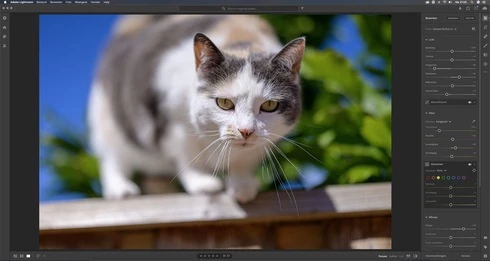
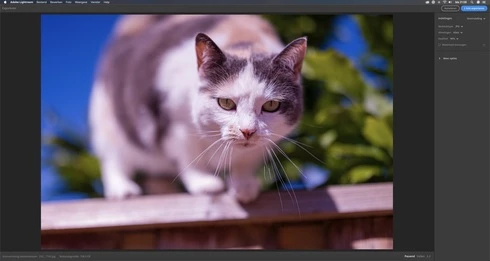
Let me share 2 screen grabs, 1 of the development window, and another one of the export preview window. Without making any edits. (Camera Nikon Z 6)

Maybe my info helps.


This topic has been closed for replies.

47 replies

Inspiring
August 18, 2020
Rikk i have the same problem with Todd both for my z6 and m9 which i haven't encountered in the older LR only in LR3.3 on mcbook. works perfectly fine during editing but problem occurs when exported. i hope you and your team can fix this problem soon. tnx
Inspiring
August 18, 2020
i have the same problem as well for my z6 and m9 it turns magenta and contrasty on bw when exported i hope rikk and his team
can do something about this problem ASAP
Inspiring
August 17, 2020
I experience the same trouble as Sam Fink, except my thumbnails turn more magenta. 
My exports turn weirdly contrasty and a bit over saturated, both in lightroom and photoshop. 
I'm shooting on a sony A7 III and editing on a asus zenbook pro duo with windows 10.
It didn't help changing WB to "as shot", or turning of "use graphic processor", and I'm seeing the same problem when exporting AND saving via Photoshop. It also happens even if I have done no edits at all.
Participant
August 15, 2020
Thanks for sharing this, Rikk. Unfortunately this did not work for me. My exports aren't turning as overly magenta, however they become more contrasty and still slightly magenta cast. 

Also, other strange thing happening in the most up to date version is that when I adjust the WB even remotely, the thumbnail is cast green. It doesn't affect the way it exports, but it is annoying when looking through my edits for clients and seeing the whole batch cast green. 

I look forward to hearing perhaps a work around for these issues. 

Thanks a bunch.
Inspiring
August 4, 2020
Thanks Rikk!  This works for me too.  I also had to create the CameraRaw folder.
Participating Frequently
August 4, 2020
Thanks Rikk for this work around for now.

I tested it and it works.
FYI I needed to create the CameraRaw folder.
Rikk Flohr_Photography
Community Manager
Community Manager
August 4, 2020
Until this a fix for this issue is released, here are some workarounds you can use to get things working correctly again:

You can install Photoshop or Bridge
or
You can install the Adobe DNG Converter (Free)
or
You can follow this procedure.
  1. Locate the profiles inside Lightroom.
    1. In Applications, go into Adobe Lightroom CC folder
    2. Right-click Adobe Lightroom.app and choose Show Package Contents
    3. Open Contents, then Resources folder
    4. Copy the folder called CameraProfiles
  2. Paste into /Library/Application Support/Adobe/CameraRaw. (If the folder doesn’t exist, create it first.)
  3. Go back to the Lightroom app and do the same for the LensProfiles folder. 
  4. You should now see:
    1. /Library/Application Support/Adobe/CameraRaw/CameraProfiles and 
    2. /Library/Application Support/Adobe/CameraRaw/LensProfiles
  5. Relaunch Lightroom and try exporting again.
Note that the Library folder mentioned in step 2 is not the /Users/yourusername/Library/... . You need to be in just plain /Library/ in the drive's root...   Access this from Finder by going to Go and holding down the [Option] key to reveal Library which is hidden by default. 

Let us know if this gets things working for you.
Rikk Flohr: Adobe Photography Org
99jon
Legend
August 3, 2020

I was also intrigued. Thanks for testing. This problem does appear to be related to the Mac Book pro and not Windows.
maxf45361467
Participating Frequently
August 2, 2020
I was intrigued by your suggestion, so I just checked. My Macbook is still running 3.3...and the magenta cast is there, even if white balance is set to "as shot" 😞 
99jon
Legend
August 2, 2020

One person on the U2U forum mentioned that exports are OK if white balance is set to “As Shot”

Has anyone investigated if the color cast appears on images with a custom WB compared with As Shot? I haven’t been able to test myself but wonder if there is a clue here?