


Participating Frequently
June 22, 2020

P: Magenta Cast on Export (Mac only)

  • June 22, 2020
  • 47 replies
  • 1264 views

I just did, but the exported photos are wrong again in version 3.3.
Uninstalled and installed a few times now.
For reference I run MacOS Catalina 10.15.5 on a 2017 5K 27 inch iMac with 3.4 GHz Intel I5 and a Radeon Pro 570 graphics card. I tried disabling GPU acceleration, but nothing works.If there is anything I can test let me know, going back to 3.2.1 again now.

Let me share 2 screen grabs, 1 of the development window, and another one of the export preview window. Without making any edits. (Camera Nikon Z 6)

Maybe my info helps.
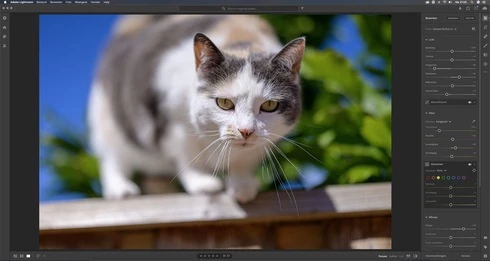
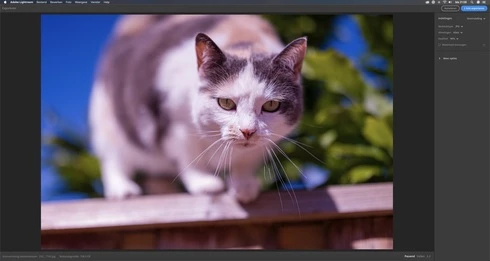


This topic has been closed for replies.

47 replies

maxf45361467
Participating Frequently
July 31, 2020
Thanks Rikk, I will try that version as well! 
Rikk Flohr_Photography
Community Manager
Community Manager
July 31, 2020
Just a quick recommendation - don't revert to 3.0 but rather revert to 3.2.1. It  should correct the problem and give you the benefit of many bug fixes and some features.   The team is still working on this issue for an upcoming release. 
Rikk Flohr: Adobe Photography Org
Participant
July 31, 2020
Thank you, Max! I am downloading version 3.0 now to see if that will work. Thanks!
Inspiring
July 31, 2020

Stream2watch is a popular open-source platform for streaming various live channels; especially channels that are sports-oriented. This website is an all-in-one destination for television entertainment and that too online. On this platform, you can stream live sports like Baseball, Hockey, Football, Tennis, Basketball, Cricket, NBA, etc.

maxf45361467
Participating Frequently
July 31, 2020
Hi Sam, you can do what I did and revert back to an older version. In my case, version 3.0 solved the problem for now. You can do this with Creative Cloud. Cheers, Max 
Participant
July 30, 2020
I am running into this exact same issue. Exporting from RAW images from my Nikon z6, Mac Catalina 10.15.6, and on the latest version of LR cc version 3.3 in export preview and after exporting, the images have a magenta cast.

Hoping there is a number to call or a solution to this issue soon. This is adding so much more time to my workflow for clients and is incredibly frustrating.
Participating Frequently
July 28, 2020
Haven't used that feature so far, but sounds like Adobe is clueless.
Participating Frequently
July 28, 2020
I would have expected a fix for this problem by now, otherwise at least some acknowledgement from Adobe that they found the cause of the problem.

Inspiring
July 25, 2020
How do you install an older version of Lightroom? I installed from Mac App Store and version 3.3 was the only option. 
Participating Frequently
July 23, 2020
I have not tried the watermarking feature. Would using it possibly resolve the issue?