


Participating Frequently
June 22, 2020

P: Magenta Cast on Export (Mac only)

  • June 22, 2020
  • 47 replies
  • 1264 views

I just did, but the exported photos are wrong again in version 3.3.
Uninstalled and installed a few times now.
For reference I run MacOS Catalina 10.15.5 on a 2017 5K 27 inch iMac with 3.4 GHz Intel I5 and a Radeon Pro 570 graphics card. I tried disabling GPU acceleration, but nothing works.If there is anything I can test let me know, going back to 3.2.1 again now.

Let me share 2 screen grabs, 1 of the development window, and another one of the export preview window. Without making any edits. (Camera Nikon Z 6)

Maybe my info helps.
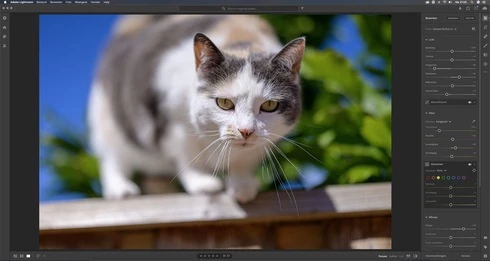
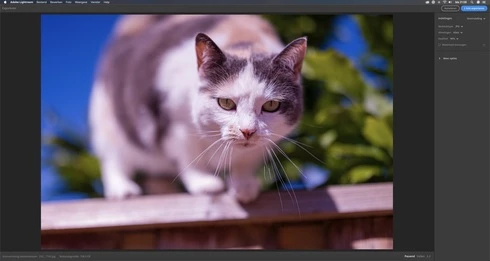


This topic has been closed for replies.

47 replies

Julie k
Community Manager
Community Manager
July 23, 2020
For those of you seeing this issue, did you happen to ever try the new watermarking feature? I'm wondering whether we broke something with that addition.
Participating Frequently
July 15, 2020
I have the same issue which I've documented here: https://community.adobe.com/t5/lightroom/pink-hue-rendered-upon-export/m-p/11285419?page=1#M29426

It's not a monitor issue. I ran an experiment where I exported the image and it came out with a pink color cast. Then I imported that exported image back into Lightroom and saw that there was still a color cast. 

I did not do any edits to counter any pink color cast therefore I was not biased by my monitor to correct in that way. If this were really a monitor issue, I would only see the pink color cast on my MacBook Pro. But instead, I see it on all my devices (iPhone, iPad, Samsung TV via airplay). 

I'm using Lightroom (cloud based) v3.3 on a MacBook Pro 16" (2.3 GHz 8-Core Intel Core i9, AMD Radeon Pro 5600M with 8GB graphics, 32 GB 2667 MHz DDR4, running latest version of Catalina 10.15.5). Upon exporting photos, several (seems random) images are rendered with a pink/magenta hue.

After seeing some of you mention that you've went back to an older version of Lr. I will be trying that as a TEMPORARY fix until a Lr is able to fix this issue. I'll report back and see if going to an older version of Lr helps for me. 
maxf45361467
Participating Frequently
July 13, 2020
I was able to revert back to version 3.0. Now it works fine again on my iMac but of course, I`d like to use the newest version. 
Inspiring
July 12, 2020
Same issue with a Nikon Z7, LR3.3 (from App Store)
Looks fine in editor but very purple when exporting
maxf45361467
Participating Frequently
July 10, 2020
Just a quick report that I experience exactly the same problem with my Nikon Z6 and the recent update. And yes, I am a Mac user as well. 
Rikk Flohr_Photography
Community Manager
Community Manager
July 1, 2020
@5935398  - what is your OS version number?
Rikk Flohr: Adobe Photography Org
Todd Shaner
Legend
June 29, 2020
Below is what it looks like on my system. From inside LR Desktop app go to Help> About Lightroom and tell us what version is showing. The latest version is 3.3. Please insert a screenshot of what you're seeing in the Creative Cloud app. Thank you.


Inspiring
June 29, 2020
For some reason, that option to select "Other Versions" is not available to me.
Todd Shaner
Legend
June 29, 2020
Open the Creative Cloud app, click on the three dots . . .  next to Open for the Lightroom app, select Other Versions, and then select 3.2.1.
Inspiring
June 29, 2020
I would like to make it known that this problem spans far beyond just Nikon Z6 users.  This is happening to me with my EOS R and I've seen other similar stories from Fujifilm users.

And it all points back to the most recent update.

Just when I get my image dialed in.  Upon previewing for export, the image turns an ugly red.  Oversaturated skin tones.  And a major stop in my workflow.

I've been using Lightroom reliably for about 6 months now.  Ever since I found out you could download directly from the App Store.  And I've never once had this issue.

Is there anyway Mac users can rollback to the previous version of Lightroom?  I actually enjoyed the simplicity (and the exporting) a lot better.