


Participating Frequently
June 22, 2020

P: Magenta Cast on Export (Mac only)

  • June 22, 2020
  • 47 replies
  • 1264 views

I just did, but the exported photos are wrong again in version 3.3.
Uninstalled and installed a few times now.
For reference I run MacOS Catalina 10.15.5 on a 2017 5K 27 inch iMac with 3.4 GHz Intel I5 and a Radeon Pro 570 graphics card. I tried disabling GPU acceleration, but nothing works.If there is anything I can test let me know, going back to 3.2.1 again now.

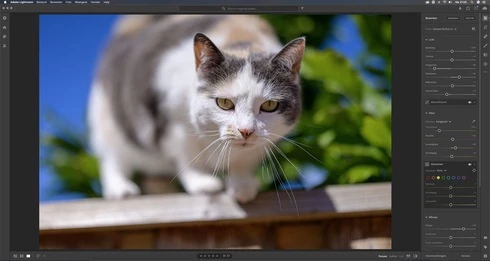
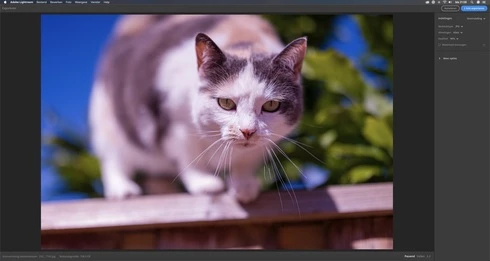
Let me share 2 screen grabs, 1 of the development window, and another one of the export preview window. Without making any edits. (Camera Nikon Z 6)

Maybe my info helps.


This topic has been closed for replies.

47 replies

Inspiring
June 28, 2020
Thank you!  I'm having this issue too.  It's basically a show stopper for exporting images.  Please keep us posted.
Todd Shaner
Legend
June 28, 2020
Rikk, the same LR 3.3 issue has also been reported at the below LR forum link. Nikon Z6 export files have a red tint. It appears to be only happen on Mac systems and I can't duplicate the issue on my Windows 10 system.

https://community.adobe.com/t5/lightroom/horrible-red-tint-when-exporting-from-raw/m-p/11235774?page...

Rikk Flohr_Photography
Community Manager
Community Manager
June 23, 2020
We've opened a bug report in our system to investigate this further. Thank you for the information. 
Rikk Flohr: Adobe Photography Org
Participating Frequently
June 23, 2020
Participating Frequently
June 22, 2020
Camera Portet V2, but also visible when using Adobe profiles.
Rikk Flohr_Photography
Community Manager
Community Manager
June 22, 2020
Which profile is applied to this image?
Rikk Flohr: Adobe Photography Org
Rikk Flohr_Photography
Community Manager
Community Manager
June 22, 2020
This is a different issue that the original poster was reporting. 

OP- "Since updating, I have noticed that when I apply lens corrections to newly added photos, the effects of those corrections are not visible when viewing the photos in grid view or in exported jpgs of the photos. "

You are seeing a Magenta Cast with no edits applied. This should be a separate thread. 

Was: https://feedback.photoshop.com/photoshop_family/topics/lens-corrections-not-visible-in-thumbnails-af...  
Rikk Flohr: Adobe Photography Org