



P: Migrations fails at Albums
My migration has been a disaster. After cleaning up my hard drive it finally started. At some point it seems that my external drive with my photos (not the catalog) got disconnected. The migration stopped and then after reconnecting it said that the original data source or something like that had changed even I did not do anything. I told it to continue with the original status (not sure about the exact wording anymore) and it said something like importing from manifest. Anyhow after that it kept migrating for quite a while so everything seemed normal.
Than after a few hours it crashed again with this ridiculous error message don't telling me anything. Clicking on support just brought me to a page with possible errors which did not cover my issue.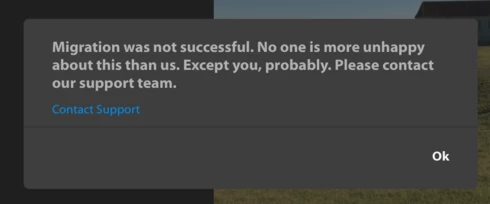
After clicking ok in the end it just exited and that was it. Somehow it kept syncing images, at least it told me so when clicking on the cloud icon top right.
I went to File > Migrate Catalog again and clicked continue. It started running again this time pretty quickly:
- mark catalog migrated
- adding photos and videos
- adding faces
- adding albums
There at albums at about 81% progress it crashed again with the same message above. I can do this over and over again and always the same result.
When I go into the album section in Lightroom CC it actually has a long list of folders but a) it is quite messy and b) it says 0 photos behind each name. However all albums have a little gray circle with a checkmark in front of them. The albums which I had previously synced with smart collections all have a little blue spinning wheel instead of the checkmark but it shows the correct number of images behind them (not 0)
Also what I noticed, not sure if related to this is about 300 something photos with no meta data and no capture date (which was not the case in Lightroom Classic)
For info I have about 65k images and videos in my catalog, mostly Raw. Currently it says that about 580GB out of 1TB cloud space are used and it says a a little more than 58k photos syncing right now.
Update: Now the photos show up also in the iOS and web app under 'all photos'. So the images seem to sync just the albums are also not syncingOne more thing: If I open the Lightroom app on my iPhone, iPad or Apple TV app (all up to date) or in the web client it only shows the albums I had previously synced via smart collections nothing else from the migrated catalog.
So where does this leave me? Is the migration failed? How can I make it finish?
Thanks
Btw: I think that 'you can only migrate once' is absolutely ridiculous and a huge joke! There has to be a full reset / start over from scratch option that cleans out everything an lets me start over fresh.
 AdChoices