


Known Participant
October 21, 2017

P: Mobile (Android): Raw photos are being imported as black and white

  • October 21, 2017
  • 29 replies
  • 1712 views

Hi. When I import RAW (*.RAF) photos into Lightroom CC (Android) directly from my Fujifilm X-T20 into Samsung Galaxy Tab Android tablet, they appera black and white. If I do the exact same on Samsung Galaxy S7 phone (Android), they are imported correctly (colour).

I made a screenshot. First picture (chronologically last one - smiling girlfriend) is imported using Phone. It is in colour everywhere. Two other pictures (chronologically first, cat on balcony and less smiling girlfriend) are imported using tablet, being incorrectly black and white.
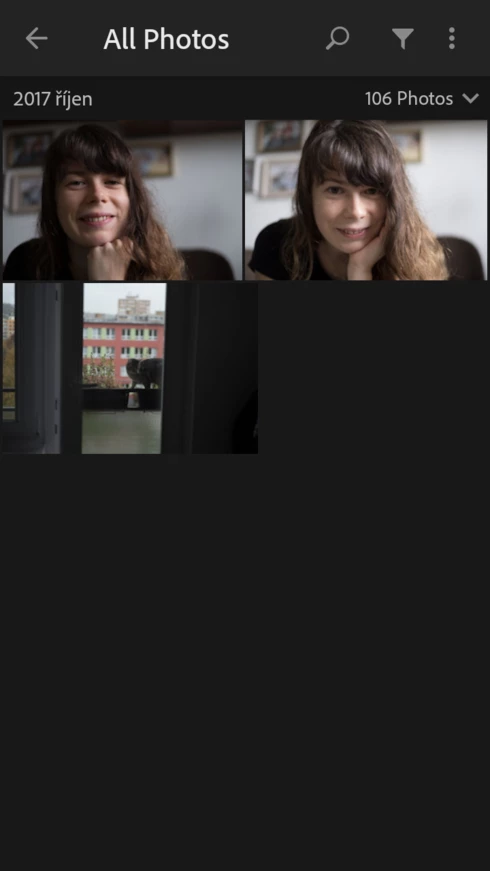
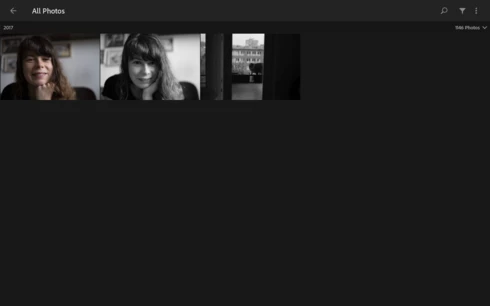


More funny things:

1) When imported on tablet, they appear B/W only on tablet, after they sync also to the phone, they appear in colour

2) When I edit this badly imported photo in tablet, they will stay B/W forever, even on other devices

3) When I import pictures using phone, they appear in colour on Phone and also on tablet.

4) More sofisticated scenario - when I import pictures using Tablet (they appear B/W) and the open it in phone (in colour) and I make basic edits on tha phone like crope, exposure and so on... these changes sync between phone and tablet in a way that the picture is edited BUT still B/W on a tablet! 

This is so weird behaviour.

This topic has been closed for replies.

29 replies

Joshua_Haftel
Adobe Employee
Adobe Employee
December 3, 2017
@luis, are you seeing this problem on iOS? We had resolved a similar issue quite a while ago and as far as I know, there's no open issue on iOS.
Joshua_Haftel
Adobe Employee
Adobe Employee
December 3, 2017
Yes, that does seem to be related to the problem--a bug in which the incorrect profile was selected automatically. We had identified and resolved a similar issue previously for iOS.

And, yes, there are plans to provide access to the camera profiles in all versions of Lightroom CC.
avelicu
Participant
December 3, 2017
Thanks for the update, Josh.
Is this related to camera profiles? It feels as if the black&white camera profile is being mistakenly applied but with no UI to change it. Are there any plans for supporting camera profiles in an upcoming version of Lightroom CC? We really love the Fuji camera profiles available in Lightroom Classic and it's such a shame we can't use them in CC.
lfhbento
Participant
December 3, 2017
That's great! Is the fix confirmed for iOS too?
fliplip1
Inspiring
December 2, 2017
Ive started a thread about this happening with Lightroom CC on my Windows 10 PC. No issues importing to my iphone/iPad or LR Classic but if LR. CC is at the start of the chain its all black and white once imported. I can change back to colour, but. Something is obviously not right here.
Joshua_Haftel
Adobe Employee
Adobe Employee
December 2, 2017
Thanks everyone for your patience, we've been able to confirm a fix that will make it into an upcoming release. We hope to have this out in a few weeks.
lfhbento
Participant
December 2, 2017
I'm having the same issue, but on iOS and with a Fuji X100F. When importing directly to the app, some RAF files open fine, but most open as black and white and I can't bring them back to color. The only way to make it work was to import them on the desktop app and sync to the cloud. Then it opens fine in the app.
Joshua_Haftel
Adobe Employee
Adobe Employee
November 27, 2017
Sorry, we're still looking into this issue. Let me ping the eng team 🙂
Known Participant
November 13, 2017
It is kind of random in m case. Today I imported several photos and they were in full colours. But the other day, again, all Black and White, I do not write it here over and over again, but it is happening a LOT.
avelicu
Participant
November 11, 2017
I contacted support via chat and they said they will escalate this as a bug, but they haven't gotten back to me yet. Maybe someone could contact Adobe Support over the phone and post some updates here?