


Participating Frequently
July 13, 2020

P: on macOS JPG export color issues

  • July 13, 2020
  • 40 replies
  • 1822 views

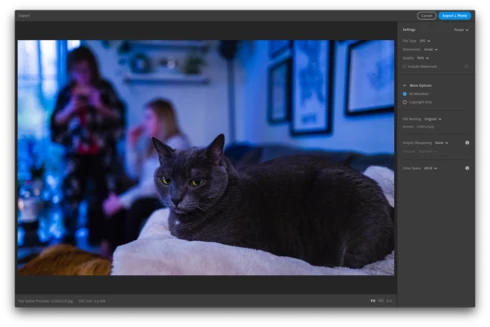
When exporting from Lightroom CC on macOS, the exported JPG takes on remarkably different colors (it looks like a lower/bluer color temperature, but I'm not precisely sure). The difference appears within the Lightroom CC export preview prior to exporting, as well as with the exported image when opened in other applications. Different images have different levels of impact, but I've seen visible differences in most of my images. The issue appears regardless of what Color Space is selected for the exported JPG.

I do not have issues when exporting the same image with Lightroom CC on iPad. I've tested by exporting the same image with the identical settings on iPad and the image is reproduced faithfully.

I'm running Lightroom CC Version 3.3 from the Mac App Store (20200611-1039-7df19f1 Build) on macOS 10.15.5 on a MacBook Pro (Retina, Mid 2012).

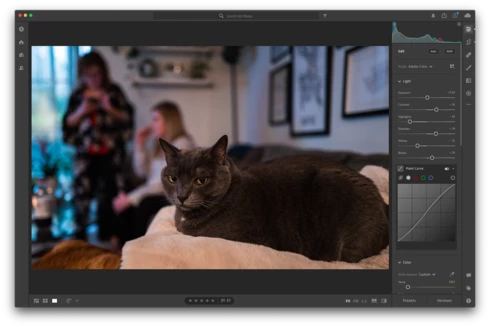
Screenshot editing the image (colors as desired):

Screenshot of export preview, displaying color issues (occurs regardless of Color Space selection):
Exported image from macOS, with color issues:
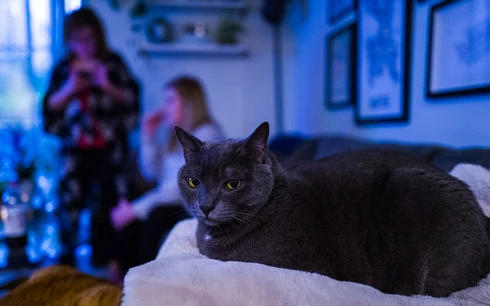

Exported image from Lightroom CC on iPad, identical settings selection, but no color issues:


For reference, I posted some details, including these screenshots of the issue and exported images, in the Lightroom community thread Trouble exporting image with my edits thread. Another user reported similar issues in a Pink hue rendered upon export thread.

This topic has been closed for replies.

40 replies

Inspiring
July 17, 2020
I have similar problems here
https://feedback.photoshop.com/photos...

And here https://feedback.photoshop.com/photos...

What I think is happening is that there is a raw profile associated with your raw image, and that profile is used when editing in Lightroom, but upon export a different version of the same raw profile that is built into the current version of Lightroom is being used.
Participating Frequently
July 17, 2020
Thank you Julie.

I selected a different Profile (changing from Adobe Color to Adobe Standard) which applied the expected effect while editing, but continued to shift when exporting.

My understanding is that the Q2's Raw DNG files (as a native format) include a built-in profile that applies significant correction (the sensor is a bit wider than the displayed frame, and there's vignetting correction at the edges, etc). In Lightroom under Optics, I see "(i) Built-in Lens Profile Applied" which when clicking further describes "Leica Q2 Summilux 1:1.7/28 ASPH. This Raw file contains a built-in lens profile for correcting distortion and chromatic aberration. The profile has already been applied automatically to this image." (see attached screenshots).

Is it possible this isn't being applied in the same was as part of export? I'm not sure if I can select a different Camera/Lens profile separately, but would be happy to try if you have any settings I could change.

Thank you again.


Participating Frequently
July 17, 2020
Thanks Todd!

I uninstalled Lightroom (dragged application to trash, but also cleared my ~/Pictures/Lightroom Library.lrlibrary file) and re-installed from the Mac App Store, but unfortunately the issue persists.
Julie k
Community Manager
Community Manager
July 17, 2020
We have a bug here that we haven't quite gotten our hands around yet. I do think Todd is getting at the root of it, though. I'm curious if anyone is able to get around this by choosing a different profile. 
Todd Shaner
Legend
July 15, 2020
I downloaded the 'Exported image from macOS' with color issues posted in the OP's original report up top. Using ExifTool I see a MissingCameraProfile entry for Adobe Standard.


Here's what I see when I export his DNG file to JPEG with LR Desktop 3.3.


This may be the source of the issue, but I can't explain what's causing it. Perhaps try an uninstall of LR 3.3 and then reinstall.
Participating Frequently
July 15, 2020
Thank you Rikk! I'll be follow that issue. 
Rikk Flohr_Photography
Community Manager
Community Manager
July 15, 2020
Rikk Flohr: Adobe Photography Org
Participating Frequently
July 15, 2020
Thank you Todd. I tried as you suggested (set 'Use Graphics Processor' to Off then restart Lightroom), but unfortunately the exported image color issues persisted.
Todd Shaner
Legend
July 15, 2020
One other thing to try that hasn't been suggested is to turn off the GPU in LR Desktop. Go to Edit> Preferences> Performance and set 'Use Graphics Processor' to Off. Close and then reopen LR and try again.
Rikk Flohr_Photography
Community Manager
Community Manager
July 15, 2020
The Z6 is a known issue and likely unrelated to your issue. 

@7648008 - you should probably be following this issue: https://feedback.photoshop.com/photoshop_family/topics/lightroom-destkop-magenta-cast-on-export-nikon-z6
Rikk Flohr: Adobe Photography Org