


Participating Frequently
July 13, 2020

P: on macOS JPG export color issues

  • July 13, 2020
  • 40 replies
  • 1822 views

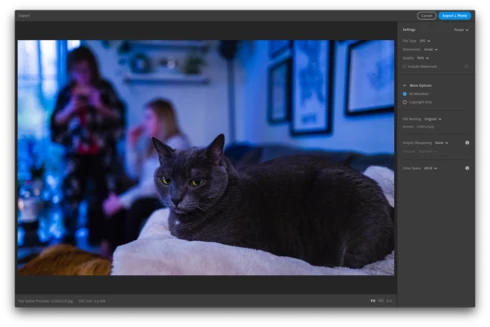
When exporting from Lightroom CC on macOS, the exported JPG takes on remarkably different colors (it looks like a lower/bluer color temperature, but I'm not precisely sure). The difference appears within the Lightroom CC export preview prior to exporting, as well as with the exported image when opened in other applications. Different images have different levels of impact, but I've seen visible differences in most of my images. The issue appears regardless of what Color Space is selected for the exported JPG.

I do not have issues when exporting the same image with Lightroom CC on iPad. I've tested by exporting the same image with the identical settings on iPad and the image is reproduced faithfully.

I'm running Lightroom CC Version 3.3 from the Mac App Store (20200611-1039-7df19f1 Build) on macOS 10.15.5 on a MacBook Pro (Retina, Mid 2012).

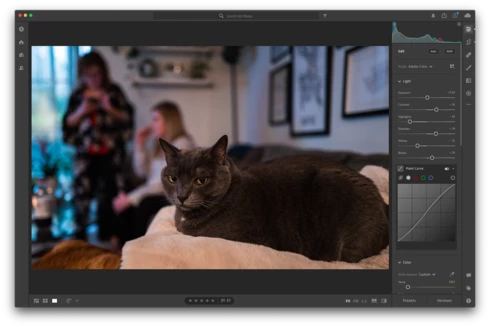
Screenshot editing the image (colors as desired):

Screenshot of export preview, displaying color issues (occurs regardless of Color Space selection):
Exported image from macOS, with color issues:


Exported image from Lightroom CC on iPad, identical settings selection, but no color issues:


For reference, I posted some details, including these screenshots of the issue and exported images, in the Lightroom community thread Trouble exporting image with my edits thread. Another user reported similar issues in a Pink hue rendered upon export thread.

This topic has been closed for replies.

40 replies

Participating Frequently
July 15, 2020
Hi Rikk, my files come from a Leica Q2 (which uses DNG as its native Raw format). It looks like Landon is using a Nikon Z6.
Participating Frequently
July 15, 2020
Hi Rikk, my files come from a Leica Q2 (which uses DNG as its native Raw format). It looks like Landon is using a Nikon Z6.
Rikk Flohr_Photography
Community Manager
Community Manager
July 15, 2020
What is the camera model used as the source to created these files?
Rikk Flohr: Adobe Photography Org
Participating Frequently
July 15, 2020
I have the same issue which I've documented here: https://community.adobe.com/t5/lightroom/pink-hue-rendered-upon-export/m-p/11285419?page=1#M29426

It's not a monitor issue. I ran an experiment where I exported the image and it came out with a pink color cast. Then I imported that exported image back into Lightroom and saw that there was still a color cast. 

I did not do any edits to counter any pink color cast therefore I was not biased by my monitor to correct in that way. If this were really a monitor issue, I would only see the pink color cast on my MacBook Pro. But instead, I see it on all my devices (iPhone, iPad, Samsung TV via airplay). 
Participating Frequently
July 15, 2020
I have the same issue which I've documented here: https://community.adobe.com/t5/lightroom/pink-hue-rendered-upon-export/m-p/11285419?page=1#M29426

It's not a monitor issue. I ran an experiment where I exported the image and it came out with a pink color cast. Then I imported that exported image back into Lightroom and saw that there was still a color cast. 

I did not do any edits to counter any pink color cast therefore I was not biased by my monitor to correct in that way. If this were really a monitor issue, I would only see the pink color cast on my MacBook Pro. But instead, I see it on all my devices (iPhone, iPad, Samsung TV via airplay). 
Community Expert
July 14, 2020
Monitor calibration can only impact the exported file if you wrongly edited the file in an attempt to correct for a faulty display profile. The display profile is not (or at least should not in any way) involved in the export rendering. The fact that the same image with the same exact settings as synced through the cloud, exports blue from your Mac and normal on your iPad indicates an issue on the Mac. I can't reproduce it with your image on my Mac but your exported file you shared above shows the issue very clearly. 
Participating Frequently
July 14, 2020
Thank you Rikk. I'm using a Dell U3415W with my Mac, as well as the MacBook's built-in display.

The image exports correctly with Lightroom CC on my iPad, and views correctly on any of my monitors. When I export from macOS, the image is shifted (as seen here), and that shift is present when I view the JPG on other monitors (including iPad, iPhone, etc).

Does monitor calibration impact the exported file, or just how it's displayed on that monitor? My understanding is that it should only be the display, and not the file itself. The images that I uploaded in the original post here are the direct exports from macOS and the iPad. It sounds like they appear differently on your displays as well. Unless Lightroom is applying calibration to the file itself, my monitor calibration shouldn't matter when you view them, right?

Thank you again for your help!

Rikk Flohr_Photography
Community Manager
Community Manager
July 14, 2020
I got it that time:

Export Window:


Exported Image: 

It is looking more and more like a monitor/profile issue to me.  Do you have a BenQ monitor by chance?
Rikk Flohr: Adobe Photography Org
Participating Frequently
July 14, 2020
Whoops, that didn't work right. Let's try Google Drive instead: https://drive.google.com/file/d/1HqgSJXih7ojVKVjGe0iyZJzblmQwf1Tv/view?usp=sharing
Rikk Flohr_Photography
Community Manager
Community Manager
July 14, 2020
Unable to download. I receive a 403 error
Rikk Flohr: Adobe Photography Org