


Participating Frequently
July 13, 2020

P: on macOS JPG export color issues

  • July 13, 2020
  • 40 replies
  • 1822 views

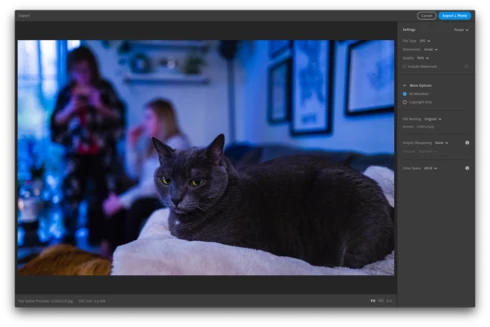
When exporting from Lightroom CC on macOS, the exported JPG takes on remarkably different colors (it looks like a lower/bluer color temperature, but I'm not precisely sure). The difference appears within the Lightroom CC export preview prior to exporting, as well as with the exported image when opened in other applications. Different images have different levels of impact, but I've seen visible differences in most of my images. The issue appears regardless of what Color Space is selected for the exported JPG.

I do not have issues when exporting the same image with Lightroom CC on iPad. I've tested by exporting the same image with the identical settings on iPad and the image is reproduced faithfully.

I'm running Lightroom CC Version 3.3 from the Mac App Store (20200611-1039-7df19f1 Build) on macOS 10.15.5 on a MacBook Pro (Retina, Mid 2012).

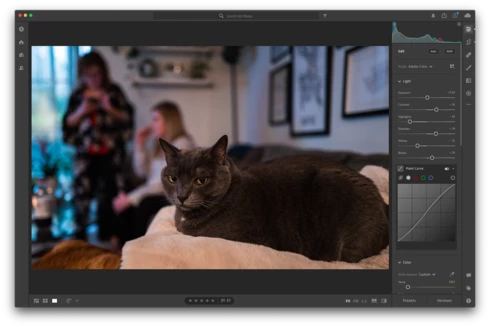
Screenshot editing the image (colors as desired):

Screenshot of export preview, displaying color issues (occurs regardless of Color Space selection):
Exported image from macOS, with color issues:
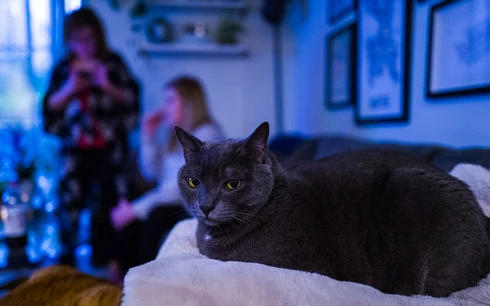

Exported image from Lightroom CC on iPad, identical settings selection, but no color issues:


For reference, I posted some details, including these screenshots of the issue and exported images, in the Lightroom community thread Trouble exporting image with my edits thread. Another user reported similar issues in a Pink hue rendered upon export thread.

This topic has been closed for replies.

40 replies

Participating Frequently
July 14, 2020
Thanks again Rikk. I've uploaded the sample image here: https://justinbonnar.com/lightroom/20200711-L1000119.DNG

The camera (Leica Q2) uses DNG as its native format, so exporting "Original + Settings" looks like it produced a copy of the DNG with my edits embedded.

Interestingly, when I imported that file, Lightroom on macOS would preview it (in the import window, Library, and areas like the film strip) with the color shifted view in some cases (viewing the Single Image or various Edit views all show the expected colors though still). It sounds like it might be a rendering issue, reflected in a cache for the smaller previews?

Anyway, thanks again for your help here, and hope this helps!
Rikk Flohr_Photography
Community Manager
Community Manager
July 14, 2020
A sample file would be great. If you can post a raw with the xmp settings for the edits.  I can get the settings for your export from the screenshot above.
Rikk Flohr: Adobe Photography Org
Community Expert
July 14, 2020
There is another person with a very similar problem on Mac OS X here: https://community.adobe.com/t5/lightroom/pink-hue-rendered-upon-export/m-p/11287596?page=1#M29465

I can't reproduce it on my Mac Book Pro with current OS X install using the same files but issue is clearly there.
Participating Frequently
July 14, 2020
Thank you Rikk. I reset the Lightroom preferences as you described (and then restarted the app following the rest). Unfortunately, the color shift persists as part of the export.

Please let me know if I can try anything else to troubleshoot or eliminate causes. I'd also be happy to upload the RAW + Settings of the example image here if that would help.
Rikk Flohr_Photography
Community Manager
Community Manager
July 14, 2020
Thank you for confirming. 

A preference reset might be a prudent next step:

1. Close Lightroom.
2. Hold down [Alt/Opt]+[Shift] while restarting Lightroom.
3. Overwrite the Preferences when prompted by the dialog.
4. Close Lightroom.
5. Restart Lightroom.
Rikk Flohr: Adobe Photography Org
Participating Frequently
July 14, 2020
Thanks Rikk. I tested with different color profiles (see screenshot below). While they shifted the colors displayed by my monitor further, the exported image continued to have the same issues, regardless of which monitor or calibration that I previewed with.

Rikk Flohr_Photography
Community Manager
Community Manager
July 14, 2020
Did you try the test Johan suggested?
Rikk Flohr: Adobe Photography Org
Participating Frequently
July 14, 2020
Thanks Johan, Landon.

As Landon mentioned, I don't believe that this is a display calibration issue. I've attached the actual exported JPGs from both macOS (the first one, color shifted) and on iPad (the second image, with correct colors). The images display consistently regardless of which display I use (laptop builtin display, laptop with external monitor, transferring to my iPad, or my phone), in that the color shifted one consistently displays shifted, while the color correct one consistently shows correct (i.e., I can open them both side-by-side on any monitor and see the same issue/difference). There's a difference in the exported image itself, that's not a property of the display.
Participating Frequently
July 14, 2020
This is not a monitor profile issue. See the latest post here where I exported the image and it was rendered with a pink color cast, then I imported the export back into Lr and the pink color cast was still there. You can even see it in the thumbnail. 

https://community.adobe.com/t5/lightroom/pink-hue-rendered-upon-export/m-p/11285419?page=1#M29426
JohanElzenga
Community Expert
Community Expert
July 14, 2020
You may have a problem with your monitor profile. Go to System Preferences - Displays - Color and select another profile, just to test. Take sRGB for example. See if that solves the problem. If it does, then create a new monitor profile.
-- Johan W. Elzenga