


Participant
July 20, 2023

P: Point curve settings are missing when creating a preset

  • July 20, 2023
  • 27 replies
  • 7770 views

I am trying to save a preset I have created, however when I apply the preset on an image the point curve setting is missing. I am not sure why this is happening as I've previously successfully saved presets without settings being missed.


My Lightroom CC is up to date (V6.4), I have restarted it too.


This is what the selection looks like when I press "Create Preset" as you can see the tone curves are ticked
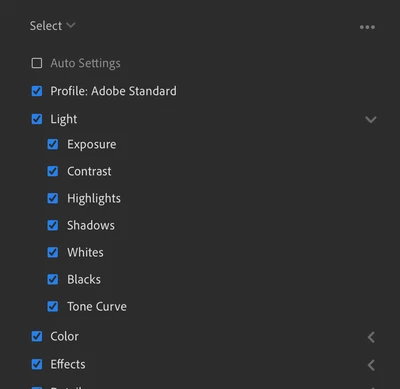
 

However, when I apply the preset, the point curve doesn't change.
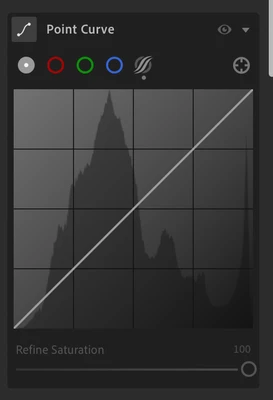
 

Please could someone give me some advice, thank you.

 
This topic has been closed for replies.

27 replies

Logan Dam
Participant
August 28, 2023

I just ran into the same issue. I don't have any Premium Preset masks, just plain old Light/Texture/Optics tweaks including point curve (and no parametric curve as suggested by others), and when I create a preset from an image and then try apply it to any image (including the one I just created the preset from) it applies everything except the point curve.


Older presets I created years ago have no problem applying point curves.


I reported it as a bug in Lightroom.

Participant
August 30, 2023

Great that you have reported it as bug, seems to be a legitimate one that started in version 6.4. I had to downgrade to 6.3.1 for me to not encounter this issue.

Rikk Flohr_Photography
Community Manager
Community Manager
August 15, 2023

Your Preset contains a Point Curve but you have selected the Parametric Curve in your screenshot.  Select the Curve on the bottom of the left icon (Gray Circle)

Rikk Flohr: Adobe Photography Org
Participant
August 15, 2023

Dear Rikk, 

Can you make an edit with a point curve in LR (not classic) and save it as a preset? It seems that you can only save the tone curve and not the point curve. Thanks in advance 

Rikk Flohr_Photography
Community Manager
Community Manager
August 15, 2023

Yes I can.

Rikk Flohr: Adobe Photography Org
Participant
August 14, 2023

I am wondering the exact same thing! The point curve is such an essential tool in photo editing and including it in a preset is crucial. How do you otherwise incorporate crushed blacks into a preset? I know this can be done in LrC, but I'm mostly, if not only, editing in Lr mobile. 

at0dd
Participant
August 4, 2023

I've also been experiencing this issue with Lightroom 6.4 (arm64) on Mac OS Ventura 13.5.


It most notably happens when I have a preset that contains some of the Premium Preset masks like Enhance Portrait. It does not happen consistently and I have verified that when saving the preset, all of the checkboxes are checked - with the exception of Auto Settings. I typically use the point curve and not the tone curve. I haven't had this issue until recently.

at0dd
Participant
August 4, 2023

It seems a temporary work-around is to copy the edit settings (three dot menu on the right or Command/Control + C) and paste them on to the photo you want to edit, then adjust and apply anything else.

Amani AliAuthor
Participant
August 30, 2023

yep this is what i've been able to do as a workaround, just copy the settings & paste on a fresh image, but it would make life easier if i could just save the preset

Participating Frequently
July 26, 2023

I am trying to save a preset that I made that includes adjustments to both the point curve and the tone curve. Here is what it looks like:


When I save this preset and then apply it to the same picture, it looks completely different. My point curve adjustments aren't saving, only the Tone Curve:

I know it's hard to tell from a small sample of my picture, but the coloring and shadows are all off. How can I save my preset so that it copies all of my adjustments, not just the Tone Curve? 

Rob_Cullen
Community Expert
Community Expert
July 27, 2023

There are Parametric Curve and a Point Curve options.

If you check both  options when creating the Preset then you should have both adjustments in the Preset to apply in other photos.

I can successfully apply both types of curves in the one Develop Preset-

Do you have other adjustments saved in the Preset that is giving the different result?


Regards. My System: Windows-11, Lightroom-Classic 15.1.1, Photoshop 27.3.1, ACR 18.1.1, Lightroom 9.0, Lr-iOS 10.4.0, Bridge 16.0.2 .
Participating Frequently
July 27, 2023

That option does not appear for me. When I create a preset, this is what my options are:


Only "Tone Curve" appears.

Rob_Cullen
Community Expert
Community Expert
July 20, 2023

Can I suggest that you created the Preset with a Parametric Curve adjustment (indicated by the dot under the s-curve icon).

And your screen image shows you have the Point Curve selected after applying the Preset.

The two curves work independently  (Parametric and Point)

Click on the s-curve icon and you should see your Preset curve adjustment.


Regards. My System: Windows-11, Lightroom-Classic 15.1.1, Photoshop 27.3.1, ACR 18.1.1, Lightroom 9.0, Lr-iOS 10.4.0, Bridge 16.0.2 .
Amani AliAuthor
Participant
July 20, 2023

I am trying to save a preset I have created, however when I apply the preset on an image the point curve setting is missing. I am not sure why this is happening as I've previously successfully saved presets without settings being missed.


My Lightroom CC is up to date (V6.4), I have restarted it too.


This is what the selection looks like when I press "Create Preset" as you can see the tone curves are ticked


However, when I apply the preset, the point curve doesn't change.


Please could someone give me some advice, thank you.

Ian Lyons
Community Expert
Community Expert
July 20, 2023

Your post relates to Lightroom desktop, not Lightroom Classic.


Moving thread to Lightroom Ecosystem

Amani AliAuthor
Participant
July 20, 2023

Yes sorry I just realised that and created a post for the other area, please can I have this post deleted?