



aaron.hkg
Participating Frequently
June 20, 2026

P: Subject detection not working on Android LrM v11.4.4

  • June 20, 2026
  • 53 replies
  • 273 views

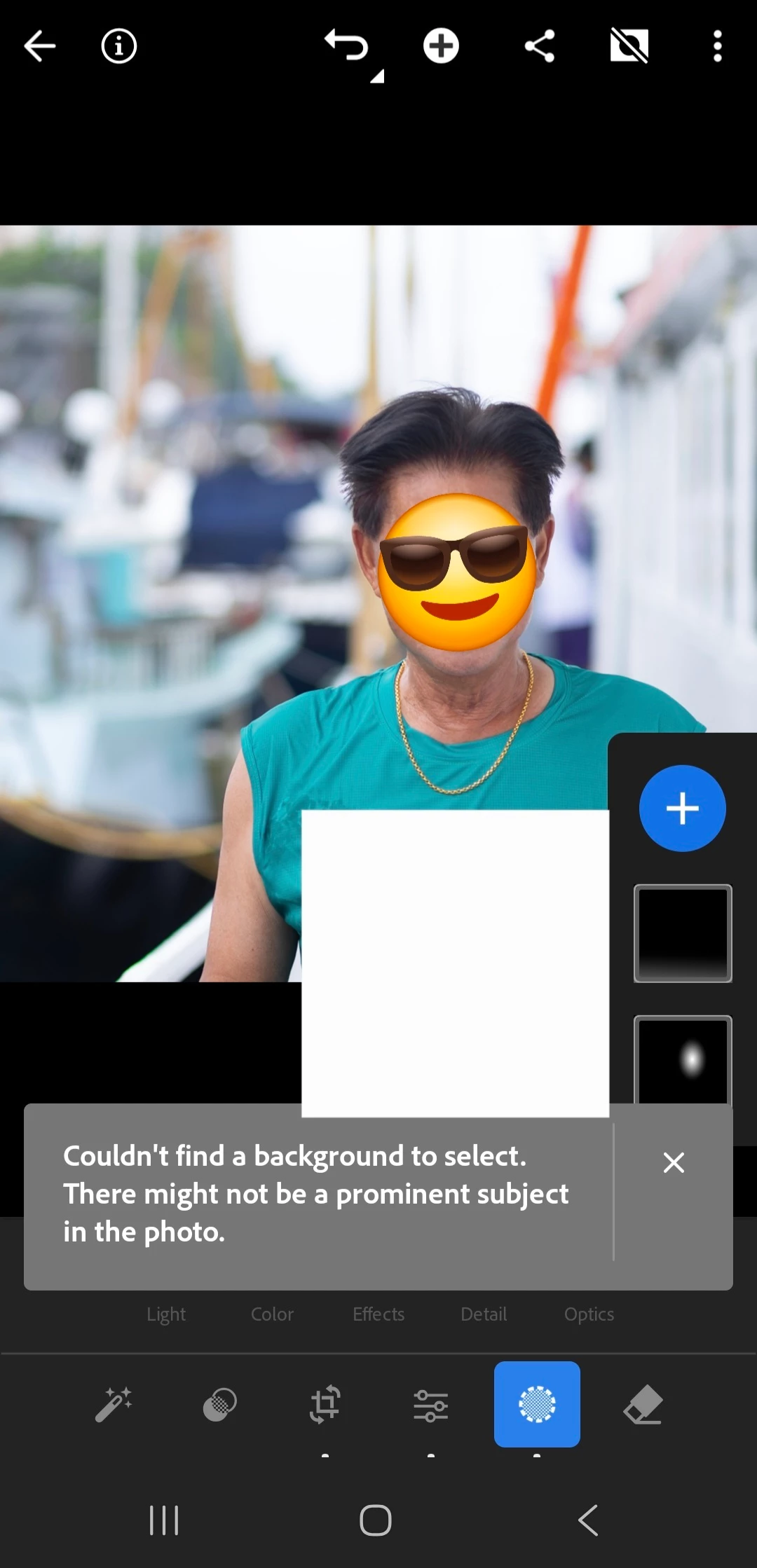
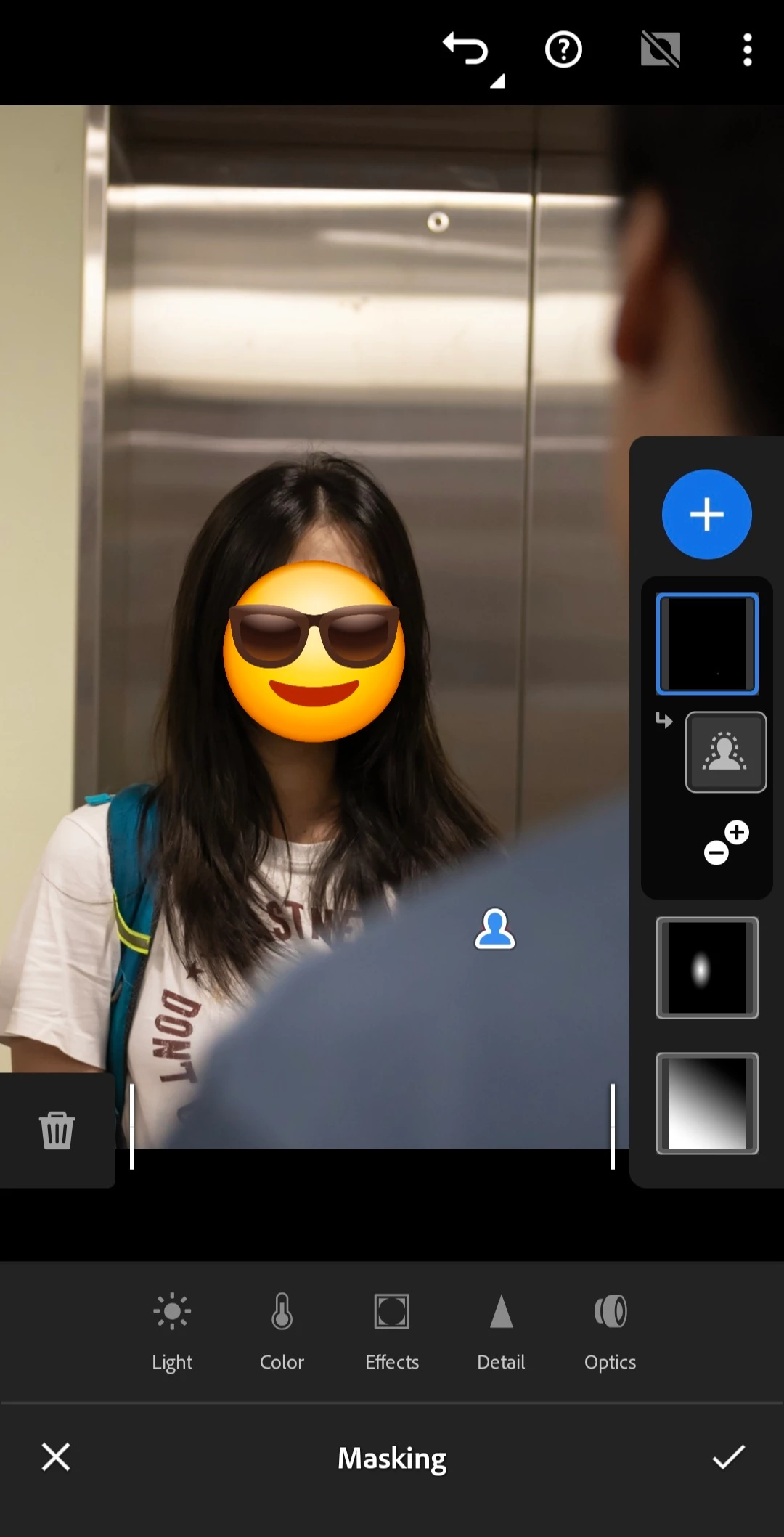
My mobile LR's subject detection fails to work since few days ago, probably starting from last update. It does not even work on simple portraits (see attached, emoji and rectangle drawn on screenshot only).
 

    Pinned Reply By Claire H.

    Hi everyone,

    A new update for the Adobe Photography products has been released. The August release for Lightroom Android (v11.5) contains an update regarding this issue. 
    If you do not see the update in your Creative Cloud Application, you can refresh it by pressing  [Ctrl/Cmd]+[Alt/Opt]+[ R ].

    Thank you for your patience and for helping us resolve this issue! ^CH

    53 replies

    Claire H.
    Community Manager
    Community Manager
    August 5, 2026

    Hi everyone,

    A new update for the Adobe Photography products has been released. The August release for Lightroom Android (v11.5) contains an update regarding this issue. 
    If you do not see the update in your Creative Cloud Application, you can refresh it by pressing  [Ctrl/Cmd]+[Alt/Opt]+[ R ].

    Thank you for your patience and for helping us resolve this issue! ^CH

    Javi+Vargot
    Participant
    August 5, 2026

    En lightroom mobile sigue apareciendo el mismo error de ediciones selectivas... Que puedo hacer?? tengo un  Samsung galaxy A55, y todo estaba bien hasta antes de la última actualización.


    Om.focus
    Participant
    July 31, 2026

    Samsung Galaxy A55 (SM-A556E)

    Android 16

    One UI 8.5

    Lightroom Mobile 11.4.4 Premium

    Subject detection is completely broken.

    Sky masking works correctly, but Subject and People masks select random parts of the image or fail completely.

    I tested:

    Canon EOS T5 RAW files

    JPEG files

    PNG files

    Images downloaded from the internet

    I already:

    cleared cache

    uninstalled and reinstalled Lightroom

    restarted the phone

    tested multiple photos

    The issue persists.


    Javi+Vargot
    Participant
    July 30, 2026

    Tengo el mismo problema, llevo 2 semanas batallando con "selección de sujeto" y "selección de fondo" selecciona cualquier cosa y no puedo trabajar con lightroom mobile.


    Claire H.
    Community Manager
    Community Manager
    July 31, 2026

    Hi @Javi Vargot, thanks for reaching out, and I am sorry for the inconvenience. Our team is investigating this issue and will be releasing a fix soon. Keep an eye on this thread for updates, and please reach out if you have any other questions or run into other issues. Thanks for your patience! ^CH

    Claire H.
    Community Manager
    Community Manager
    July 30, 2026

    Hi everyone, thank you for reporting this issue and for your patience while we investigated. We've identified the root cause of the subject detection problem, and our team is actively working on a fix. We'll update this thread once the release is available. Thanks again for helping us figure out this bug! ^CH

    MoreiraPN
    Participant
    July 30, 2026

    I've been going through the same problem on mobile, latest version of both Lightroom and my OS, on a Samsung Galaxy A55.


    aaron.hkg
    aaron.hkgAuthor
    Participating Frequently
    July 28, 2026

    I have reported the same issue around 1 month ago. Issue has NOT been fixed and I haven't received updates from the supports for more than a week already.

    PS. It seems to be a compatibility issue with certain Android devices (myself using Samsung A55).

    Claire H.
    Community Manager
    Community Manager
    July 30, 2026

    Hi ​@aaron.hkg, Thank you for letting us know. We are still trying to reproduce this issue internally and create a fix. Please continue sending the diagnostic log and sample media as we continue investigating.  https://helpx.adobe.com/lightroom/mobile/get-started/generate-and-share-diagnostic-logs.html. Thank you for the assistance so far! I hope we can figure this out soon. ^CH

    selondon
    Community Expert
    Community Expert
    July 26, 2026

    That seems very strange. I took the liberty of screengrabbing your grabs and taking them into my Lightroom Mobile.

    I am using an iPhone 16Pro on the latest OS. Both Select Subject as expected.


    How did the photos get into Lightroom Mobile?

    Imported, taken with the device camera or synced from Lightroom Classic?

    Checking the app and OS are up to date is a start. Also have you tried reinstalling the app (making sure any syncing to the cloud has completed first)?

    Maybe a member of the team or another Android user will comment if they experiencing the same issue.


    Participant
    July 26, 2026

    I transfer the photos via an adapter that plugs into my charging port.I import them to a sd card and from there I do my culling and import them to LR mobile,and everything is up to date only thing I haven't tried is uninstalling and re installing 

    Participant
    July 25, 2026

    I've been using Lr mobile for about 5 years now,and just recently the auto select on masks has been buggy,it'll select random spots of the photo or just say no subject found(some examples below) Im on a Samsung A55 with 8gb ram


    aaron.hkg
    aaron.hkgAuthor
    Participating Frequently
    July 29, 2026

    @Sameer K ​@Claire H. ​@Srishti Bali Please continue to support! Much is appreciated! 

    Participant
    July 16, 2026

    I have the same issue and it has started after the latest update. I am unable to fix this by clearing the cache or completely clearing the storage either.

    Participating Frequently
    July 18, 2026

    I've already cleared the cache and cookies, reinstalled the app, and updated to the latest version (v11.4.5). I also uninstalled Snapseed and tried running the subject detection in airplane mode, on mobile data, and over Wi-Fi. Still, it isn't detecting the subject.

    Participant
    July 18, 2026

    Yeah. I went through all that as well and nothing changed. Can't detect subject. 

    Participating Frequently
    July 16, 2026

    I am experiencing this SAME ISSUE!!!! However mine is detecting This creepy Victorian woman and trees! At first it was just when applying presets now it's on the original photo when I click mask detect subject or select background here are a couple examples. Were you able to find a solution for this? 😭😭 ​@Sameer K could you please help me with this? 🙏


    Reference I edit on an IPad using lightroom cloud and LR mobile from my phone. (Both are having the issue) I have updated and cleared my cache on both yet it keeps getting worse.

    Claire H.
    Community Manager
    Community Manager
    July 17, 2026

    Hi ​@Katherinelee9393, Thanks for reaching out! Interesting that you’re seeing this behavior on both your phone and iPad. Have you tried clearing your cache? Open Lightroom, tap on the three dots in the upper right corner, tap on App settings and then Local Storage. Press the Clear Cache button. Let me know if that helps, or we can continue to troubleshoot the issue. Thanks! ^CH

    Participating Frequently
    July 17, 2026

    Hi Yes, I have cleared the cache on both devices - here is a photo of my son I went to the original and clicked select background and once again this image is generating. Any help you can provide would be greatly appreciated 🙏 as I am at my wits end 😭😭 😫