



aaron.hkg
Participating Frequently
June 20, 2026

P: Subject detection not working on Android LrM v11.4.4

  • June 20, 2026
  • 53 replies
  • 273 views

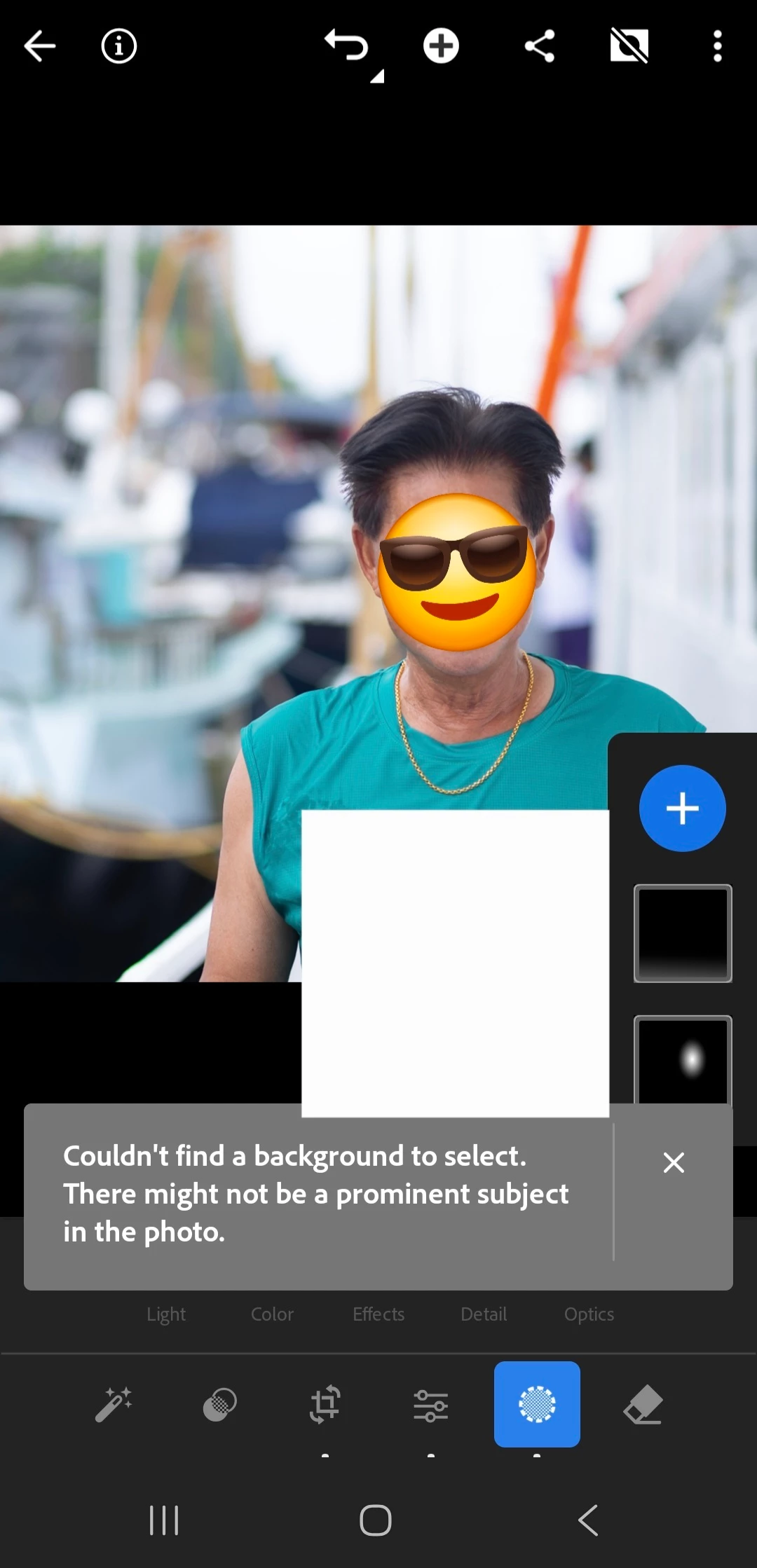
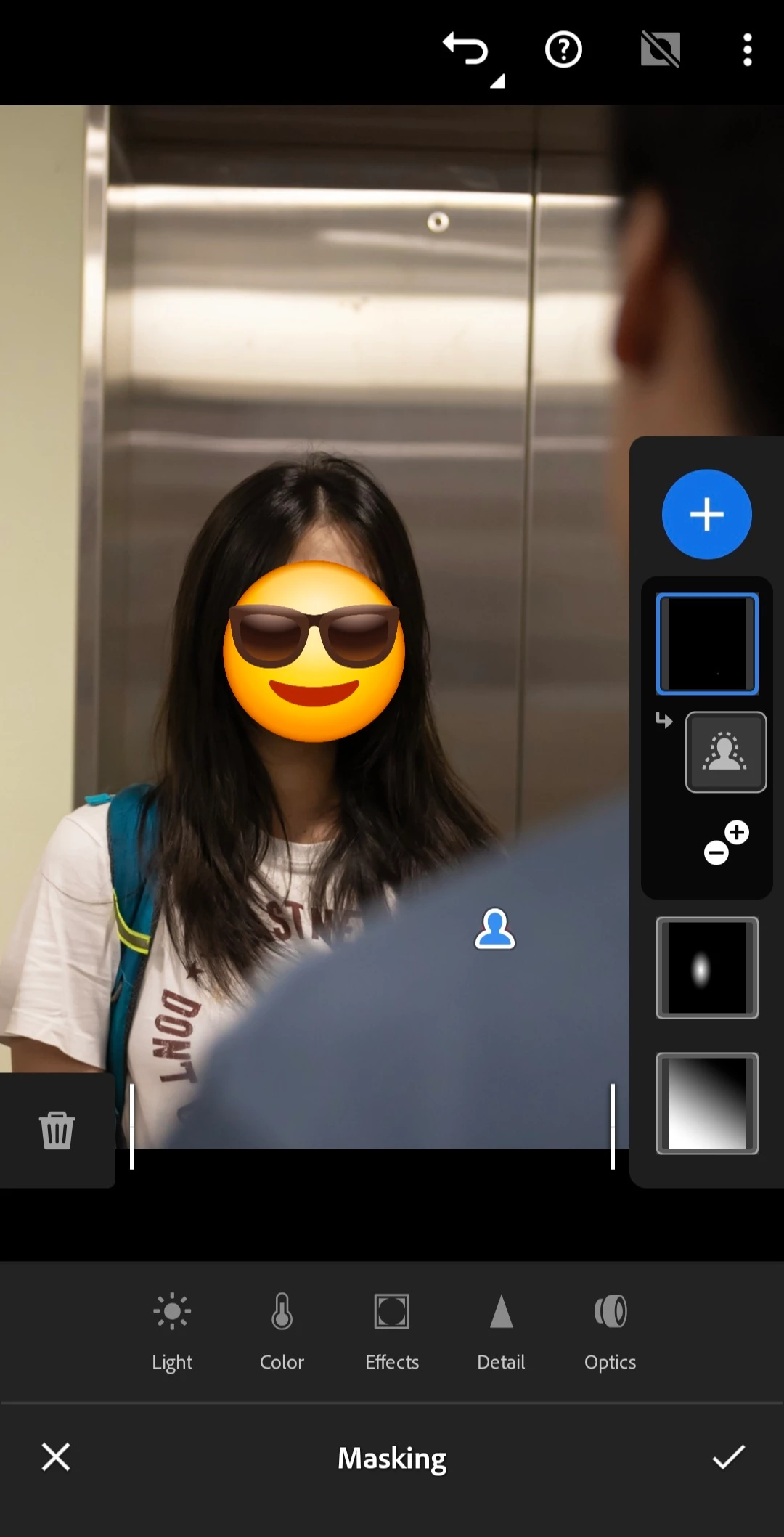
My mobile LR's subject detection fails to work since few days ago, probably starting from last update. It does not even work on simple portraits (see attached, emoji and rectangle drawn on screenshot only).
 

    Pinned Reply By Claire H.

    Hi everyone,

    A new update for the Adobe Photography products has been released. The August release for Lightroom Android (v11.5) contains an update regarding this issue. 
    If you do not see the update in your Creative Cloud Application, you can refresh it by pressing  [Ctrl/Cmd]+[Alt/Opt]+[ R ].

    Thank you for your patience and for helping us resolve this issue! ^CH

    53 replies

    Participating Frequently
    July 16, 2026

    I updated the app today, v11.4.5 and tried using the subject detection feature, but it still failed to detect the subject. Please see the attached screenshots.


    Claire H.
    Community Manager
    Community Manager
    July 17, 2026

    @Jysn_Tndn, thank you so much for sharing your information! Would you mind sharing your OS information and a sample media file that isn't working for you? Are all images or just particular images? This will really help us try to recreate this issue and fix it. Thanks! ^CH

    Participating Frequently
    July 18, 2026

    -For my phone's OS see attached photo. 

    -it doesnt detect to all images even if the subject is quite obvious.


    aaron.hkg
    aaron.hkgAuthor
    Participating Frequently
    July 14, 2026

    I didn't mean to finish the report, just pressed the wrong button resulting "correct answer" and there seems no way backward. The issue still persists.

    Claire H.
    Community Manager
    Community Manager
    July 17, 2026

    @aaron.hkg, Not a problem! The Correct Answer has been removed. Would you be able to send sample media as well as images that are not working for you? ^CH

    Participating Frequently
    July 9, 2026

    My phone is a Samsung A55. Everything was fine until recently; now, when I edit a photo and use the subject detection feature, Adobe Lightroom Mobile detects everything but the subject. I've already cleared the app's cache and updated it, but that didn't work. I even uninstalled and reinstalled the app, and it still didn't fix the issue. It's really frustrating.

    Claire H.
    Community Manager
    Community Manager
    July 9, 2026

    HI ​@Jysn_Tndn, thanks for sharing all the steps you’ve taken to try to fix this issue. Would you be able to send which version of Lr you are using on your phone, OS version, and a screen recording of what you’re seeing? That would be very helpful in replicating and fixing the issue. Thanks for your patience! ^CH

    Participating Frequently
    July 10, 2026


    I have attached three photos here: my Lightroom version, my phone's OS details, and a sample of the subject detection error. As you can see, it completely missed the subject (the cat) and instead randomly selected something in the upper left-hand corner of the photo.

    Regarding my phone's OS: I actually started experiencing this subject detection issue about two weeks before I even updated the operating system. I have also tried running the subject detection in Airplane Mode as well as over Cellular Data, but it still fails to detect the subject.

    I can't upload a video directly here, so I have uploaded a screen recording to Google Drive. You can access it via the link below:

    https://drive.google.com/file/d/1DjZQqYAKsWOy7JV4WrxJX_1WxqEJCcEw/view?usp=drivesdk

    JohanElzenga
    Community Expert
    Community Expert
    July 7, 2026

    You need to give more information about your system. Go to Help - System Info in Lightroom and post that here. The most common cause of problems like this are (on Windows computers) outdated GPU drivers.

    -- Johan W. Elzenga
    Participating Frequently
    July 7, 2026

    Hi, thanks for the reply. Im using lightroom mobile. Samsung A55. Didnt have the problem until recently. I already cleared the Cached. The app is updated too.

    Participating Frequently
    July 7, 2026

    I put a picture with an obvious subject, a person. And light doesnt detect it.

    Participant
    July 5, 2026

    Desde que lo he actualizado la IA no encuentra SUJETO cuando es fácilmente identificable e interpreta que el fondo es TODA LA IMAGEN (SUJETO Y FONDO)

    Claire H.
    Community Manager
    Community Manager
    July 8, 2026

    HI ​@Vero, thanks for reaching out! Could you share a screenshot or a short screen recording demonstrating the issue? Along with example pictures? Also, can you send your system info? You can find your system info by going to Help > System Info, copying and pasting it into a text file, and attaching it here. Thanks! ^CH

    Participating Frequently
    July 10, 2026

    I have attached three photos here: my Lightroom version, my phone's OS details, and a sample of the subject detection error. As you can see, it completely missed the subject (the cat) and instead randomly selected something in the upper left-hand corner of the photo.

    Regarding my phone's OS: I actually started experiencing this subject detection issue about two weeks before I even updated the operating system. I have also tried running the subject detection in Airplane Mode as well as over Cellular Data, but it still fails to detect the subject..

    Screen recording

    Srishti Bali
    Community Manager
    Community Manager
    July 3, 2026

    Hi ​@leo31882846ifrr 


    Thanks for reaching out. Could you please share a few more details so we can better understand the issue?

    • Which version of Lightroom are you using?
    • Could you share a screenshot or a short screen recording demonstrating the issue?
    • Does this happen with all images, or is it specific to certain photos?

    Looking forward to your response.

    Thanks, Srishti Bali | Community & Engagement Strategist, Digital Imaging | Adobe
    Participant
    July 3, 2026

    I've attached examples. It happens to all the photos of late. 

    Participant
    July 6, 2026

    I'm still awaiting feedback 

    Participant
    July 3, 2026

    I'm using the mobile version and not getting subject or background detection 

    Sameer K
    Community Manager
    Community Manager
    June 29, 2026

    Hey, @aaron.hkg. Welcome to the Lightroom Community. I'll help you figure this out. 


    Please share more details, such as the exact Lightroom version, mobile OS details, and video recordings of what you see. 


    Looking forward to hearing from you. 
    Sameer K

    (Type '@' and type my name to mention me when you reply)

    aaron.hkg
    aaron.hkgAuthor
    Participating Frequently
    July 3, 2026

    @Sameer K Attached a recording. The subject detection is ... not working at all. I've tried both raw (CR3) photos and JPEG photos, and the results are the same (i.e. not working).


    Lightroom mobile version: 11.4.3

    Android 16, One UI 8.0

    Sameer K
    Community Manager
    Community Manager
    July 3, 2026

    Thanks for adding the video. Is Lightroom installed from the PlayStore, or tha Galaxy App Store? 

    Please follow the steps here to generate and share the diagnostic logs: https://helpx.adobe.com/lightroom/mobile/get-started/generate-and-share-diagnostic-logs.html


    Thanks!
    Sameer K

    Participant
    June 24, 2026

    Subject detection hasn’t worked well with me lately either. At one point is says no subject detected, even though its obvious there is a subject. The photo was clean. Fucken annoying ass shit. COME ON ADOBE