


Participant
February 5, 2026

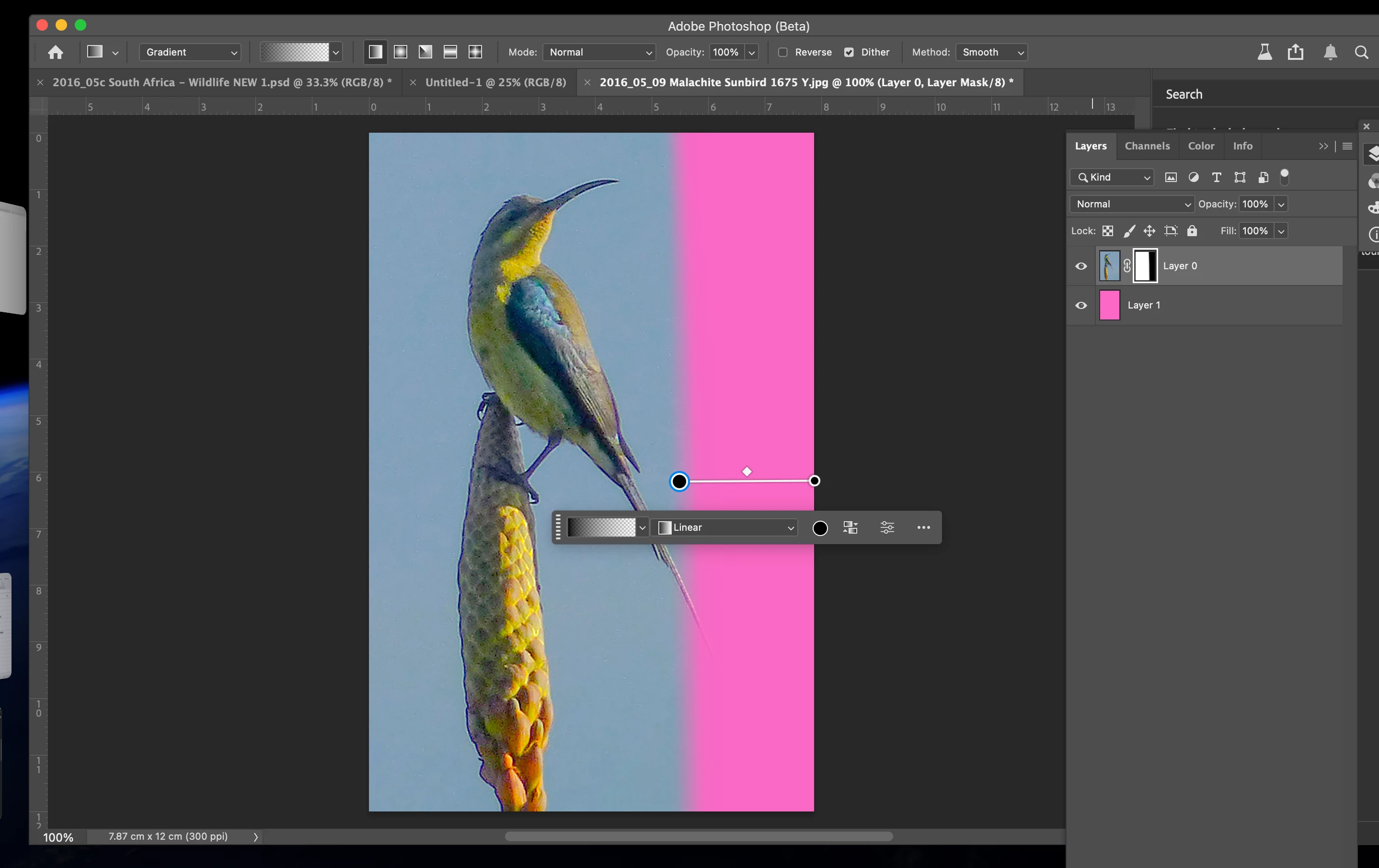
Beta 27.4 Gradient Tool - the gradient to transparency option does not work correctly - while it was working in Photoshop 27.3 the functionality has changed. I've been unable to create a fade to transparency with individual images.

  • February 5, 2026
  • 2 replies
  • 36 views

Select layer, add layer mask (ensure layer mask is selected), select gradient too and ensure options set to linear and black to transparency with black in the foreground. There is no gradient to transparency - only a vertical line as shown in the attached. In addition adjusting the points of the gradient does not update the gradient positions. It used to work fine until recent releases.
 

    2 replies

    salvoo76993234
    Participant
    February 6, 2026

    Same problem with Photoshop 27.3.1, gradient tool not work correctly on layer mask, every time you move endpoints gradients overwrite previuos action.

    CShubert
    Community Manager
    Community Manager
    February 5, 2026

    Hi ​@Rod Sims, a couple things stand out:
     

    • The endpoints on the gradient overlay are both black. It should be black on the right and white on the left. Look at the properties of the gradient.
    • Also for masking values be sure to use classic or linear not smooth. Smooth will give values for human color/light perception, but in this case he probably wants values that follow a linear path.

    Let us know if this fixes this.


    Thanks,

    Cory - Photoshop Product Manager

    Rod SimsAuthor
    Participant
    February 5, 2026

    Thanks for your reply Cory. 

    I suspect I’ve somehow selected an option that has resulted in this. As far as I can see the Classic works as expected, but with Gradient set I still see the single line and both circles black … perhaps this screen shot will help?


    Rod SimsAuthor
    Participant
    February 5, 2026

    The reason for reporting is that I’ve been using the gradient to transparency frequently and I noticed it stopped working as expected in the Beta release as well as the most recent Photoshop update … but perhaps I’ve inadvertently set an option? Thanks again for your reply.