
Participant
Nov 22, 2020 4:40 PM UTC
Released

P: Error with variable fonts in Photoshop

(From: https://community.adobe.com/t5/photoshop-ecosystem-bugs/error-with-variable-fonts-in-photoshop/idc-p/14069208#M90499)


On my computer with Windows 11 (untested on MacOS and Windows 10) I have this problem with variable fonts in Photoshop Beta (The fonts are downloaded from Google Fonts).

Only occurs with BOLD, EXTRABOLD and BLACK sizes.
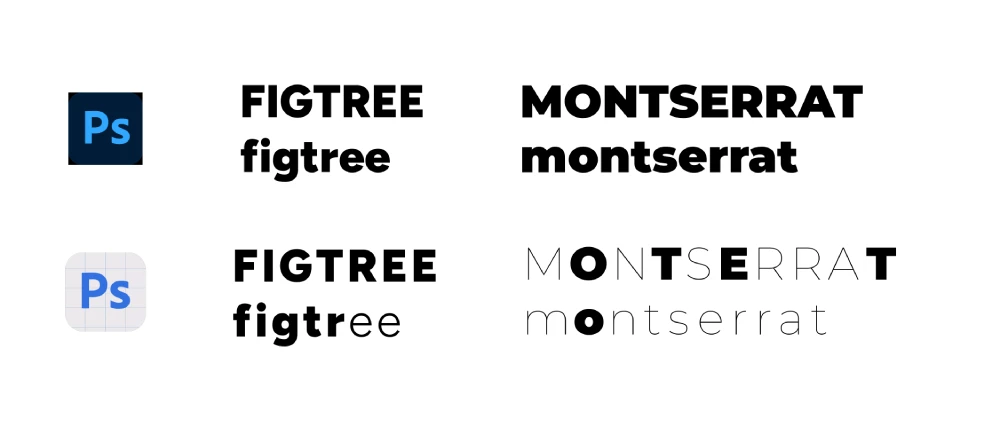
 

I hope they fix it soon 🙂

68 replies

c.pfaffenbichler
Community Expert
Community Expert
Jan 3, 2024 5:19 PM UTC

@Olga229025465qis , supposedly the issue is already being looked into anyway, but if you want to give the Photoshop team more material for testing »certain fonts« may not be exact enough. 

Translate
Participant
Jan 3, 2024 5:05 PM UTC

hello,


I am wondering when the problem regarding the font weights is going to be solved. It's already January, and it seems it's been a few months by now. I can not use certain fonts in bold/extra bold/ black. 

Translate
Participant
Dec 18, 2023 9:17 AM UTC

I can't confirm this because I downgraded PS and dare not mess with it at the moment but, going by the latest release notes for 25.3.1, this still hasn't been fixed. It's not acknowledged in known issues either.

Translate
Participant
Dec 12, 2023 6:05 AM UTC

I think they prioritize their new AI more than fixing this problem. Hopefully, they will patch it in the next update✌️

Translate
Participant
Dec 11, 2023 3:14 PM UTC

@CShubertIt is December 11, over two months later and this is still an issue. When will adobe have this fixed? This seems like such a simple issue to fix and it really is a massive issue when it comes to design. Fonts and typography are everything in marketing and there should be a priority to get an issue like this fixed as soon as possible.

Translate
Participant
Dec 3, 2023 1:21 PM UTC

just updated it to 25.2, still facing the same issues with variable fonts

Translate
Participant
Nov 29, 2023 8:50 PM UTC

Still an issue for me in 25.2 (W11). The suggested workaround of downgrading to 24.5 works. I wish this bug was more of a priority.

Translate
StopTheMadness
Participant
Nov 29, 2023 1:13 PM UTC

Any update on this? Just updated to 25.2 and it fixed the color picker issue but variable width fonts are still broken.

Translate
Participant
Nov 2, 2023 4:53 AM UTC

When I try to make the text bold its acting weirdly, few words are bold and others won't, I tried using the same font in Illustrator and its working fine there, so I reinstalled the photoshop but its still the same, help me to resolve this issue.

Translate
Jeff Arola
Community Expert
Community Expert
Nov 2, 2023 8:42 PM UTC

It looks to be a bug that Adobe is aware of and working on a fix:

https://community.adobe.com/t5/photoshop-beta-bugs/p-error-with-variable-fonts-in-photoshop/idi-p/14069372#comments


Translate
Participant
Nov 1, 2023 12:40 AM UTC

I'm also having the same issue with Raleway, using PS 25.1, and have tried uninstalling and reinstalling the font, and installing from both the google font and adobe font source. Has a solution been found yet?

Translate