
Participant
November 22, 2020

P: Error with variable fonts in Photoshop

  • November 22, 2020
  • 46 replies
  • 11582 views

(From: https://community.adobe.com/t5/photoshop-ecosystem-bugs/error-with-variable-fonts-in-photoshop/idc-p/14069208#M90499)


On my computer with Windows 11 (untested on MacOS and Windows 10) I have this problem with variable fonts in Photoshop Beta (The fonts are downloaded from Google Fonts).

Only occurs with BOLD, EXTRABOLD and BLACK sizes.
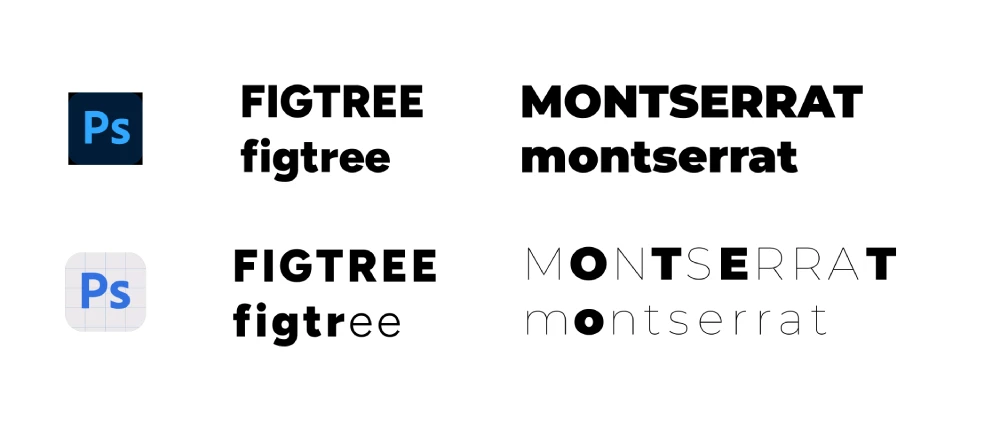
 

I hope they fix it soon 🙂

46 replies

Lola5EDF
Participant
September 18, 2023

Hi, after updating Photoshop Beta. I´ve been having problems with all the fonts. The program do not respect the type I choose, has anyone had this problem? Adobe help didn´t help 😞

thank you,

Lola

Participant
September 15, 2023

I have the same problem with Mulish variable font from Adobe fonts installed in Adobe CC. It works fine in Illustrator. The solution presented here, did not work.


Participant
September 9, 2023

Recenlty I updated my Photoshop to Photoshop beta, and I've come uppon a problem using the Montserrat font, specificly with Black, Bold and Semi Bold weights. The problem is that some of the characters are appearing as Black, and some are appearing as Thin. This is a huge problem for me since i use Montserrat for most of my projects and I could really use the help here. Example image below. Thanks in advance!

jane-e
Community Expert
Community Expert
September 9, 2023

@Njegos321783683dka 


I've moved your post to Photoshop Beta.


Did the typeface work correctly in the released version of Photoshop? If so, use that version. The Beta version is for testing and reporting bugs; the released version is for production work. You can have both installed.


Jane


CShubert
Community Manager
Community Manager
September 8, 2023

Hi @Eduard32137602lmf8 testing here and we are not seeing this.


Try resetting Prefs for the Beta:

/Users/yourname/Library/Preferences/ Photoshop Beta Settings (Mac Ventura)

/Users/yourname/Library/Preferences/Adobe\ Photoshop\ \(Beta\)\ Settings (Mac)
C:\Users\user name\AppData\Roaming\Adobe\Adobe Photoshop (Beta)\Adobe Photoshop (Beta) Settings )Win)

Launch BETA Photoshop While Pressing The Keyboard Shortcut

With Photoshop closed, press and hold Shift+Ctrl+Alt (Win) / Shift+Command+Option (Mac) on your keyboard and then Launch Photoshop the way you normally would.

https://helpx.adobe.com/photoshop/using/preferences.html#Manually 


Participant
September 7, 2023

When downloading variable fonts from Google Fonts I have the error that normally the extrabold and black sizes do not work. Has anyone had this problem? Have you managed to solve it?

Participant
September 8, 2023

I could say that it happens to me with all variable fonts. Yes, this happens to me with the fonts of the screenshot but it is curious since for example on the office computer Montserrat works well but at home it works poorly, and Figtree on the office computer fails more letters than on my home.

I don't know if this could be an error if I was using Windows 11 or Photoshop Beta.


Okay, before publishing this comment I tested it and it seems that it is a Photoshop Beta error.
Does anyone know how I can report this to Adobe so they can fix it in future updates?

Participant
September 4, 2023

I am using Raleway from Google Fonts. In the beta, the font is not shown correctly. Some letters are the correct weight, some letters are much thinner. When I change the weight, the same letters are in the correct weight change, while the other stay thin.

CShubert
Community Manager
Community Manager
September 5, 2023

Hi @Flowmedia it is not uncommon for other software/plugins to not work correctly until the release version of Ps is released.  Please reach out to Google to see if they have any updates or suggestions or use the Ps release version and if there is an issue there, please report it in the Ps forum for Ps release.


Participant
September 18, 2023

Hello, @CShubert I am having this same problem in the Beta version only but after updating the new PS release version which is 25.0.0 this problem is carried over to this release also now I'm stuck Please Reply ASAP.