
Participant
November 22, 2020

P: Error with variable fonts in Photoshop

  • November 22, 2020
  • 46 replies
  • 11582 views

(From: https://community.adobe.com/t5/photoshop-ecosystem-bugs/error-with-variable-fonts-in-photoshop/idc-p/14069208#M90499)


On my computer with Windows 11 (untested on MacOS and Windows 10) I have this problem with variable fonts in Photoshop Beta (The fonts are downloaded from Google Fonts).

Only occurs with BOLD, EXTRABOLD and BLACK sizes.
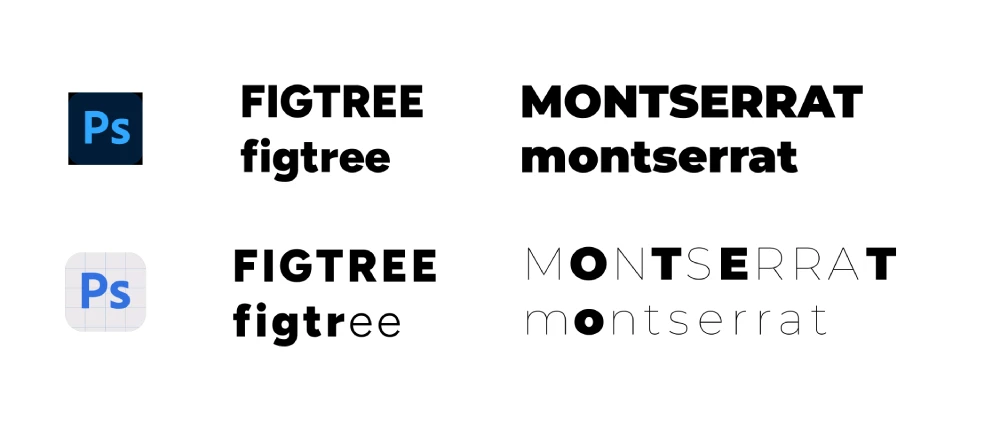
 

I hope they fix it soon 🙂

46 replies

Participant
October 26, 2023

The Outfit semibold and bold fonts behaves strangely in Photoshop. Other weights of the font work as they should. I have reinstalled the fonts and upgraded to the latest version of Photoshop. I work on PC. What could be the cause of the error?

jane-e
Community Expert
Community Expert
October 26, 2023

@lottaf84726701 


There is a primary thread in the Photoshop Beta forum where this issue with variable fonts has been reported:

https://community.adobe.com/t5/photoshop-beta-bugs/p-error-with-variable-fonts-in-photoshop/idi-p/14069372


Are you using the beta or released version of Photoshop?


Jane

NHD-Toronto
Participating Frequently
October 24, 2023

Yes, I'm also having issues in Indesign with variable fonts including Monsterrat. 


I have downloaded the font from Google and still having issues. I found if you have any Paragraph / Character Styles, open them and re-select the font. That fixed it for me.

TenTin
Known Participant
October 22, 2023
StopTheMadness
Participant
October 11, 2023

Updated to Photoshop 25.0.0, OSX 13.5.2 and variable width font Outfit from Google fonts. Workaround currently is that if I close the file and open it again everything rendered correctly, as long as I dont change the font width in the textfield. At least I can export correct looking files even if editing is horrible.

Participant
October 11, 2023

Hello! I am having a similar problem with Sculpin Variable from Adobe fonts (https://fonts.adobe.com/fonts/sculpin-variable). Bold and Black are not working properly on Photoshop, they work fine on Illustrator and other programs. 
I tried Photoshop Beta, Photoshop 2024 and earlier versions and the same thing happens. Any ideas?


Participant
October 10, 2023


Still having this issue for a while now and i am not really sure when this should be fixed!

Participant
October 8, 2023

For Montserrat, adding the font from adobe fonts and using the creative cloud version on PS does solve the problem.

Participant
September 27, 2023

@Eduard32137602lmf8  Hi I'm also facing the same problem and I figured out a temporary solution, Just downgrade the latest version to the older version of the PS version (24.5) and your problem will be fixed until Adobe fixes this issue.

Participant
September 26, 2023

Its some one the glyphs, they arent showing the correct ones. This is what i get. a mix of normal and italic.


Participant
September 26, 2023

I'm sorry, I can't remember, but I found this on the internet:
https://community.adobe.com/t5/photoshop-ecosystem-discussions/font-looks-different-in-photoshop-than-on-system-and-other-adobe-tools/m-p/10235403
Perhaps an update fixed it for me at that time...