
Participant
November 22, 2020

P: Error with variable fonts in Photoshop

  • November 22, 2020
  • 46 replies
  • 11582 views

(From: https://community.adobe.com/t5/photoshop-ecosystem-bugs/error-with-variable-fonts-in-photoshop/idc-p/14069208#M90499)


On my computer with Windows 11 (untested on MacOS and Windows 10) I have this problem with variable fonts in Photoshop Beta (The fonts are downloaded from Google Fonts).

Only occurs with BOLD, EXTRABOLD and BLACK sizes.
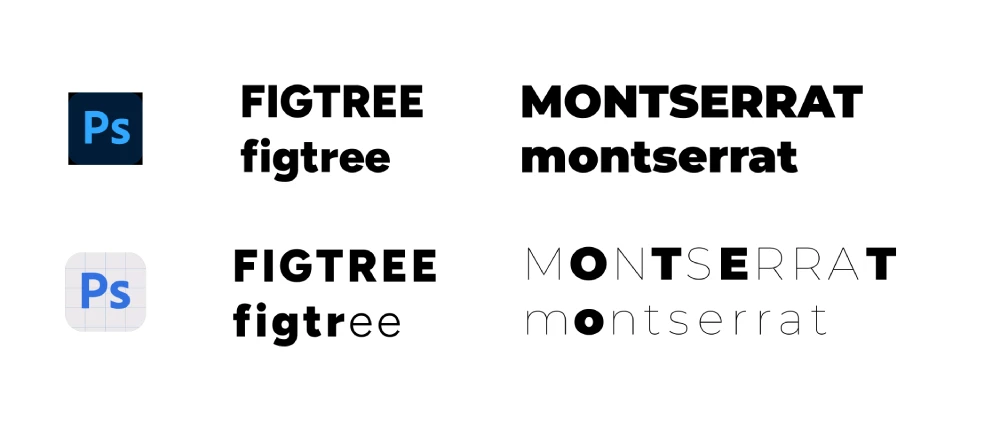
 

I hope they fix it soon 🙂

46 replies

sparklemax
Inspiring
September 26, 2023

Is there any update on this please? I am having the same trouble with the font Mulish. I have used the downloaded version from Google and also actived the version from Adobe Fonts.

**update on my issue. I have reinstalled version 24.5 and the fonts are working. I will keep this version until it is resolved.

Participant
September 25, 2023

Same issue hee, have'nt installed Ps update since last friday 22th september, now then i have to go back to my duties have seen this error on Monserrat and Josefin Sans. Its stressfull and even look any post about this until i found this one


And its vey sad seen that lot of people have this issue more than a week:C

c.pfaffenbichler
Community Expert
Community Expert
September 25, 2023

@Mark30636952ujde , could you please post meaningful with the pertinent Panels (Toolbar, Layers, Character, Options Bar, …) visible? 

Is the text scaled or were the Type Layers transformed? 

Can you provide the layered file with the Type Layer? 

Participant
September 25, 2023

really seems that its variable fonts. I guess back to PS 2020 or something

Participant
November 22, 2020

My CI-Font doesn't look normal in Photoshop, it's too narrow. I think it concerns all fonts... Have you ever had this problem? See on the photo (left PS, right Indesign)! I use Mac with Catalina 10.15.4 and latest PS Version 22.0.1.

Participant
September 25, 2023

Hi Oscar, it seems I have the same problem. Did you find the solution yet?

Participant
September 25, 2023

I don't understand what happened but now it happens to me again in Photoshop, not just in Beta although it depends on the typography.

Does anyone know a version of Photoshop that doesn't have this error?

Participant
September 25, 2023

This problem has not been fixed in PS2024. I think it related to all variable fonts. I am using TT Octcosquares, and now the whole brand, wiht every artwork is messed up. Good job Adobe.

CShubert
Community Manager
Community Manager
September 22, 2023

Hi, the team is aware and lookiing into this issue.


Inspiring
September 21, 2023

@Kevin Stohlmeyer I had to go back to PS 24.7.0 for Sequel 100 Wide VF to display the "95" weight properly.

Kevin Stohlmeyer
Community Expert
Community Expert
September 21, 2023

Hi all is this with the most recent beta 25.1 or the general Photoshop release 25.0?

Participant
September 21, 2023

Recientemente al utilizar tipografías de Google Fonts en Photoshop presenta un fallo que no he logrado resolver pues el programa no identifica las variables Semibold, Bold, Extra Bold, Heavy.


Intenté desisnstalando el programa de Photoshop y volviéndolo a instalar pero no ha funcionado. Anexo una imagen para dar a entender mi problema.