


Participant
October 31, 2023

P: Photoshop Beta (BUG) Free Transform and Transform Selection no longer work

  • October 31, 2023
  • 41 replies
  • 10731 views

Repost from another forum post (I was told to repost over here).

Photoshop Beta, version 25.2 (latest)
OS: Windows 11

Troubleshooting steps:
- I have uninstalled ALL adobe products, rebooted and reinstalled. Still same issue
- Reset prefrences on quit

Steps to reproduce:
1. create new project
2. Select Rectangular Marque Tool
3. Select an area on the page
4. right-click, and chose either Free Transform or Transform Selection
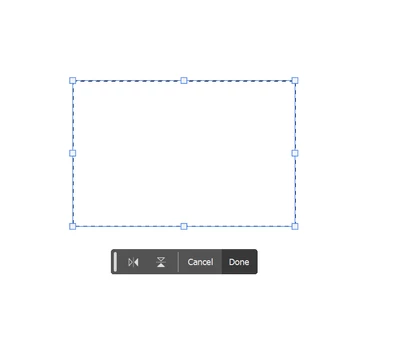


5. clicking and dragging on the handles does nothing, not even rotate works.

The only way to actually transform what you have selected is to change the values in the top bar, or by clicking on a vector (X:, Y:, W:, H:) and dragging.  Grabbing and dragging the box handles do nothing.

This works okay in Photoshop Beta 25.1 and the current version of regular, non-beta, Photoshop.

This topic has been closed for replies.

41 replies

CShubert
Community Manager
Community Manager
November 7, 2023

Thank you @Jeff26889344mxrl we see this as well and will have the team look into it.


kfind001
Participant
November 7, 2023

Problem

Show Transform Controls (check), select object, scale object by dragging a corner handle, I cannot perform another transform action such as rotate unless I deselect the object (by clicking off) and then reselecting the object.


In previous versions of PS and PS Beta, I've used the Transform Controls to scale, rotate and scale some more all without deselecting the object.


I just updated to m.2388


Windows 10, PS Beta m.2388

Participating Frequently
November 7, 2023

Photoshop Beta

Version: 25.2
Windows 11 Pro: 22H2
When the layer is selceted and i click and drag with transformation tool it works, but when i let go of selection (not deselecting layer) it stops working completly, and i can only choose cancel or done option. It doesnt allow me to use transformation tool again. I have to deselect layer, then select again and then drag the edges again.

I have tried to reinstal photoshop, and to also reset prefrences bu nothing helped to fix the issue. Please help.

Participating Frequently
November 8, 2023

I have installed 25.1 version and it doenst have the same problem

Participant
November 7, 2023

Lorsque l'on sélectionne le texte (texte surligné) dans son champ, on peut normalement intervenir ensuite sur la taille du champ. Faire de la place pour les lignes du dessous, on bien ajuster le champ au bord du texte.

Dans mon cas, une fois le texte surligné, cette fonctionnalité ne marche pas toujours. Des fois oui, des fois non alors qu'aucun autre paramètre n'est changé/modifié entre temps, mis à part peut-être la position du texte sur l'image.

Participant
November 7, 2023

Je précise que, bien sûr, si le texte n'est pas sélectionné avec l'outil texte, mais avec l'outil de transformation, là il est possible de modifier le champ mais sans conserver les proportions du texte. Cela le déforme. Et ça c'est normal.
J'ajoute que les boutons de rotation du texte ne fonctionnent pas non plus.

Participant
November 6, 2023

As of the 6/11/2023 release Photoshop Beta does not allow resizing any object (Image, Text, etc.).

Trevor.Dennis
Community Expert
Community Expert
November 6, 2023

Are you saying that Free Transform is not working for you?

I am on Windows 11 and both versions appear to be working OK for me.

Are you seeing any error messages?

Are you able to use other functions like the brush tool?

When did this start, and does it correlate with an event like an update for instance?


If you can show us a full res screenshot of your entire workspace showing image and layers panel, that might be helpful.

You need to give us a lot more information for us to stand a chance of working this out for you.

mata_o
Participating Frequently
November 6, 2023

In PS (Beta): When I rotate a layer and enter Free Tranform mode, I am unable to use my cursor to drag and reposition the layer.  It remains locked in place until I press enter and exit Free Transform mode.  I have exited the program and tried different files.  This problem is reproduced.  I tried to reproduce the problem in PS 25.1, and did not encounter the issue.  I can rotate or skew a layer, and then drag and reposition with no issue. 


Trevor.Dennis
Community Expert
Community Expert
November 6, 2023

I can't duplicate that on my Windows 11 system.

Can you give us more information like when this started?


A full res screen shot of your workspace showing the layers panel would probably help us.

J.C. Scott
Inspiring
November 4, 2023

The Transform functionality associated with the Marquee Tool isn't working. In fact, selecting Transform or Free Transform will show the Transform box but you can't interact with or move it.

maritak4403900
Participating Frequently
November 4, 2023

One of the glitches I noticed is that the mouse can't resize anything in Free Transform.

Participant
November 5, 2023

Comando ctrol+T não está funcionando.

jane-e
Community Expert
Community Expert
November 5, 2023

@KairosMarketing 


Can you show a screenshot of your Layers panel?


Jane

Participant
November 4, 2023

 A caixa texto de parágrafo não expandi mais depois da última atualização.

Trevor.Dennis
Community Expert
Community Expert
November 4, 2023
quote

 The paragraph text box didn't expand any more after the last update.


By @KairosMarketing


Can you describe your exact workflow?  What steps are you taking when trying to increase the text box size?

Is this happening to 25.1 or the 25.2 beta version of Photoshop?


I have tried testing this with both versions and it is working OK for me.

Participating Frequently
November 3, 2023

Hi, I am using Photoshop Beta, for the last 3 months I could resize and transform my image without any problems but today all of a sudden I can't do it.

When I import an image for the first time, I can resize it however I want but only once. When I click somewhere other than the image and then click it again, it won't let me move, transform, or resize it. When I do it with Ctrl+T, it lets me do it but only once. Then I need to click somewhere outside of the image again and then click again and ctrl+t to resize or move it Once again and it goes like this. I tried to reset all preferences but no luck.

CShubert
Community Manager
Community Manager
November 3, 2023

Hi @alazp do you see the same issue with Ps release version, or is this just in Ps beta?


It may help if we could see your Photoshop System Info. Launch Photoshop, and select Help >System Info...and copy/paste the text in a reply.