
Brush preset thumbnails render flat (no pressure taper) when Photoshop is launched with mouse instead of Wacom pen
Brush preset thumbnails lose pressure taper when Photoshop is launched with mouse instead of Wacom pen (regression)
Hi, I've found a consistent behavior with brush preset thumbnails in the Brushes panel:
WHAT HAPPENS
- If I launch Photoshop by clicking its icon with my MOUSE, all brush preset
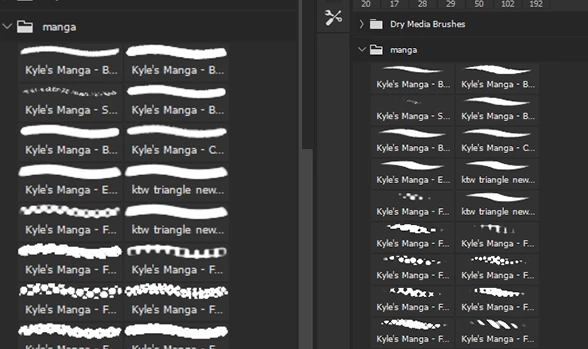
thumbnails (e.g. Kyle's Manga brushes) render as FLAT, uniform strokes —
no thin-thick taper. (screenshot 1)
- If I launch Photoshop by tapping its icon with my WACOM PEN, the same
thumbnails render WITH proper pressure taper (thin-thick). (screenshot 2)
WHY IT MATTERS (my workflow)
I choose brushes based on their stroke shape in the thumbnails. With flat
thumbnails I have to guess what each brush does; the tapered preview shows
me the brush character at a glance.
REGRESSION
In older Photoshop versions I could fix this mid-session: touch the pen to
the tablet, close and reopen the Brushes panel, and thumbnails would
re-render with taper. In the current version this no longer works — the pen
isn't picked up as the active device after launch, and thumbnails stay flat
until I restart Photoshop via the pen.
TRIED, DIDN'T HELP
- Toggling Windows Ink in Wacom Tablet Properties
- UseSystemStylus 0 in PSUserConfig.txt
- Pen pressure while painting works fine in both cases — this is purely a
thumbnail preview issue.
EXPECTED
Thumbnails should re-render with pen pressure once the pen is used, as in
older versions — or there should be a way to force it without restarting.
SYSTEM
Photoshop [27.1.0], Windows [11], Wacom [Intuos M Pro],
driver [6.4.13-4]


 AdChoices