Participant
Oct 6, 2026 12:02 PM UTC
Answered

PSUserConfig stopped working

Photoshop v 27.11 and Beta - pen pressure now only works with use windows ink enabled in wacom tablet with or without PSUserConfig file

    Jeff Arola
    Jeff ArolaCorrect answer
    Community Expert
    Oct 6, 2026 8:21 PM UTC

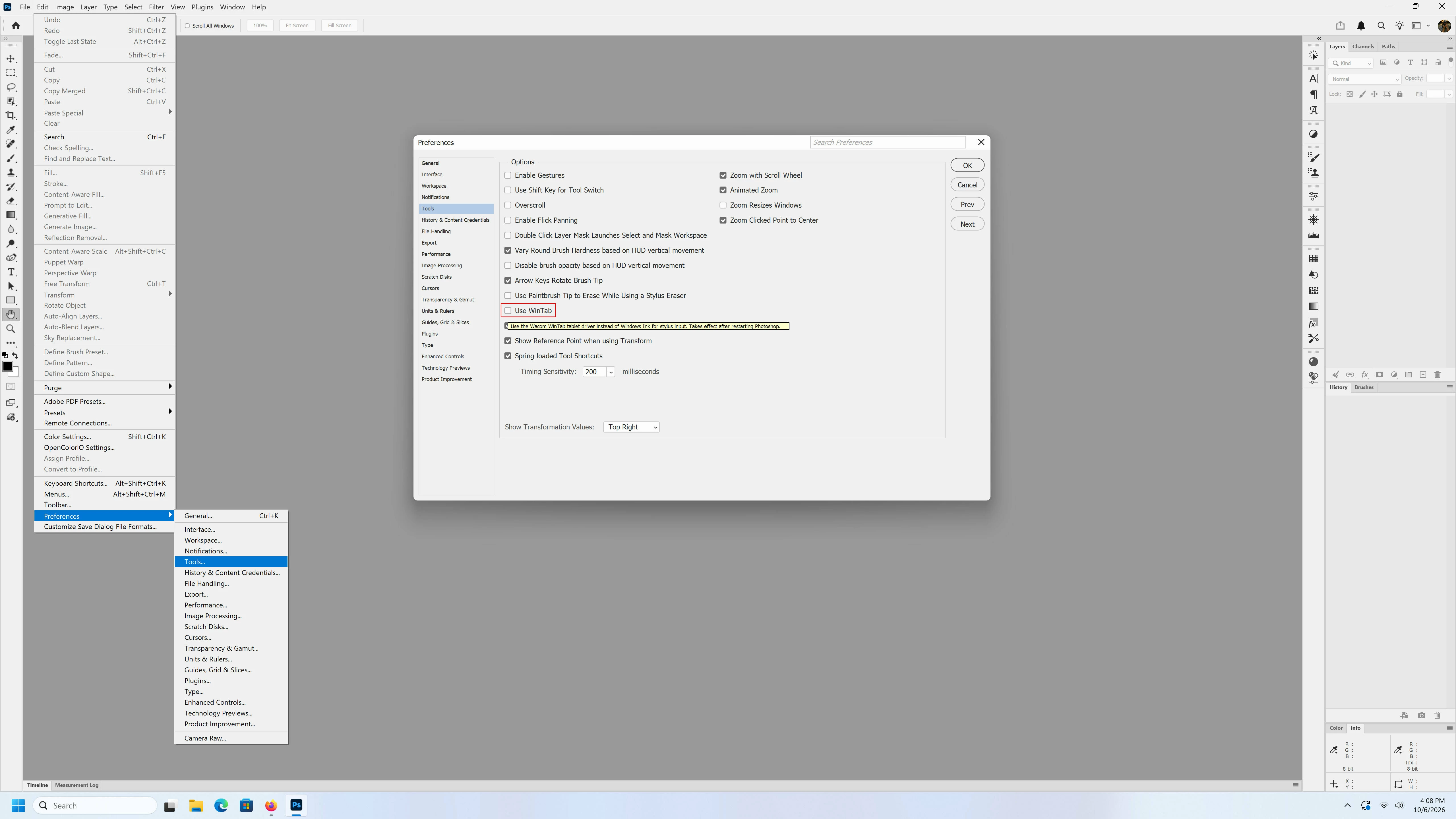
    New in Photoshop 27.11 is a WinTab setting in Edit>Preferences>Tools>WinTab.

    So far, i haven’t found any info on the 27.11 update page or on the Adobe site about it.


    9 replies

    Community Expert
    Oct 13, 2026 5:37 AM UTC
    My System: Intel i7-8700K - 64GB RAM - NVidia Geforce RTX 3060 - Windows 11 Pro 26H2 -- LR-Classic 15 - Photoshop 27 - Nik Collection 9 - PureRAW 6 - Topaz Photo AI
    Participant
    Oct 13, 2026 2:31 AM UTC

    Brush preset thumbnails lose pressure taper when Photoshop is launched with mouse instead of Wacom pen (regression)

    Hi, I've found a consistent behavior with brush preset thumbnails in the Brushes panel:

    WHAT HAPPENS
    - If I launch Photoshop by clicking its icon with my MOUSE, all brush preset
      thumbnails (e.g. Kyle's Manga brushes) render as FLAT, uniform strokes —
      no thin-thick taper. (screenshot 1)
    - If I launch Photoshop by tapping its icon with my WACOM PEN, the same
      thumbnails render WITH proper pressure taper (thin-thick). (screenshot 2)

    WHY IT MATTERS (my workflow)
    I choose brushes based on their stroke shape in the thumbnails. With flat
    thumbnails I have to guess what each brush does; the tapered preview shows
    me the brush character at a glance.

    REGRESSION
    In older Photoshop versions I could fix this mid-session: touch the pen to
    the tablet, close and reopen the Brushes panel, and thumbnails would
    re-render with taper. In the current version this no longer works — the pen
    isn't picked up as the active device after launch, and thumbnails stay flat
    until I restart Photoshop via the pen.

    TRIED, DIDN'T HELP
    - Toggling Windows Ink in Wacom Tablet Properties
    - UseSystemStylus 0 in PSUserConfig.txt
    - Pen pressure while painting works fine in both cases — this is purely a
      thumbnail preview issue.

    EXPECTED
    Thumbnails should re-render with pen pressure once the pen is used, as in
    older versions — or there should be a way to force it without restarting.

    SYSTEM
    Photoshop [27.1.0], Windows [11], Wacom [Intuos M Pro],
    driver [6.4.13-4]


    Translate
    Trevor.Dennis
    Community Expert
    Community Expert
    Oct 10, 2026 8:37 AM UTC

    Guillaime has some info on this on the Lazy Nezumi News page.  Not much help if you are a Mac user.

    Lazy Nezumi Pro 2026 News


    Translate
    Community Expert
    Oct 10, 2026 7:26 AM UTC

    See here: 


    Translate
    My System: Intel i7-8700K - 64GB RAM - NVidia Geforce RTX 3060 - Windows 11 Pro 26H2 -- LR-Classic 15 - Photoshop 27 - Nik Collection 9 - PureRAW 6 - Topaz Photo AI
    Participant
    Oct 11, 2026 2:53 AM UTC

    Thank you Axel Matt. This did the trick. Some feedback from a long time user who has had to use the PSUserConfig trick for years. There should be a tool tip when you mouse over the warning icon that points you to the Wintab setting in preferences.

    Needs a Tool tip for discoverability


    Translate
    Participant
    Oct 10, 2026 1:19 AM UTC

    Summary
    Pen pressure doesn’t work in Photoshop 27.11 (the current release) on a Wacom Cintiq Pro 24. Strokes draw at full size and opacity no matter how hard I press. Rolling back to 27.3.1 fixes it right away. Pressure works in every other application, so the driver and hardware are working. Other users have reported the same issue starting in 27.4.

    Environment

    • Photoshop: 27.11 (broken), 27.3.1 (works)
    • Tablet: Wacom Cintiq Pro 24 Pen & Touch (DTH-2420)
    • Wacom driver: [version find it in Wacom Center > Help > About]
    • OS: Windows 11 Pro, build 26300 (Insider)
    • GPU: [model and driver version]

    Steps to reproduce

    1. Install Photoshop 27.11 with the Wacom driver above.
    2. Create a new document and select the default Brush tool.
    3. Turn on pressure for size and opacity (in the options bar and in Brush Settings > Shape Dynamics and Transfer).
    4. Draw strokes with light and heavy pressure.

    Expected: Stroke size and opacity change with pen pressure.
    Actual: Strokes are uniform. Pressure is ignored.

    Already tried (none fixed it in 27.11)

    • Reset the Brush tool and checked Pen Pressure controls in Brush Settings
    • Turned Windows Ink on and off in Wacom Tablet Properties
    • Forced WinTab with PSUserConfig.txt (UseSystemStylus 0)
    • Restarted the Wacom service and reinstalled the driver
    • Reset Photoshop preferences

    Workaround: Roll back to 27.3.1 via Creative Cloud > Other versions.

    Related reports: [link the existing 27.4 forum threads]

    Translate
    Jeff Arola
    Community Expert
    Jeff ArolaCommunity ExpertCorrect answer
    Community Expert
    Oct 6, 2026 8:21 PM UTC

    New in Photoshop 27.11 is a WinTab setting in Edit>Preferences>Tools>WinTab.

    So far, i haven’t found any info on the 27.11 update page or on the Adobe site about it.


    Translate
    FirankaAuthor
    Participant
    Oct 7, 2026 11:16 AM UTC

    Thanks Jeff, works flawlessly. So after all these years adobe finally did not break something again but actually addressed the issue with WinTab and forgot to even mention about it 😅

    Translate
    Srishti Bali
    Community Manager
    Community Manager
    Oct 6, 2026 3:41 PM UTC

    Hi ​@Firanka 


    Thanks for reaching out. Here’s a detailed thread on this topic: 


    Hope this helps! Please let us know if you have any further questions or continue to experience the issue.

    Translate
    Thanks, Srishti Bali | Community & Engagement Strategist, Digital Imaging | Adobe