


Participating Frequently
October 15, 2024

Colour error after update to v. 26.0

  • October 15, 2024
  • 14 replies
  • 1592 views

Today Photoshop was updated to v26.0 (Photoshop 2025), but as happened previously there an error in colour pallette, as you can see:
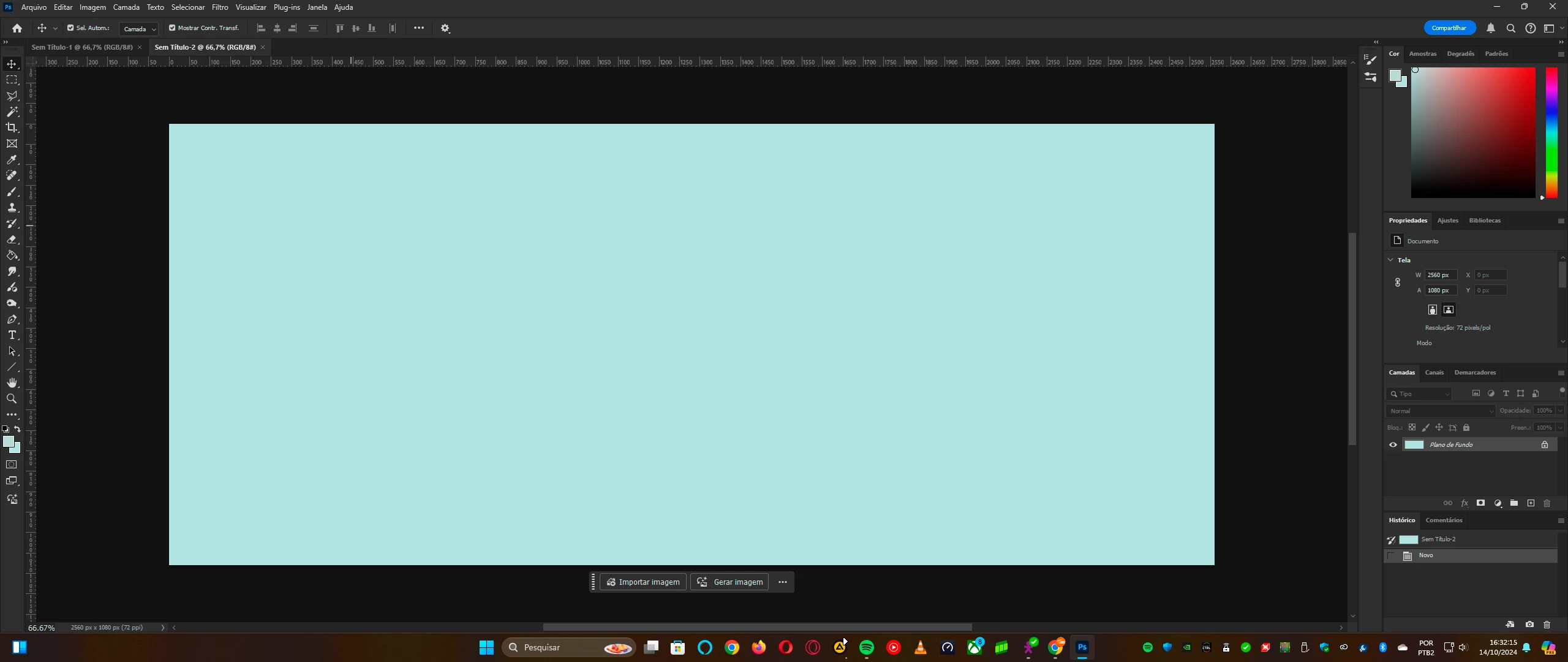
 

The white simply isn't white, but cyan. This error happened also when the version 2023 was updated to 2024. As happened in previous version, the support suggested to install the old version until the proper correction was made.


So until this new version be update, I installed the previous version, and you'll can see the colours are correct:
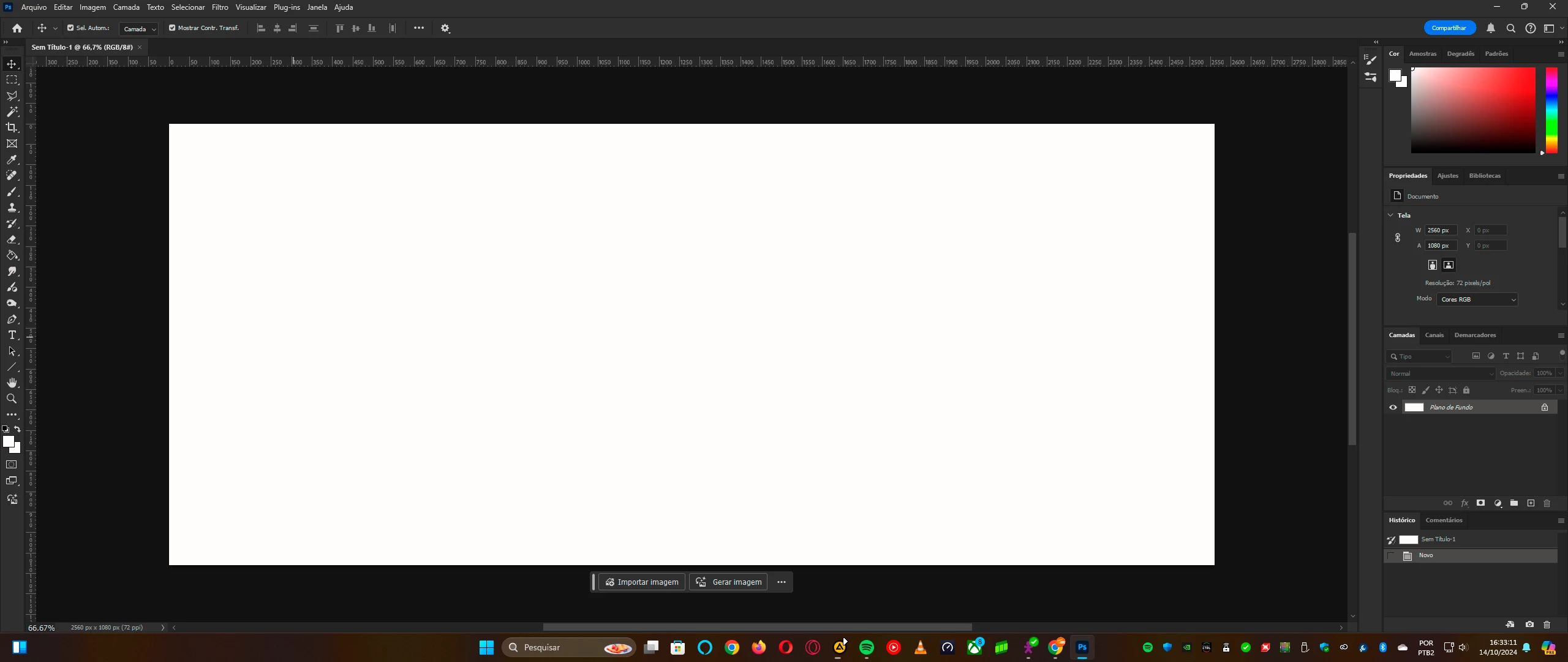
By the way, this isn't an issue of my computer neither the video card (nVidia GeForce RTX 3050)


I ask the support to see what's happening with the new Photoshop's version v26.0 released today (October 14)

14 replies

rbenettiAuthor
Participating Frequently
December 8, 2024

Yesterday Windows 11 updated to the version 24H2 and guess what? Now everything's working properly, and also using 


And also using RGB as 

Before this, the only way possible was changing to 'Monitor RGB - sRGB'


I really suspected that was a 'Windows thing' this issue

rbenettiAuthor
Participating Frequently
October 20, 2024

@D Fosse Thank you so much for the reply


I made a try here that I believe worked: 


As matter of fact the Adobe RGB was automatically set. I tried change do 'Display's RGB - HDR calibrated in August 06' (that I really did this calibration in August to improve the image quality in some apps), and now the white is correct:


Maybe I discovered by chance the solution. The calibration was made in 'Windows's HDR calibration', available in Windows (if not, available in Microsoft Store)


Thanks everybody for the attention and replies. I helped me so much to find the solution.


D Fosse
Community Expert
Community Expert
October 19, 2024

@mahabub_9109 

You misunderstand how this works. There's no way you can know that your monitor profile is fine until you've tested it.


The monitor profile is not used at all in applications that don't support color management, and there's a lot of those. They will never display entirely correctly - but on the other hand they aren't affected by a defective profile either.


The monitor profile is a standard icc profile. Still, it's more complex than most people realize, and a defective profile may work in one application, but fail in another. When that happens, it's a red flag for a bad profile.


The actual conversion from the document profile into the monitor profile is executed in the GPU in modern software. Previously this was done by the CPU. So when you turn off "use graphics processor" in Preferences, the whole profile conversion is moved to a different subsystem. That is a way to determine whether a GPU bug is responsible for the problem.


So, to sum up, there are two things you need to do before this discussion can continue:

  • replace your current monitor profile with sRGB IEC61966-2.1 (or Adobe RGB/P3 if it's a wide gamut monitor model). Relaunch Photoshop when done; the profile is loaded at application startup.
  • turn off "use graphics processor" in Photoshop Preferences.


A third possibility, when applicable, is to make sure HDR display is turned off in Windows. There was a bug there at one time, but I believe it's fixed now.

rbenettiAuthor
Participating Frequently
October 19, 2024

And just for information: I tried uninstall the new version (and also the previous), and nothing changes.


The conclusion, once clearly I see the RGB colours is clearly wrong (RGB are not RGB) is that Adobe needs ASAP release an update to fix this

rbenettiAuthor
Participating Frequently
October 19, 2024

@jane-e thanks for your reply 


I did what you said and also nothing happened:

Clearly the RGB range is not right in this version. See how this part looks in Photoshop 2024, that I said reinstalled due needs and now I have both here:


The same setup in both versions, but different results.


Adobe needs ASAP fix this issue, and also there's nothing wrong with my setup neither my display. If something was wrong, even the previous version should looks like in 2025.

Participant
October 19, 2024

It certainly isn't, just a temporary means until adobe fix it. And my monitor/profile/gpu/anything else is perfectly fine… because the images look totally fine anywhere else I open it.

jane-e
Community Expert
Community Expert
October 19, 2024

@rbenetti 


While this is not the answer to your issue, note that the circle is a little off and is not exactly in the corner. Try dragging it out of the window so you only see as much as you do in the second screenshot. 


Or use the panel menu to display the sliders and type the numbers in.


Jane


rbenettiAuthor
Participating Frequently
October 19, 2024

@gaude66Grazie per il consiglio, ma sfortunatamente non ha funzionato. Ho fatto come hai detto, come puoi vedere qui:


E se riesci a vedere, il colore rimane ciano (incollo la stampa in Photoshop 2026). Aspetterò il prossimo aggiornamento per vedere se questo problema verrà corretto. Ma grazie mille per il suggerimento.


La cosa strana qui è che nella versione 2024 tutto funziona bene nei colori corretti.

Participant
October 19, 2024

Ciao.

Avevo il medesimo problema: l'ho appena risolto, andando in Impostazioni - Gestione File e nella sezione Compatibilità File ho messo la spunta su Ignora tag profilo EXIF. Prova e poi fammi sapere. 

rbenettiAuthor
Participating Frequently
October 18, 2024

Thanks everybody for the replies and helpful tips. 


My monitor is a LG 29" LED Ultrawide Ips Hdr Freesync - model 29wl500 (full specs here). Like I said: previous Photoshop version works fine (see images) but not in the new one. And this kind of error also happened in my previous PC + monitor (that was a Samsung display), when changed from 2023 to 2024, that had very different setup I'm using today. My PC and monitor are brand new, with less than 8 months .


Here's the specs of my video card: