


Participant
September 3, 2024

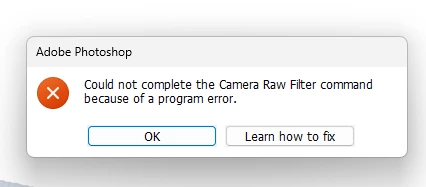
“Could not complete the Camera Raw Filter command because of a program error”
  • September 3, 2024
  • 98 replies
  • 18030 views

i m facing issue in letest photoshop..
i try all the ways, like reinstallation, older version, but still not working 

any buddy knows solution ???
please Help me...
Bhargav


[subject renamed for clarity]


98 replies

Participant
July 13, 2025

I may have found a workaround for this, but I'm not sure if it can be implemented. As the majority of posters here, my ACR stops working and displays the error message after some time of activity in PS. However, I've found that ACR still works when invoked via an action. That is, I can start recording an action, opening ACR, change some settings there, close ACR and stop recording the action. This action will play even when PS gets into the tiresome mode of not being able to open ACR from the menu or the keyboard shortcut. The problem is that I simply want to open ACR. I can't record the mere opening of ACR in an action. The button for stopping the recording of the action isn't active while ACR is open. I can stop the recording first after having closed ACR.


Does anyone know if this is possible? I.e. recording just the opening of ACR in an action.


I should add that it isn't possible to edit the action afterwards. The whole process of opening and closing ACR is shown as one step in the actions menu, and hence can't be edited.

Tele55
Inspiring
April 29, 2025

That's what I meant ... open from Bridge, without Photoshop running.

Should have said it clearer.

To come back to the original issue and phenomenon that it sometimes gives the error

and other times works fine for hours ...?!? with the same images ...

D Fosse
Community Expert
Community Expert
April 29, 2025

That's what I'm saying: ACR hosted by Bridge works. ACR hosted by Photoshop fails (when it fails).


ACR (Camera Raw) can't open or run by itself. It's a plugin that needs to run under a host application - Photoshop, Bridge or After Effects.

Inspiring
April 28, 2025

Hi D Fosse,

it finally failed again.

Yes, as you said: after having the error message, "Open" a dng from bridge = same error message

                                                                              "Open in Camera Raw" = no error, opens in ACR


But, again, the problem was never with dngs ... and ... double clicking the DNG always works fine.

Chosing "Open with ACR" with a JPG also always works.

Only with PSDs you don't have that choice. To edit a PSD in ACR again is only possible from PS > Filter ... where it fails (sometimes)

It seams that directly from Bridge to ACR always works (dngs and jpgs) but with opening PS first and then into ACR creates the problem (sometimes)

Inspiring
April 28, 2025

Hi D Fosse,

I try and try ... so far every image works (meaning to open a PSD or JPG from PS into Filter > ARC) ... no pronlems .. no error.

However ... befor I get another error ... openeing a DNG from Bridge as you described, both "Open" AND "Open In RAW" ... both open in RAW ... as double clicking does as well. This is what it always did ... "Open / Open InCamera Raw / double click" all open Camera Raw

I'll post again once I get an error.

K

PS: just as an observation I never gave to much attention to:

DNGs from Bridge - 3 options: - "Open" - into ACR with PS running

                                                      - "Open With" - into PS (default) but... is the sane as above

                                                      - "Open In Canera Raw" - opens into ACR without PS running


JPGs from Bridge - 3 options: - "Open" and "Open With" ... both open in PS

                                                   - "Open With Camera Raw" opens in ACR


PSDs from Bridge - 2 options: - "Open" and "Open With" - both opn in PS


So, to reedit a PSD in ACR is only possible from PS > Filter

while a jpg can be opened inACR from Bridge and from PS > Filter


Interesting though is that for JPGs some features in ACR are not available from Filter but only from Bridge > Open in Camera Raw (e.g. Straighten tool)

D Fosse
Community Expert
Community Expert
April 28, 2025

There, it finally broke, took about an hour this time...


OK, try this. First keep working until the ACR filter stops responding. It can take a while after launching PS. Are you getting this error message?


Once you have that error - open a raw file (not jpeg or PSD) from Bridge by right-clicking and choosing a) Open and b) Open in Camera Raw. If it is indeed the same issue, the first should not work but the second should:


EDIT: Hang on. The plot thickens. Now it started spontaneously working again here! It has never done that before! Was it because I launched ACR through Bridge, thus maybe kickstarting it back? That's something I haven't done before. This is beginning to feel like chasing ghosts...

Inspiring
April 28, 2025

Hi D Fosse,

thanks for your time.

I'll go through your comments:

Yes, I always import RAW files via Bridge, which converts them automatically into DNGs and gives them a separate folder under a choosen name. Works very well ... can't even even imagine how elso to import images from the camera.

When I want to edit them I open Bridge, click the DNG image and it opens in Camera RAW ... without Photoshop being bothered yet ... and I do an initial editing, then open in PS for further editing and finalizing as PSD.

All this works without a problem.

My problem only starts now ... and only in case I decide to want to take the PSD back into Camera RAW editor for certain features I find better than in PS. As mentioned before ... get the error message ... sometimes ... with every image ... sometimes only occasionally ... weird!

That for explaining my workflow.

Strangely, I just had a session where everything worked without errors, every image ... and I thought it's gone.

But started another session later and it was back ... every image ... excep, of course, no problems when restarting PS every time.

To your suggestons:

- can I open RAW file from explorer?

Yes, no problem. They either open in Windows Pictures (I set it that way) or ... right click and "open with" in PS ... and opens in Camera RAW. ... all as it supposed to be.

- Liquify works (with a PSD file, PS > filter> Liquify)

- Save for web (PS > export > safe for web(legacy) - NOT working! No reaction!?!


I hope this might gives you some new ideas


Thanks

D Fosse
Community Expert
Community Expert
April 28, 2025

@Klaus5F8D 

It most likely is the same problem - but it sounds like you're opening raw files hosted by Bridge, not hosted by Photoshop. This is a Photoshop issue, not a Bridge or ACR issue.


Hosting ACR in Bridge is actually a good workaround that I hadn't thought of. It won't work for the ACR filter, but it will for raw files.


I'm waiting for the ACR module to fail so I can test this, but when you need it to fail, it works as if nothing ever happened... 😉


In the meantime - can you still open raw files from Photoshop, or by double-clicking them in Windows Explorer? Can you open the Liquify filter in Photoshop, or Save For Web? They fail at the same time.

Inspiring
April 28, 2025

Hello Sameer,

I also never touched label names.

Also - In preferences you cannot change a file's name ... only general behaviour, e.g. what the colours codes mean

or the explanations for shortcuts of ratings.

File names can only be changed at the file itself - colour or stars.

So - I don't know what you are talking about ...?

Also - for the topic in general - it seams to be highjcked ...?

The issue of my post was ONLY for editing alreadt existing PSDs or JPGs via Photoshop > Filter > Camera RAW Filter!!

NOT about opening RAW files from Bridge ... no problems there!

Thanks

Inspiring
April 28, 2025

Hi dc289,

to clear this up ... it's NOT about opening RAW files (e.g. DNG, straight from Bridge).

No problems there!

Are two different issues mixed up / combined here?

It only occures with PSDs or JPGs etc. already open in Photoshop > Filter > Camera RAW Filter.

My post was NOT about problems opening RAW file! 

It's strictly about using the RAW editior for alrady processed PSDs or JPGs from PS > Filter > Camera RAW Filter

Thanks