


Participant
September 3, 2024

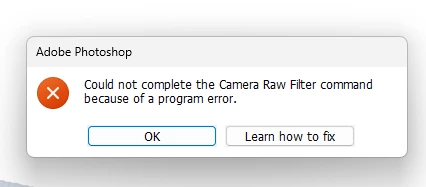
“Could not complete the Camera Raw Filter command because of a program error”
  • September 3, 2024
  • 98 replies
  • 18030 views

i m facing issue in letest photoshop..
i try all the ways, like reinstallation, older version, but still not working 

any buddy knows solution ???
please Help me...
Bhargav


[subject renamed for clarity]


98 replies

Participating Frequently
April 28, 2025

I've just started a new thread on this, hopefully to get noticed again as it is clearly affecting a number of users still.

Participating Frequently
April 28, 2025

Sorry to slightly repeat post from a while back, basically haven't been able to use PS26 since launch because of camera raw issue opening files. The first one or two raw files always open on restart and then the error message will appear and no further files can be opened, it's driving me mad at the moment!

Definitely gpu related as if disabled in preferences it does not occur.


Basic specs, Win 10 64bit, i7-9700k , amd radeon 6650xt, 32gb ram


Steps taken;

Reset preferences both ps and raw plugin, reinstall camera raw and ps, switch from latest radeon adrenaline to pro drivers all to no change. Also looked at a previous post mentioning labelling in bridge, but no custom labels are used. Also to mention was working fine in PS beta, that is now uninstalled as well.


Camera raw works fine all day long on latest version in PS 25.9.1 and all is stable.


I'm guessing it's a very strange little issue somewhere, any suggestions most welcome!

D Fosse
Community Expert
Community Expert
April 28, 2025

This is a known issue, reported regularly since 25.11, when it started. Engineering is looking closer into it (but it's hard to reliably reproduce since it only occurs after a varying time interval).


You can use 25.9, or perhaps use Lightroom Classic, which isn't affected by this.


Here's the main bug report thread:

https://community.adobe.com/t5/photoshop-ecosystem-bugs/could-not-complete-the-camera-raw-filter-command-because-of-a-program-error/idc-p/15290607/

Participant
April 27, 2025

The version of PS I'm using now is still 25.11😭

Once I upgrade to a higher version, camera raw can't be used, and the whole software is also paralyzed after a mouse click, and I can't continue to click any menu.

My computer is a 2019 macbook pro, intel core i9 ,Intel UHD Graphics 630 1536 MB. Is it related to this?

Legend
April 27, 2025

The description of your MBP is limited. Whic MacOS?


You are still running Ps 2024.

For Ps 2024, see the Photoshop 25.x system requirements for Minimum and Recommended under MacOS.

Big Sur (version 11.0) minimum; macOS Ventura (version 13.5.1). Installation is blocked on v10.15.x  | GPU with Metal support required


For Ps 2025, see Photoshop system requirements.

macOS v12*, v13, v14, v15 (Minimum); macOS Sonoma (version 14.6.1) cannot be installed on macOS v11.x (Big Sur) or earlier.

*Adobe Camera Raw (version 17.0 and later) is not supported on macOS 12.x; we recommend updating to a later version of the OS for ACR support.


What happens when you try to download and install v25.12.3? Messages?


Larry
Participant
April 28, 2025

My  system has been upgraded to the latest sequoia.  PS can be updated normally, but it can't be used when the PS is opened after the update.After opening the camera raw,mouse clicked once,I can't click other menus again. 

I don't know what's wrong😭


D Fosse
Community Expert
Community Expert
April 26, 2025

Thanks, Axel.  Engineering has picked this up and will take a closer look, but I suspect it may be tricky to backtrack this to the actual triggering event. It's not really reproducible on command.

Participant
January 21, 2025

Could not complete the Camera Raw Filter command
because of a program error.
Last version that works
Photoshop 2024 25.9.1

I followed all suggestions that I could find online without success.
I save info from all previous versions of photoshop so that I can copy such as workspaces or Plug-Ins into a new version. Looking through my latest beta version I noticed in Windows:Program Files;Adobe:Adobe:Photoshop (beta):Plug-ins an empty Generator folder and my ICO Plug-in. Just for fun I added in a vey old Plug-in Camera Raw.8bi(last modified in November 2006).
When I fired up Photoshop beta a message popped "One or more plug-ins are currently not available on your system> Don't show again).
And lo and behold Camera Raw filter works ever since.

You may try this and if you have no old Camera Raw Plug-ins you may try using any file by adding .8bi extension. Let me know if this worked for you!

Inspiring
April 25, 2025

Hi Everyone!

I noticed:

When trying to open an open image in PS (not DNG, but PSD or JPG) I get the message:

Funny though ... not every image ... not when just started Photoshop.

Actually, after I close PS and restart, the first image DOES open in RAW filter ... even the ones

that previously got the error/didn't open in RAW filter.

Maybe a couple more, but then get the error message again.

- All is updated and preferences are set as usual: Gaphic Processor ON, nothing checked in Plugins.

- No images in 16 bit!

- powerful machine, SSDs, lots of memory, free space

- PS Memory Usage set to 80%


Any suggestions what's going on?


Thanks

AxelMatt
Community Expert
Community Expert
April 25, 2025

In a first try to reset the preferences of Photoshop using the steps described here:

https://helpx.adobe.com/photoshop/using/preferences.html#reset-preferences

It's recommended to backup your settings before resetting the preferences.

See here:  https://helpx.adobe.com/photoshop/using/preferences.html#backup-photoshop-preferences


If this doesn't help try to reset the Camera Raw preferences.


If this also does't help, provide a copy of your 'System Info'. This can be get from the Photoshop menu item Help > System Info. There's a copy button in the System Info dialog. Press this button and paste the info into your next forum post.


My System: Intel i7-8700K - 64GB RAM - NVidia Geforce RTX 3060 - Windows 11 Pro 25H2 -- LR-Classic 15 - Photoshop 27 - Nik Collection 8 - PureRAW 5 - Topaz Photo
Bomber33
Inspiring
January 2, 2025

Have edited another 40 odd RAW photos without any issues.Have not yet updated to 26-2.

Bomber33
Inspiring
December 19, 2024

Greetings. Last RAW photos I did(about 35) went with out any issues.I noytice that there is another update 26-2 for Photoshop .Has anyone used it yet if so is the problem solved? Thankyou

Known Participant
December 12, 2024

Yes! his one finally helps! You're a master Sameer

Tele55
Inspiring
April 27, 2025

Hi All,

a strange thing!!

When trying to open an image from Photoshop into RAW filter, in order to use some of the features in Camera RAW ... well, it usually works, especially when it's the first time doing this after starting PS ... but often I get this:

It does NOT happen every time. When I shut down PS and restart ... it works!!??!!

Sometimes several in a row without shutting down. But then there is another with the above message.

I went to "Learn How To Fiz It" but with no avail.

Everything is uptodate and latest version.

All SSDs, lots of free space, Intel i9, Nvidia 2060, 32 GB RAM

No 16 bit images.

I'm NOT talking about opening DNGs from Bridge ... just PSDs or JPGs from PS > Filter > Camera Raw Filter.


Any suggestions?

Thanks

Participating Frequently
December 12, 2024

This issue has stopped me using v26 entrirely at the moment. Same as other reports, maybe 3-4 raw files open over 10-15 mins and then the error message comes up, restart ps and maybe works again for a few minutes. Interestingly i'm running 25.9 all day long opening hundreds of raws with no issues, I'm glad I didin't upgrade to 25.11 as it seems that's where this problem started.

Participating Frequently
December 11, 2024

I have been editing photos in Camera RAW for a few days now sometimes reopening them multiple times (to save in between my editting sessions). I have not hit the bug again so far.