


Participant
September 3, 2024

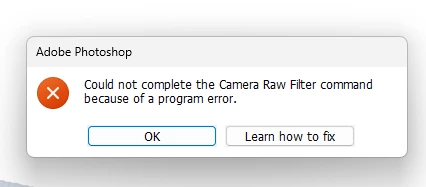
“Could not complete the Camera Raw Filter command because of a program error”
  • September 3, 2024
  • 98 replies
  • 18033 views

i m facing issue in letest photoshop..
i try all the ways, like reinstallation, older version, but still not working 

any buddy knows solution ???
please Help me...
Bhargav


[subject renamed for clarity]


98 replies

JerryandLoisPhotography
Known Participant
December 9, 2024

I wish I could report all is well, but it's quite the opposite.  I'm in the middle of editing a large set of holiday photos (one at a time), and today alone I encountered this damnable bug at least 15 times.

With each occurence, it means breaking my workflow, saving the file, quitting PS, and then resuming.  A huge time-sink when everything is extremely time-sensitive.

I have not yet looked at the comments about Adobe Bridge, that all settings there are set to default as I do not use Bridge whatsoever.

I've reset the ACR presets a few times, purged the cache a few times.  NOT helping.

Is 10 gig enough?  Do I need a lot more?

This is beyond maddening.

---------------

Current versions:
Windows: 
OS Name Microsoft Windows 11 Pro
Version 10.0.22631 Build 22631

PS:
26.1

ACR:
ver 17.0.0.2048
Raw cache: 10.0 gig, aimed at an internal SSD (LOTS of space).

Machine:
64 gig
Processor Intel(R) Core(TM) i9-14900K, 3200 Mhz, 24 Core(s), 32 Logical Processor(s)
GPU is older:  NVIDIA GeForce RTX 2080 SUPER 8gig
(about to be replaced when I have enough down time to get this done without risk to current deliverables schedule)


Participating Frequently
December 7, 2024

I'm currently editing RAW files today taking breaks in between. So far I haven't hit the bug and I opened the RAW files multiple times in Camera RAW.

D Fosse
Community Expert
Community Expert
December 6, 2024

OK - ACR has now worked flawlessly for over a week.I am completely unable to get it to fail again.


This is crazy. Computers and software don't spontaneously "heal" in my experience. And yet, that seems to have happened here. No updates from Adobe in this period.


IIRC, however, there were a couple of Windows updates this week.


Not wanting to jinx it, you can all appreciate why I hesitated to write this post... 😉 Fingers and toes crossed.

D Fosse
Community Expert
Community Expert
December 4, 2024

Agreed, reproducability is the obvious problem here. I can't even reliably reproduce it myself - it works for a long time, then suddenly fails and keeps failing until next PS launch. It can be minutes, it can be hours or perhaps even days. There's clearly a chain of events that needs to be tracked back.


But there's one smoking gun: It always works in actions, and it always works with "Edit in" from Lightroom Classic. That suggests to me that the problem is calling the ACR interface, not the basic functionality.

Community Manager
December 4, 2024

@D Fosse Understood. Since we had just solved one case for this same error we thought we could at least provide that information here in case some could benefit from it. Other than ruling out Mac cases, we have no way to know if that Bridge Label issue may be affecting some Windows users here so we felt it best to post that information.


The Windows Bridge Label issue is 100% reproducible. So this only affects Windows users unable to use Camera Raw at all.


Regarding what issue may be affecting some or most users here, the main difficulty is that for us to be able to diagnose the problem we typically need a case we can reproduce on one of our machines. Short of that, other avenues are possible but tend to be rather painful and time consuming (but we can speak of that later if necessary). So it's worth asking first if anyone has any tips or specific steps on how our team can reproduce the problem. We're happy to try whatever steps people provide. It would be great if any such information allowed us to reproduce the problem, though often in cases like this steps that reproduce the problem for a given user on a given machine do not necessraily produce the same results elsewhere (for a variety of reasons).

D Fosse
Community Expert
Community Expert
December 4, 2024

@Bruce Kaskel 

Yes, I understand it's a generic message. But this isn't random, there's a pattern.


Something changed from Photoshop 25.9 to 25.11, which is the point where this error started appearing for a lot of users. The Photoshop version is the variable here, not the ACR version.

Community Manager
December 4, 2024

The error message discussed in this thread is generic. It means that Ps has detected that something has gone wrong with Camera Raw plugin and that "something" was not caught earlier by the plugin. So the exact issue experienced by users seeing this error can vary. 


The Bridge Label issue that Sameer posted about is an issue that engineering recently resolved for a Windows customer seeing this error message. It is a Windows-only issue and so cannot possibly apply to Mac users experiencing this error, but MAY apply to some Windows users. So it is just something that Windows users experiencing this error should check. A fix for that Windows issue (related to the Bridge Labels) will be included in an upcoming Camera Raw plugin release.

Known Participant
December 4, 2024

Bonjour à la communauté, ce matin je me retrouve avec un problème d'ouverture de camera raw dans Photoshop 2025, v 26,1 et la dernière version de Photoshop beta 26.2. j'ai téléchargé la dernière version Beta hier soir. Je suis sur un macbook pro M1 de 2022, dans les préférences, le processeur graphique est bien sélectionné. A savoir que Ligthroom classic 14.1 fonctionne correctement. Est-ce que quelqu'un aurait eu ce problème, c'est arrivé d'un coup, hier tout fonctionnait correctement. Merci de votre réponse, bonne journée, cordialement

D Fosse
Community Expert
Community Expert
December 4, 2024

I always suspected this would be some weird interaction, but I did't see Labels coming 😉


I do use color labels both in Bridge and Lightroom Classic, and I remember the labels used to come in from LrC to Br all white because they used different names for the colors ("select" vs. "red"). But I changed that to match long ago, and as far as I know, none of them have ever had 1-character names.


Anyway - as of now, ACR hasn't failed a single time in days (!). No idea why it suddenly seems to work, I don't think there have been any updates in the meantime.

Participating Frequently
December 4, 2024

I have never touched label names ever... As for S3 sleep, I'm not sure what it means, despite my looking at it, but pretty much all power saving functions on my desktop is disabled and that computer never gets put on sleep. I turn it on when I need to use it and for photo editing, and it gets shutdown once I'm done. I use a laptop for everything else.