


Participant
September 3, 2024

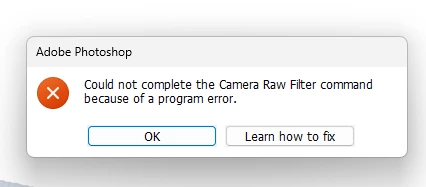
“Could not complete the Camera Raw Filter command because of a program error”
  • September 3, 2024
  • 98 replies
  • 18034 views

i m facing issue in letest photoshop..
i try all the ways, like reinstallation, older version, but still not working 

any buddy knows solution ???
please Help me...
Bhargav


[subject renamed for clarity]


98 replies

AlanGilbertson
Community Expert
Community Expert
December 4, 2024

Hi @Sameer K. That would be a very rare case, I suspect. How many people change their label names?

AlanGilbertson
Community Expert
Community Expert
December 4, 2024

@ilikesnowflakes It's specific to S3 sleep. Shutdown (Ps would be shut down also) and hibernate don't trigger it.

Sameer K
Community Manager
Community Manager
December 3, 2024

Hi All! The specific error could appear for a broad number of reasons. The team has identified a Windows-only workaround for this issue. 

If you already have Adobe Bridge on your Windows machine, try this: 

  • Go to Edit > Preferences > Labels & Ratings > Rename & make sure no labels have a 1-character name. 


Let us know how it goes. Thanks! 

Sameer K

Bomber33
Inspiring
December 2, 2024

Greetings

Have just edited 16 RAW photos without any issues.Photo opened directly into Photoshop.Highlights and shadows edited along with a bit of clarity.Then saved for web.Have got some more to edit and will advise if ok etc.

Participating Frequently
November 27, 2024

No idea if the problem has to do with sleep because I do my main editing on my desktop computer, which is shutdown every day. 

AlanGilbertson
Community Expert
Community Expert
November 26, 2024

@D Fosse I can work for days** in the GA, and at least several hours (>5) in the beta. I do all my production work in GA, and my tyre-kicking, noodling, and general mayhem in the beta. 😸


** That is, unless it does the "crash after sleep" thing. This has been an issue for about four years, whereby if Ps is running in the background, the computer enters S3 sleep and some hours pass (e.g., overnight), Ps will crash when the system wakes.

D Fosse
Community Expert
Community Expert
November 24, 2024

@ilikesnowflakes 

Yes, the exact time it fails seems random. Apparently you have a more severe case if it consistently fails immediately.


On my two machines, it always works correctly for at least a few minutes after launch. Sometimes it works for an hour or even two. But eventually, at some point, it fails.


So there is some event in the system that triggers it. I suspect it can be difficult to track this down. I also suspect that this affects more users than have posted here, but they just haven't had Photoshop running long enough to see it. If you process raw files in Lightroom, and don't use the ACR filter much, you won't see it.


Now, I have noticed another curios thing. When ACR fails to open, so does Save For Web. But as I said above - they both work in actions (I mostly use SFW in actions). So the functionality is intact - the problem is calling the interface.

Bomber33
Inspiring
November 17, 2024

Hi folks.

I took 3 photos in RAW last night and have just tried to edit them but keep getting the message in the title.Never had any troubles like this before.Is this a bug in the recent update to Camera Raw.I,m using Photoshop v26.0

Camera Raw V17.01.

This has only appeared since the latest Camera Raw update 4 days ago.Thankyou in advance for any help/fixes to this problem.Seem to be able to open JPEGS ok.

Windows 11

1 tb ssd

32gb RAM

System compatible with Photoshop.

nikunj.m
Community Manager
Community Manager
November 18, 2024

Hi, we're sorry about the trouble! 

Please try re-installing Camera raw using the installer available here: https://adobe.ly/4ftOBTJ


Let us know if this helps! 
Thanks,
Nikunj

Participating Frequently
November 24, 2024

I already posted a system log earlier. Received a Photoshop update today on my Windows 10 desktop. I went to go edit RAWs immediately upon opening Photoshop, but kept getting the same errors. It won't load. So it seems the glitch is random. Someone earlier said it seems to stop working after like 10 minutes or more, but it doesn't seem to be the case on mine. However i got the popup for the Black Friday Deal thing again despite me having just a few days ago told it to not show for another 7 days. I hope you guys can fix it soon, or I feel I have to ask CS for a complementary extension on my subscription. I'm not able to use the software I'm paying for. I'm seeing on another forum some people complaining about this up to a month earlier.

D Fosse
Community Expert
Community Expert
November 23, 2024

@AlanGilbertson 

Two quick questions: One, I see you're using the beta (26.2). Are you also using the production version?


Two, how long can you have Photoshop running and still confirm everything's working? On my two machines it usually works for up to an hour before it fails.

Known Participant
November 23, 2024

Aprés la dernière maj de Photoshop, CR pour l'instant refonctionne chez moi.