



Mr.Potato Man
Participant
October 21, 2024

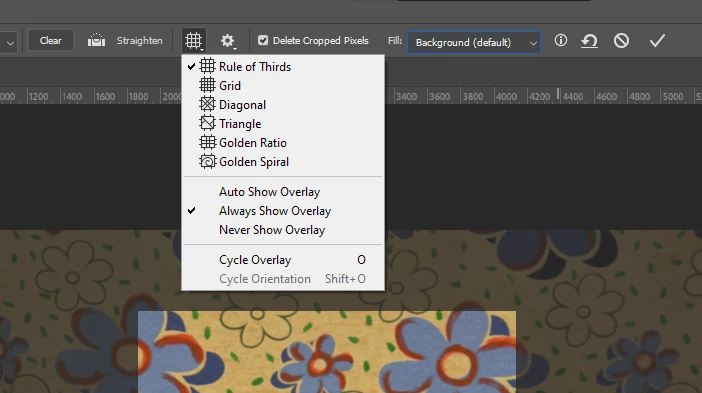
Crop tool not showing guide

  • October 21, 2024
  • 5 replies
  • 423 views

Greetings!  
I've been trying to fix this following an older post talking about "forcing" a config reset at the start or by properties menu.  
Photoshop is Updated to the 2025 for the sake of testing but it does not matter, I can't see the crop guide no matter what. 

Any idea about this ?  (Screenshot at the end)

Also, sorry if there are major spell issues, not my main language. 

Thanks in Advance!
 

5 replies

Mr.Potato Man
Participant
October 23, 2024

Indeed! I have already reseted preferences and re-installed the app. 

What I noticed, is the following:

- Crop toll doest not show any rule/guide. 
- Preferences seems to not affect the functionality even  resetting them
- NOT MINOR POINT, if I hover the cursor over extras while using crop tool, it shows the rule/guide for crop till I restart PS and had to do it again. 

This is the most accurate solution by now and, even if annoys me, it works. 

Potato~
Jeff Arola
Community Expert
Community Expert
October 23, 2024

 You did reset the Photoshop preferences?

https://helpx.adobe.com/photoshop/using/preferences.html


With the Crop Tool enabled as in your screenshot, if you go to View is Extras checked?


Mr.Potato Man
Participant
October 22, 2024

Thanks for the answer! Where we work, when something like this happens, it's called a bug or a glitch, but it is not the point here. I would like to get a solution or find one. 

Problem is happening since 25.9 If I'm not wrong. With my previous system happened the same before 26.0 and never used beta versions. 

Previous system specs: 

i7 6700
Gtx 1060 
16Gb ram 
Kingston 200Gb SSD
Windows 10 Home 22h2

Potato~
Bojan Živković11378569
Community Expert
Community Expert
October 22, 2024

I have no issues running version 26.0.0 of Photoshop on Windows. That relates to your machine, not a bug. I can't determine what the issue might be at the moment, but generally, it's not a bug.

Mr.Potato Man
Participant
October 21, 2024

Tried this with no good results => "Photoshop 2022 Crop Tool Glitch"  

In case of need: 
I5 14600kf 
RTX 3070
16Gb Ram 
Windows 10 Home 22h2
All the Adobe Apps are installed by default (C:)  Kingston M.2 

Potato~