

luisnbispo
Participant
December 14, 2022

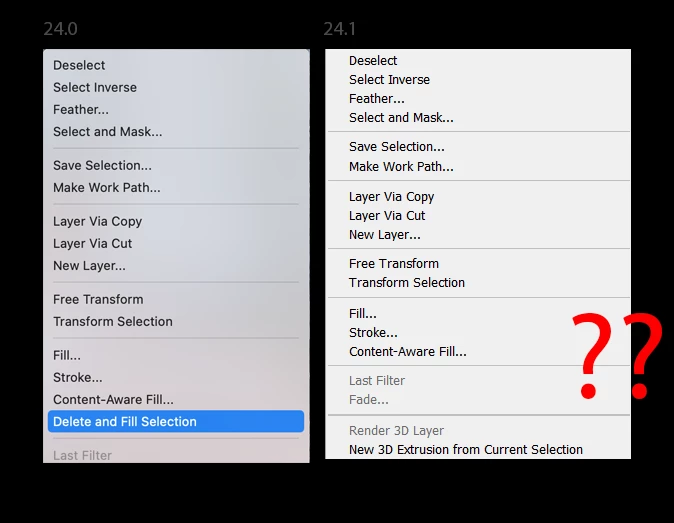
P: 24.1 - Where has Delete and Fill context menu gone?

  • December 14, 2022
  • 84 replies
  • 18687 views

I just updated photo shop today two version 24.1 and I have noticed delete and fill has been removed. This is really disheartening because it works so much better than content aware fill. Normally you can right click on the selection to access this, but I have looked through all the menus and have not found it since this update.


This topic has been closed for replies.

84 replies

Known Participant
December 28, 2022

I have the same problem, and SHIFT+DELETE doesnt solve it, it just brigs up the fill box. Content aware takes too long for my purpose.

Known Participant
December 28, 2022

I have tge same problem 😞

Known Participant
December 27, 2022

Con questo Aggiornamento 24.1 non esiste più ELIMINA e RIEMPI e non si apre più la Finestra MATERIALI. Entrambi erano molto utilizzati ed apprezzati e non ne capisco il motivo........ come si fa a ripristinarli????


jane-e
Community Expert
Community Expert
December 30, 2022


@D.Calafato wrote on 27 December:

With this Update 24.1 there is no longer DELETE and FILL and the MATERIALS window no longer opens. Both were very used and appreciated and I do not understand why........ How do you restore them?


This is a known issue and has been reported. I've moved your post to the primary thread, which will be updated when there is a fix. Until then, you can revert to 24.0.1.


Jane


Known Participant
December 27, 2022

Dopo l'aggiornamento di Photoshop 24.1 non si riesce più ad applicare due fuzioni:

1. MODIFICA - Elimina e riempi la Selezione

2. FINESTRA - Materiali ( esiste ancora il nome, ma non si apre più la finestra)

Perchè?????

Known Participant
December 27, 2022

That's exactly what it is. Let's say you a image of a ball on the street, when you make a seceltion of the ball and then press delete and fill, PS removes the ball and creates the street instead of the ball. So it's like content aware but much more effective.

HooliganImages
Inspiring
December 27, 2022

@Sarwat5E95 how does it choose the background?  Seems to me its just Content Aware without any user input.  Like autopilot or more the AI implementation.  

Known Participant
December 27, 2022

Delete and fill is so much better, it removes the selection and replaces it with the background with one click.

HooliganImages
Inspiring
December 27, 2022

Ok now what I would like to know is what is the actual different between Delete and Fill and Content Aware Fill?   I'll wait for a fix yet I would like to understand how the program treats the two differently?  

Known Participant
December 26, 2022

The new feature delete and fill selection doesn't show up when i select something. I have the latest version of PS. How can i fix that? 

Inspiring
December 26, 2022

I FOUND IT !!

IT IS  > 24.0.1 < !!