



TenTin
Known Participant
June 24, 2023

P: "Achieve non-destructive brush painting" doesn't work! Photoshop 24.6 Stable (not the Beta)

  • June 24, 2023
  • 11 replies
  • 860 views
This topic has been closed for replies.

11 replies

TenTin
TenTinAuthor
Known Participant
September 23, 2023

It works in 25.0😏

Jeff Arola
Community Expert
Community Expert
September 19, 2023

I don't see this in the What's new in photoshop 2024 or documented anywhere on what kinds of

layers are affected and how it's supposed to work.

https://community.adobe.com/t5/photoshop-ecosystem-discussions/photoshop-25-0-amp-photoshop-on-the-ipad-5-0-are-now-available/td-p/14080837


Can we please have a preference to turn this off.

Pete.Green
Community Manager
September 18, 2023

In 25.0, this bug should be resolved...Please test it out and let us know if it's working for you!

TenTin
TenTinAuthor
Known Participant
June 26, 2023

I don't consider this one as a bug! With the last two update releases, I realized a synchronizer was needed between the "Product Release Team" and the "Release Features Writers Team"! 🥴 

CShubert
Community Manager
Community Manager
June 26, 2023

Thanks everyone, will pass this on to the team.


davescm
Community Expert
Community Expert
June 26, 2023

@CShubert  can you take a look at this one. The release capabilities in 24.6 do not match the documentation - it looks like one or the other is out of step


Thanks

Dave

J E L
Community Expert
Community Expert
June 26, 2023

@davescm, thank you, Dave! Then this is indeed a bug. Even though I couldn't get it to work based on the Adobe Helpx article either, I thought I was reading the instructions wrong. @TenTin, thank you for pointing this bug out. Hopefully it will be added to the list of fixes for the next release.

davescm
Community Expert
Community Expert
June 25, 2023

@J E L  The new feature is supposed to automatically add a layer rather than prompting that the layer needs to be rasterised, or requiring you to open an SO.

https://helpx.adobe.com/photoshop/using/whats-new/2023-4.html
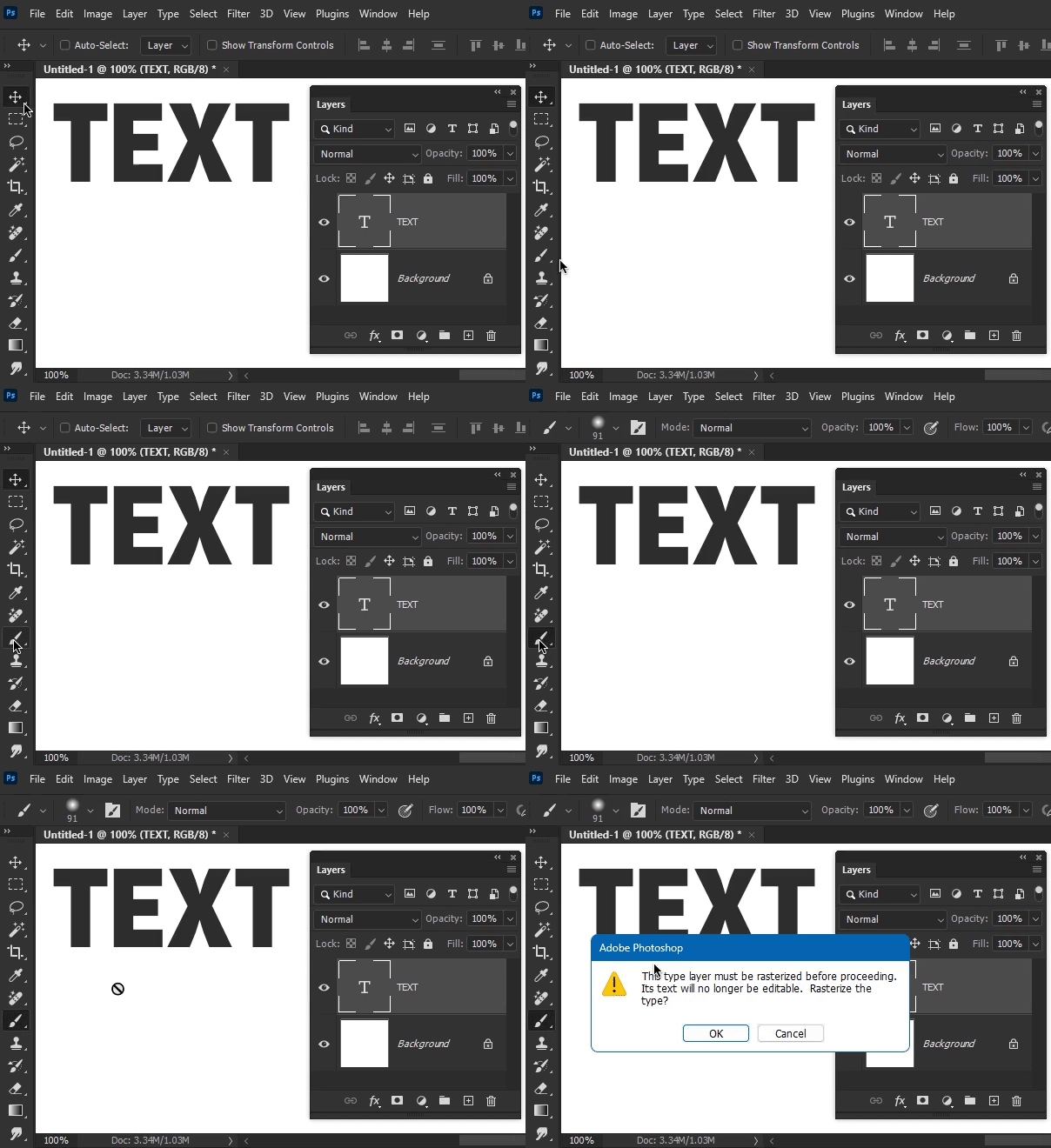
 

Unfortunately, despite being in the documentation, the feature does not seem to be active in the new version 24.6. It was raised in another thread that I can't find right now, if I do I'll link it.


Dave


Edit : It was mentioned in this thread https://community.adobe.com/t5/photoshop-ecosystem-discussions/ps-v-24-6-is-out/m-p/13881103#M739843


Dave

J E L
Community Expert
Community Expert
June 25, 2023

@TenTin, I sincerely read your title, and your post, several times. I admit confusion and humbly ask that you rephrase your question. Because non-destructive brush painting does work in Photoshop 24.6 Stable… if you convert the layer to a smart object. Which I attempted to point out in my third pass. My apologies for not being able to assist you with your question so far.

TenTin
TenTinAuthor
Known Participant
June 24, 2023

Did you read my post title (!)?