


Participating Frequently
May 24, 2012

P: Acrobat offsets raster objects in after editing in CS6

  • May 24, 2012
  • 24 replies
  • 752 views

I tried on two different machines os windows 7 it in acrobat 8, 9.51, 10.1 versions, also pdf document version from 1.3 to 1.7.
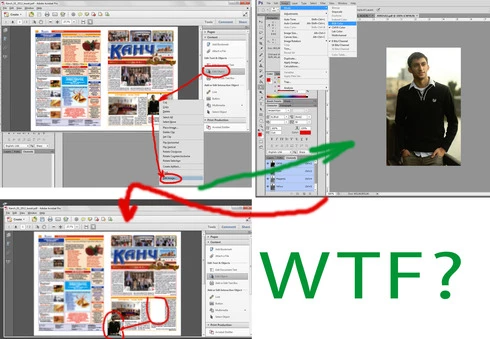
Problem: when choose "Edit object" tool, choose image>right click>Edit image. Image opening in photoshop CS6, after any editing for example change color model, saving and closing, in acrobat position of image changes, often to bottom and left corner of document.
If do such actions in Photoshop CS5, everything is ok, position of object after editing is constant
Thanks in advance and good luck
This topic has been closed for replies.

24 replies

Inspiring
June 6, 2012
We really don't know. There could be any number of things that Acrobat might have added as metadata and Photoshop not know about, or Acrobat be misreading, or ....
But Acrobat is the only one with the full knowledge, and the ability to debug this. Even if it was a bug in Photoshop - we wouldn't know where to start until Acrobat debugged it on their side.
Inspiring
June 5, 2012
In addition to this, if the image in the pdf is "rotated" (i.e. I have a pdf with a picture of a car that is upside down) and I use the touchup tool to edit the file in Photoshop CS6, the modified image does NOT retain is rotated state! When sent back to acrobat it "un-rotates"! Once again this ONLY happens with Photoshop CS6

-Marc
Inspiring
June 5, 2012
Chris, I understand your point and will be happy to post in the acrobat forums...

I was thinking the same thing as you but what then would explain why this behavior ONLY happens with Photoshop CS6? Illustrator CS6 works fine BTW. Do you think PS CS6 is somehow removing information from the PDF content steam that was previously retained? PS6 is seemingly introducing something to the image that acrobat doesn't know how to interpret?

When I keep all the other variables exactly the same and I use Photoshop CS 5.5, 5,4,3, or 2, everything works fine with both Acro 8,9 and 10. As soon as I change my touch up tool to Photoshop CS6 then it goes wonky.

Now for the record Acro8 and Acro9/10 display different behavior with Photoshop CS6. When touching up an image with Acro8 the image comes back from Photoshop and anchors itself to the lower left hand corner of the document just like the example above. (Essentially all position information is lost). Using Acro9/10 the image comes back from Photoshop CS6 and stays anchored on it's original lower left but if re-sized it does not retain it's original content box definitions. (In layman's term if I take a 1"x1" image send it to PS CS6 and change it's size to 2"x2", it would normally squeeze the 2"x2" image back into the 1"x1" image area)

Any thoughts before I start hound the acrobat folks?
Inspiring
June 5, 2012
Photoshop can't be the source of the problem since Photoshop doesn't know anything about the Acrobat layout. Acrobat is the only application here that knows about the position of the document, and the only one that could get it confused.

No, the best place to post your results would be on the Acrobat user forums ( http://forums.adobe.com/community/acr... ), where the Acrobat team can see them and work with you to figure out the problem in Acrobat.
Inspiring
June 5, 2012
I can verify that this seems to be a Photoshop CS6 issue NOT acrobat. I discovered this bug 2 days ago and have been testing like mad and my results point to PS6 not acrobat. I can reproduce this across different versions of Acrobat (8,9, and 10), across different OSes (XP, Win7, and OSX) and have tested using CS 2,3,4,5,5.5 and 6. Photoshop CS6 is the ONLY version that displays the above behavior.

I would love to upgrade and deploy 90 CS6's to my organization this year but cannot do so until we get this fixed. Is this the best place for me to post my results? Would a video be more helpful to explain the issue?
Inspiring
May 25, 2012
Thank you for the files. Hopefully the Acrobat team can get to the bottom of this bug.
uran1cAuthor
Participating Frequently
May 25, 2012
i dont change image size, just clicking save item
http://dl.dropbox.com/u/17492325/A9R5...
try to open both files in ai or acrobat and ps
Inspiring
May 24, 2012
Photoshop doesn't change dimensions unless you explicitly change them (image size).

This still sounds like it must be an Acrobat bug.
uran1cAuthor
Participating Frequently
May 24, 2012
dimensions changes in ps so it isnt acrobat. its wrong saving with cropping to image bounds instead keeping artboard bounds of tmp file, and when dimensions are different then position changes from primary (sorry for bad english)

uran1cAuthor
Participating Frequently
May 24, 2012