


Participating Frequently
May 24, 2012

P: Acrobat offsets raster objects in after editing in CS6

  • May 24, 2012
  • 24 replies
  • 752 views

I tried on two different machines os windows 7 it in acrobat 8, 9.51, 10.1 versions, also pdf document version from 1.3 to 1.7.
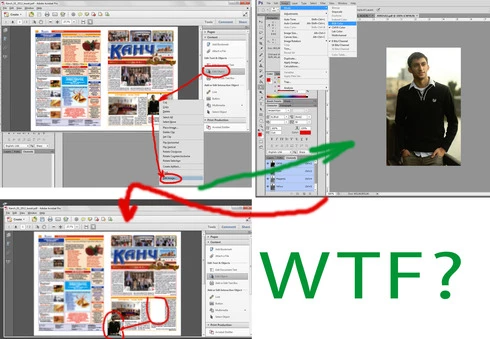
Problem: when choose "Edit object" tool, choose image>right click>Edit image. Image opening in photoshop CS6, after any editing for example change color model, saving and closing, in acrobat position of image changes, often to bottom and left corner of document.
If do such actions in Photoshop CS5, everything is ok, position of object after editing is constant
Thanks in advance and good luck
This topic has been closed for replies.

24 replies

Legend
May 24, 2012
Hi Uranic,

I just tried to reproduce this - but couldn't with Acrobat 10 and Photoshop CS6 on Mac 10.7.4.

Would it be possible to post your problematic PDF. I can forward to the Acrobat team if I can repro.
Inspiring
May 24, 2012
I can't tell what you're trying to show in that second image: you edit in Photoshop, add a gradient map, and Acrobat picks up the changes like it should.

In the first image you showed a bug in Acrobat, where the edited image was not kept in it's proper location. The Acrobat team will have to solve that issue in Acrobat.

Again, Photoshop has no knowledge of the position of the image within Acrobat -- Photoshop just sees and edits the image file.
uran1cAuthor
Participating Frequently
May 24, 2012
Inspiring
May 24, 2012
Photoshop is just editing the image.
Photoshop doesn't know anything about the position of the image on a page.

Acrobat would be responsible for the position of that image on the page -- so you need to ask the Acrobat team what is going on and why their behavior changed.