Participant
April 29, 2025

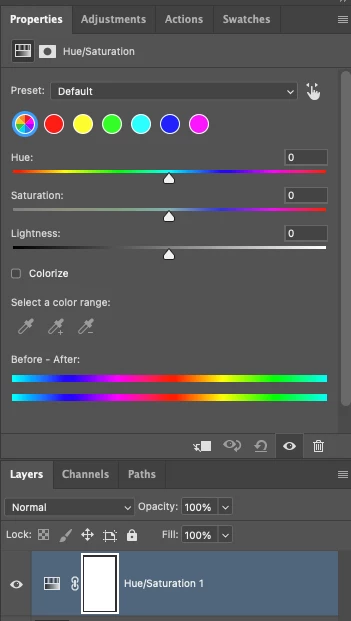
P: Adjusting layer properties doesn't work for Hue/Saturation/lum. HSL layers

  • April 29, 2025
  • 68 replies
  • 12214 views

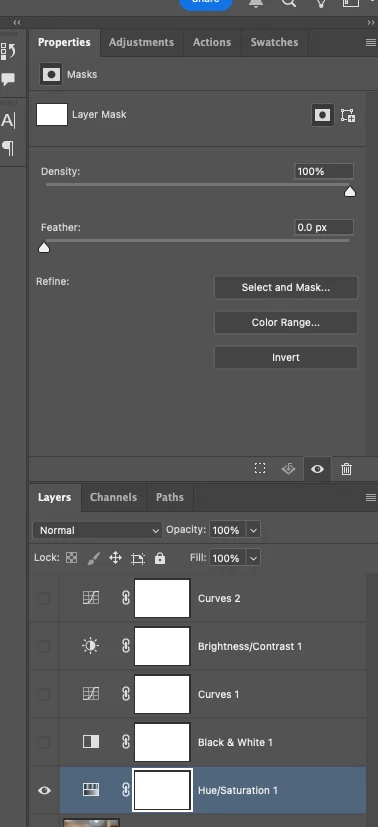
The tab to click on and change the properties for an adjustment layer randomly disappears. Quitting and re-opening the app solves the issue, but it will happen again within minutes, usually when switching between different projects or different app on the computer. 

On Photoshop v26.6 - Mac Mini M4 pro, 32gb ram, 1tb ssd.


Any help would be appreciated!
ss

68 replies

Participant
May 10, 2026

This has been going on for so long… I will have completed Grand Theft Auto 6 before they fix this! It happens constantly and this is a tool I use all the time! Pull your fingers out!

Participating Frequently
May 7, 2026

This has been an ongoing thread that Adobe keep stating they have acknowledged, yet its been nearly a year without a fix.

You have had the entire community tell you over and over again how to replicate this bug.

Its a vital tool as per post

It requires a full reboot of the software, in 2026, to sort, this is inexcuseable.

I want to know why no one from Adobe is actually doing anyting about this. Who signed this off as acknowledged? Do you know you have to actually you know, go then do something, or it sits in limbo? Thats kind of what acknowledgement means. 

Ive posted about this myself at leats 5 times now. Everyone is fed up with the lack of action.

For the 50th time, seeing as it keeps getting ignored, this bug happens when layers are merged. then the tool breaks. go into the software, duplicate your layer, then merge them, then try make a hue saturation layer. 

Its the easiest bug to replicate. A year of investigation, or lack of.

D Fosse
Community Expert
Community Expert
March 28, 2026

Sounds like corrupt preferences. Resetting preferences returns the application to clean, out-of-the-box factory state.


Corrupt preferences can cause erratic behavior that usually looks like application bugs. Preferences are vulnerable to corruption because they are rewritten on every application exit.

Chris 486
Community Expert
Community Expert
March 28, 2026

adding on to ​@D Fosse response, here are the adobe instructions to do that.

Reset preferences

Robert________
Participating Frequently
March 28, 2026

Sometimes when I add a hue/saturation adjustment panel I am given a “mask” layer, instead of the H/S/L adjustment. I need to stop what I am doing and reset photoshop in order to get the adjustment panel. “Updating Photoshop” does not fix the problem. I’ve been dealing with this for months.

Creative Director 1
Participant
March 17, 2026

Have to reboot photoshop EVRY time to get this to work. Ridiculous.

Participant
March 13, 2026

I’m having this issue in the latest version, I see that this post is 10 months old. How is this bug still active?

Community Expert
February 25, 2026

As I see in your screenshot the properties panel shows the settings for a mask. What happened if you click on the mask and the back again?

Try to create a new document and insert a hue/saturation layer. what happened?

As a first try I would try to reset the preferences to the default settings and the try again.


My System: Intel i7-8700K - 64GB RAM - NVidia Geforce RTX 3060 - Windows 11 Pro 25H2 -- LR-Classic 15 - Photoshop 27 - Nik Collection 9 - PureRAW 6 - Topaz Photo AI
PixelDeluxe
Known Participant
February 25, 2026

Unfortuately, when I click the mask and go back again the controls are not visible. I’ve had to setup then copy and paste an existing Hue/Sat layer and place it where I want in the layer stack - when it is placed, the Hue/Sat controls disappear.

It’s been hit and miss whether this happens or not, it was happening on some PSD documents and not on others. I’ll try resetting the preferences if it keeps happening, but Adobe, this should not be happening at all.

It seems as though Adobe have merged my thread with this one now, it’s the same issue.  ​@AxelMatt 

PixelDeluxe
Known Participant
February 25, 2026

I’m getting this in 27.4 on Windows 11 too.

PixelDeluxe
Known Participant
February 25, 2026

When a new Hue/Saturation layer is selected, the properties to adjust it don’t appear in the Properties panel. Using Photoshop version 27.4.


February 22, 2026

Adobe, what's wrong with you? In this thread, you confirmed that you were able to reproduce this bug, but nothing happened, and the bug hasn't been fixed. The Hue/Saturation layer still can't be used.

@Aleke  @CMass @Srishti Bali @Anshul_Saini ​@Sameer K ​@Srishti Bali