Participant
Apr 29, 2025 8:57 AM UTC
In Development

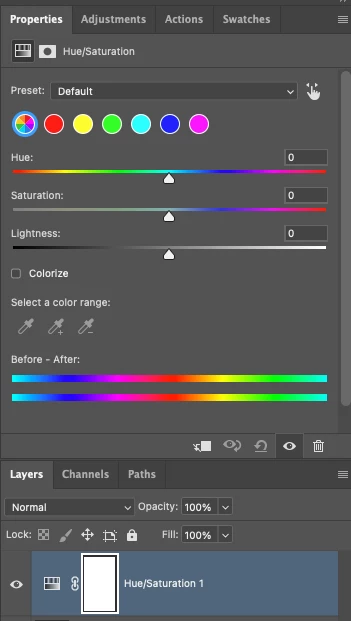
P: Adjusting layer properties doesn't work for Hue/Saturation/lum. HSL layers

The tab to click on and change the properties for an adjustment layer randomly disappears. Quitting and re-opening the app solves the issue, but it will happen again within minutes, usually when switching between different projects or different app on the computer. 

On Photoshop v26.6 - Mac Mini M4 pro, 32gb ram, 1tb ssd.


Any help would be appreciated!
ss
Pinned Reply By Srishti Bali

Hi All,


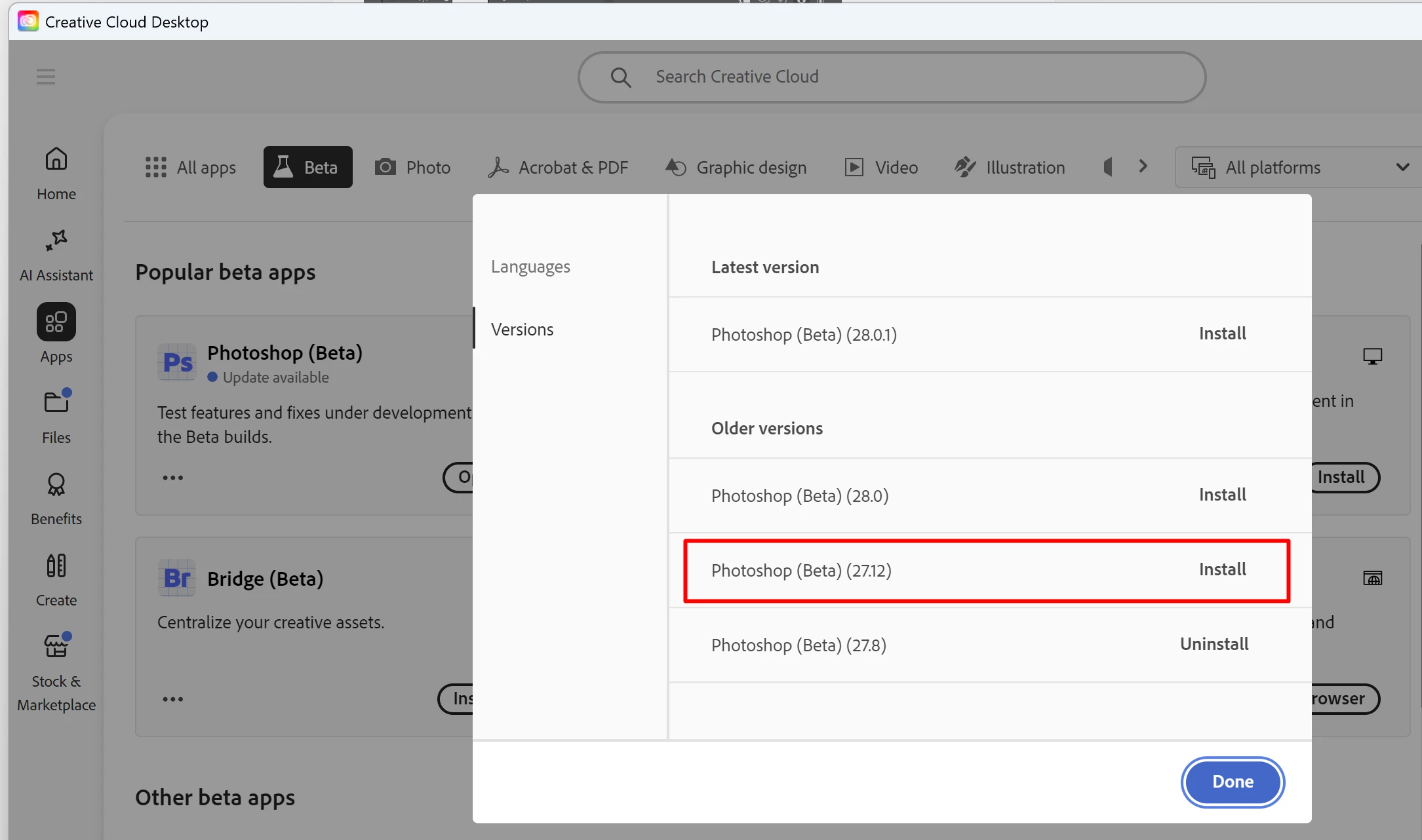
We'vetried to fix this issue in the recent beta release (27.12). Please give it a try and let us know how it goes.


147 replies

Participant
Jul 1, 2025 2:53 PM UTC

Also still having this issue with 26.8

Translate
Participating Frequently
Jun 24, 2025 7:55 PM UTC

I haven't noticed any rythm or reason for the bad layers. Only that once a bad adjustment layer appears, all subsequent hue/sat adjustment layers are also bugged (i.e., with mask tabs, but no property tabs). Relaunching PS, any file works fine and new adjustment layers work... until at some point another bad one crops up. I could send a file in which this has happened, but they're quite large and I do not hold copyright to the images... they'd be secure?

Translate
Known Participant
May 30, 2025 4:56 PM UTC

Attached a video example. Project A Loads both Hue/Sat and Mask properties no issue. Project B loads Hue/Saturation as a Mask only layer and won't display the layer propertiers to adjust, no matter what.

Inconsistently happens in 16bit and 32bit projects, couldn't trigger it in 8bit projects.

Translate
Anshul_Saini
Community Manager
Community Manager
May 30, 2025 5:17 PM UTC

Hi @Angel_Leyenda,


Thanks for reporting this issue.


To help us investigate further and escalate this properly to the product team, could you please share the following:
 1. A sample PSD file where this issue occurs (preferably “Project B” as mentioned).
 2. Your system information from Photoshop: Go to Help > System Info and copy the full output into a .txt file.
 3. Any specific steps (if known) that you take before the adjustment layer becomes non-functional.


Once we have this information, we can investigate further what’s causing this and share it with engineering for a closer look.


Appreciate your help in narrowing this down!

Best,

Anshul Saini

Translate
Participating Frequently
May 28, 2025 5:39 PM UTC

PS 26.7.0 running on Mac OSX Sequoia 15.4.1:


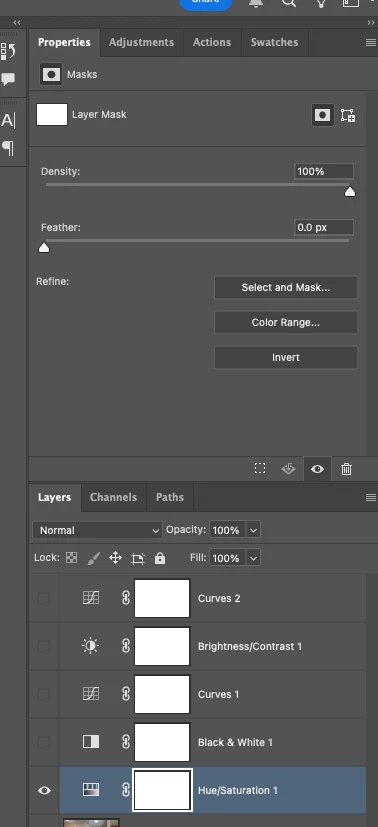
Creating a new Hue/Sat adjustment layer intermittently results in a layer whose Properties panel includes ONLY a mask, and no properties. 

PS must be re-launched in order to access the hue/sat controls. 


Additionally, the "direct selection" tool can on longer be selected by use of a keyboard shortcut. I.e. the key board shortcut is in place, but the key fails to select the tool. 

Translate
Srishti_Bali
Legend
May 28, 2025 8:13 PM UTC

Hi @antonioi21376345


Sorry to hear you're experiencing this issue. Has this issue started occurring after the recent release? I recommend resetting Photoshop preferences to see if that resolves the problem.

Before doing so, please make sure to back up your preferences, as resetting will restore everything to default settings.


Steps are shared here.


Regards,

Srishti

Translate
Participating Frequently
May 27, 2025 6:09 PM UTC

Hi there

I don't know in which comunity I'm supposed to post this.

I'm having this bug with photoshop Hue And Saturation. It does not happen all the time so I don't know the pattern/reason. The change color is all white, and the properties box does not have any colors. I don't know how to explain the issue as English is not my first language. I attached a screenshot. 

Translate
MassC
Legend
May 27, 2025 10:36 PM UTC

Hey @Monroe23977549yy9g, 

Try clicking on the hue adjustment layer, not the mask, and select the preset to default. Does that help? 


^CM

Translate
Participating Frequently
May 27, 2025 11:12 PM UTC

Hi CMass

If you check the screenshot, you'll see that I'm clicking on it. This was the first thing I tried unfortuntely. It didn't work

Translate
Srishti_Bali
Legend
May 26, 2025 5:20 PM UTC

Hi @Sam Singleton @LEMONardo 


Sorry to hear you're facing issues with the adjustment layer. We recently addressed similar problems in our latest release (version 26.7). I’d recommend updating to this version and letting us know if the issue persists. Looking forward to your response!


Regards,

Srishti

Translate
Participating Frequently
May 12, 2025 8:10 PM UTC

Before the most recent update I ran, when working with a Hue/Sat Adjustment Layer, any time you clicked on the layer you would see the Main/Defualt/Master/All colors view, you could then switch to and modify a channel, but when you came back to the layer it would take you to All Colors page again.


Now, when you navigate to a different channel, leave the layer, come back, it will just be on the last channel that was open (not the last channel that was modified) until you close the file.

This means that I can never assume I know which channel is active when I click on a Hue/Sat Layer, which sucks when you're trying to work quickly and in a flow state.  Yeah, clicking off the layer and back when you were in a specific channel is anoying, but not functioning in a realiable and consistant manner is much more anoying.


Please rethink this functionality.  It needs to work in a more predicatable way.


PS 26.6.0, MacOS 15.4.1


[Six topics that do not apply removed by moderator]


Translate
c.pfaffenbichler
Community Expert
Community Expert
May 14, 2025 7:04 AM UTC

Could you post screenshots just to make sure? 

Hue/Saturation does not operate on channels per se, so what do you mean by »which channel is active« exactly? 


If I understand correctly the old behaviour (displaying »Master« in the Properties Panel on reselecting the Hue/Saturation Layer) did not indicate the last edited range, either, so how would that be better than the current one? 

Translate
Participant
May 9, 2025 3:39 PM UTC

This is an intermitent problem for me running photoshop 26.6.0. When making a Hue/Sat adjustment layer the tool in the Properties panel will only show the mask adjustments and not the Hue/Sat tools. Restarting the program seems to fix this issue for a time and then when swtiching between adjustment layers it occurs again.


Translate
melissapiccone
Community Expert
Community Expert
May 9, 2025 4:26 PM UTC

Try resetting your preferences. 

Translate
Melissa Piccone | Adobe Trainer | Online Courses Author | Fine Artist
Participant
May 9, 2025 4:41 AM UTC

Latest PS 2025 intermittant bug issue with Hue Sat adjustment layer. 

Loading a new Hue Sat adjustment layer into a layer stack, intermittantly the H/S layer does not show the adjustable propeties as it should ie the properties area is blank. The ajustable Hue Sat propeties is only visible and accessible once you quit PS and restart. 

Translate
Community Expert
May 9, 2025 6:10 AM UTC

In a first step try to reset the preferences of Photoshop using the steps described here:

https://helpx.adobe.com/photoshop/using/preferences.html#reset-preferences

It's recommended to backup your settings before resetting the preferences.

See here:  https://helpx.adobe.com/photoshop/using/preferences.html#backup-photoshop-preferences


If this doesn't help, try to disable the option to "Use Graphics Procesor" from Photoshop by going to Preferences, then Performance. Once done, quit & relaunch Photoshop to check if that helps.

If it helps, you can check out the steps suggested here:  https://helpx.adobe.com/photoshop/kb/troubleshoot-gpu-graphics-card.html


Translate
My System: Intel i7-8700K - 64GB RAM - NVidia Geforce RTX 3060 - Windows 11 Pro 26H2 -- LR-Classic 16 - Photoshop 28 - Nik Collection 9 - PureRAW 6 - Topaz Photo AI
nazameijide
Participant
May 8, 2025 2:57 PM UTC

Hola a todos,

Actualicé hace unos dáis a la última versión de Photoshop, la 26.6.0, y han cambiado la interfaz de funcionamiento de tono y saturación. 


El problema es que, después de un rato de estar trabajando con la aplicación, no se abre la opción de propiedades en dicho ajuste y no puede usarse.

A alguien más le pasa?


Además hubiera agradecido que en la nueva versión hubieran añadido la opción de transición a la herramienta quitar (la tirita con función generativa) o poder poner, por fin, un comando a la opción de enmascarar.


Mil gracias!


Translate
melissapiccone
Community Expert
Community Expert
May 8, 2025 4:43 PM UTC

Hue Saturation hasn't changed, are you using an Adjustment layer in the Adjustment panel or from the Image > Adjustments drop down?


If you are using the Adjustment panel maybe you are selecting the Mask icon instead of the adjustment icon? Screenshots would help me understand the problem. 


For the second comment - are you saying you want to be able to add a prompt to the remove tool? That isn't what it's for. If you want to make a selection and add a prompt, use the new selection brush tool to paint over the area and you can add a prompt. 

Translate
Melissa Piccone | Adobe Trainer | Online Courses Author | Fine Artist
Known Participant
May 30, 2025 5:00 PM UTC

The layer is bugged. I have a couple projects that it won't load the layer at all, but it will in others.

Even attempting to copy paste the layer from a working project to the other one breaks it. Between working projects, copies fine.

Translate