


Inspiring
June 17, 2020

P: Arabic text issue

  • June 17, 2020
  • 54 replies
  • 4748 views

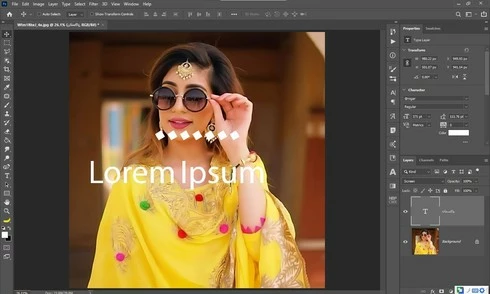
Yesterday i update my photoshop cc 2020 21.1.3 to 21.2 latest one but i got some bugs 1st one is that when i used text tool and write some thing like arabic text the screen display 2 text one is mine 2nd one is default text which one is freez and some of my arabic fonts did not work in it . i also attached a screen shot along this complaint ...my 2nd problem is GPU disable ater updates i am trying to updates my drivers already updated i trying everything but still problem ... sorry for my bad english and thanks in advanced ..
This topic has been closed for replies.

54 replies

mayal33876248
Participating Frequently
July 18, 2020
Hi David,
For Hebrew fonts you can go to http://freefonts.co.il/ - these are free Hebrew fonts which are not OS fonts and you can make a list out of them and test them.
In addition, there is a known company in Israel that makes digital photo books. When installing its software, it also installs plenty of Hebrew fonts - BN font family.
https://www.lupa.co.il/LandingPage/chrome-install.aspx
After installing it, you can uninstall it, but it will leave the BN fonts family in your fonts directory.

Now, regarding Adobe, they insisted on closing the case, although it hasn't been fixed yet. Do you know if a fix for that issue will arrive in the next delivery?

Thanks for all you help,
Maya 


David Mohr
Participating Frequently
July 17, 2020
Howdy!

When you run into text being displayed as a series of boxes, that means that the font doesn't include those specific glyphs (characters).  The boxes are "missing glyph symbols," colloquially referred to as "tofu boxes."  If you change fonts, things should work.

If you have a list of commonly used Persian fonts, would you be willing to share?

Thanks,
David
David Mohr
Participating Frequently
July 17, 2020
MarHabtayn ya Ghasem,

I saw your post in the other thread and I wanted to respond to you.

I understand this bug came at a really bad time for you.  It blindsided us too.  For what it's worth, we're actively working on a solution.  Hopefully, it will be available soon.  Sorry for the headache this is creating for you.

In the meanwhile, as I've mentioned elsewhere, this bug only impacts a subset of fonts.  Of the fonts which ship with the OSes are almost all fine, such as Myriad Arabic or Geeza Pro or Simplified Arabic or Arabic Typesetting.  We are aware of some incompatibilities with a few of Apple's AAT fonts, but that's been the same way for at least ten years.

To prevent this in the future and because it's good for us to know, what are common fonts in your work in Arabic, Persian, Urdu, or Hebrew?  I'd like to build a list of the  common ones so that we can explicitly test these in the future.

Shukran,
David
Inspiring
July 17, 2020


Hi there

In latest version(20.2.0) Im trying to type some arabic text (With Casablanca font and many of other fonts); In world ready mode it dosent work! Jast shows [][][][][][][] in stead words!
In Latin and East Asia layout i can see Arabic words but they displayed as English words (د ا دع ت) and not as Arabic words (تعداد)!

Help me Plz!

With Regards, Ghasem

mayal33876248
Participating Frequently
July 14, 2020
Hi Ofir,
Agree with you and hopefully in the next delivery they will fix it. For the meantime you can downgrade your PS to previous version like 21.1.3 or even work with PS 2019. (this is what I've been doing for works with Hebrew text)
Inspiring
July 14, 2020
same problem
this big bag i cant working
Inspiring
July 13, 2020
Same problem!
Flodymx
Participant
July 12, 2020
same problem 

Inspiring
July 11, 2020
i have this problem with Persian  fonts and show some of my fonts as square.
but some Persian fonts are ok

Image is not available

Participant
July 5, 2020
Hello David, I am experiencing the same. Below is a screen shot of a very popular "titr" font used for headlines on Windows 10 (Photoshop 20.2 -- I have been using this font with Photoshop since 2005 and it still works just fine with other Windows 10 apps.